A website can look polished and still have serious problems behind the scenes. Slow pages, broken links, missing content, mobile display issues and faulty forms can quietly affect both search visibility and customer trust.
A website health check helps you find these problems before they become more expensive to fix. It looks at how easily search engines can access your pages, how quickly the site loads and whether visitors can complete important actions without difficulty.
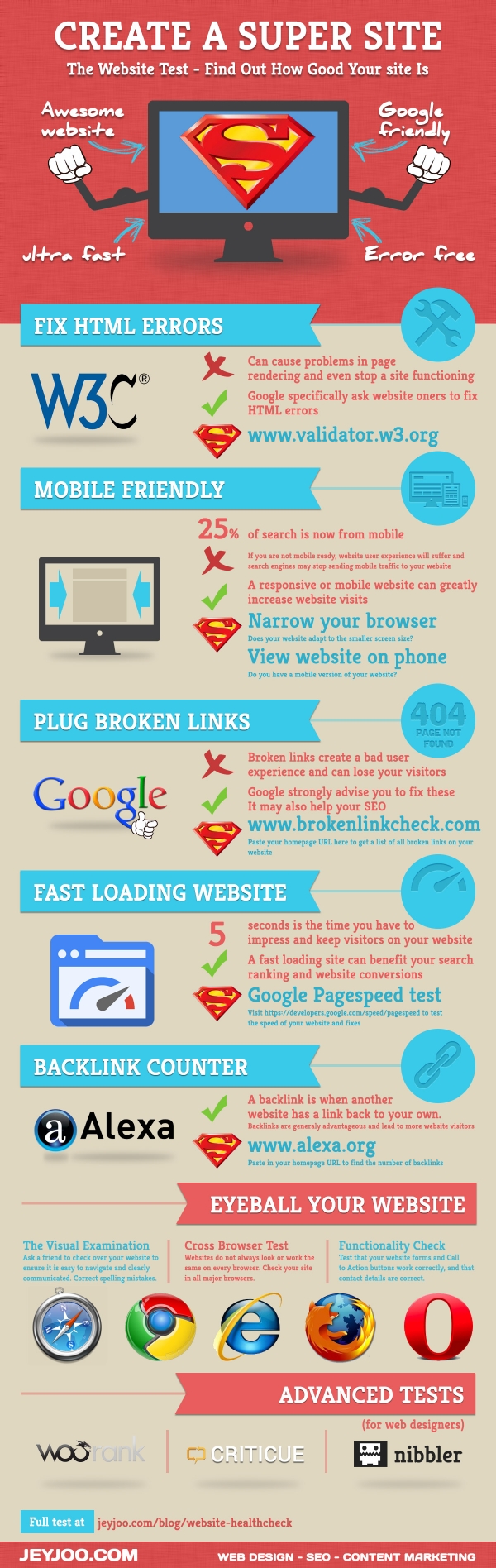
The infographic above provides a useful starting point, but website testing has moved well beyond checking HTML and counting backlinks. A modern review should also cover mobile usability, page experience, content quality, tracking and the complete customer journey.
What Does a Website Health Check Include?
A website health check is a practical review of the factors that influence how well a site performs for users and search engines. It is not simply a score from one testing tool.
The review should answer a few important questions. Can Google find the right pages? Does the website work properly on mobile? Are visitors able to contact the business, complete a purchase or find useful information without running into errors?
A basic check usually covers:
- Crawling and indexing
- Website speed
- Mobile usability
- Broken links and redirects
- Page content
- Forms and conversion paths
- Analytics and tracking
- Security and accessibility
A health check can be completed as a routine review, while a deeper website audit may be needed when traffic has fallen, a redesign has gone wrong or several technical issues appear at the same time.
Start With the Pages That Matter Most
You do not need to inspect every URL on the first day. Begin with the pages that bring in traffic, generate enquiries or support sales.
This normally includes the homepage, main service pages, popular blog posts, product pages, contact page and any landing pages used in advertising campaigns. Open each one and view it as a potential customer would.
Check that the page loads, the main message is clear and all important buttons lead to the correct destination. A service page may look fine visually, but it is not helping the business if the contact button is broken or the form never delivers an enquiry.
Google Search Console can help you identify pages that are not being indexed or are experiencing crawl problems. You should also review the website manually because automated tools will not always notice confusing navigation, unclear wording or missing information.
A broader understanding of technical and content signals can be found in the Periodic Table of SEO, which explains how different elements work together rather than operating in isolation.
Make Sure Search Engines Can Find the Right Content
A page cannot appear in search results if search engines cannot access or understand it. That makes crawlability and indexing one of the most important parts of a website health check.
Look for important pages that are missing from Google, accidentally blocked or marked with a noindex instruction. Also check whether the XML sitemap includes current pages and excludes outdated or redirected URLs.
Duplicate pages can create another problem. A website may generate several versions of the same content through filters, tracking parameters, print views or category pages. Correct canonical tags help search engines understand which version should be treated as the main page.
Internal links also matter. Important pages should be connected naturally from other relevant parts of the website. A page that has no incoming internal links may be difficult for both visitors and search engines to discover.
For websites with large category sections, the structure becomes even more important. This guide to SEO pagination explains how to organise multi-page content without making navigation or discovery unnecessarily difficult.
Check Website Speed Without Chasing a Perfect Score
Website speed affects how people experience a page. A visitor may leave if the main content takes too long to appear, a button does not respond or the layout keeps moving while the page loads.
PageSpeed Insights can help identify common issues such as oversized images, unnecessary scripts, slow server response times and layout shifts. However, the goal should not be to reach a perfect score at any cost.
Focus on the parts of the page that visitors actually notice. An image that loads slightly later may not be a major concern, while a contact form that freezes or a product page that takes several seconds to become usable needs immediate attention.
Test more than the homepage. Blog posts, service pages, product listings and checkout pages often use different templates and may perform very differently.
Speed should also be viewed alongside user behaviour. A page with a high exit rate may have a loading problem, but it could also have weak content or fail to match the visitor’s intent. Understanding bounce rate and how to improve it can help you separate technical issues from content and experience problems.
Test the Website on a Real Mobile Device
A responsive layout is essential, but passing an automated mobile test does not guarantee that the website is comfortable to use.
Open the site on an actual phone and try to complete a normal task. Read a service page, open the menu, tap a telephone number, complete a form and move between related pages.
Pay attention to buttons that are too close together, text that requires zooming and pop-ups that cover the main content. Tables, maps and embedded videos should fit within the screen without forcing visitors to scroll sideways.
The mobile version should also contain the same useful information as the desktop version. Important text, internal links or service details should not disappear simply because the visitor is using a smaller screen.
A mobile-friendly website should feel simple rather than compressed. Clear navigation, readable text and obvious next steps are also central to creating a consumer-friendly website that visitors can use with confidence.
Find Broken Links and Redirect Visitors Properly
Broken links are frustrating because they interrupt the journey at the exact moment someone wants more information. They can appear after a page is deleted, a URL is changed or an external source is removed.
Use a broken-link checker or website crawler to scan internal and external links. Then review the results rather than automatically redirecting every error.
When a page has moved permanently, redirect the old URL to the most relevant new page. Avoid sending every missing page to the homepage because that rarely gives the visitor what they expected.
If there is no suitable replacement, a helpful 404 page is often better than an unrelated redirect. It should explain that the page is unavailable and offer clear links to useful sections of the website.
Check buttons, image links, navigation menus and footer links as well as standard text links. A site can have no obvious broken links in the content while still containing a faulty contact button or outdated menu item.
These checks are part of the wider process of diagnosing website issues before they begin affecting more pages.
Review the Content as a Visitor, Not Just as an SEO Tool
A technically healthy page can still perform poorly when the content is vague, outdated or difficult to read.
Each important page should have a clear purpose. The visitor should quickly understand what the page covers and what they can do next.
Review introductions that take too long to reach the main point. Remove repetitive paragraphs, unsupported claims and sections written only to increase the word count. Add useful examples, clear explanations and direct answers where they genuinely improve the page.
Headings should help visitors move through the content. They should describe the section naturally rather than repeating the same keyword in slightly different ways.
Older pages may also contain statistics, screenshots, tools or recommendations that are no longer current. Updating these details can make the content more reliable and reduce the chance that visitors leave to find a better answer elsewhere.
A useful starting point is to review the advice in Improving Your Blog Posts, especially when older articles are receiving impressions but failing to attract clicks or engagement.
Check Forms, Buttons and Conversion Paths
A website health check should include every action that matters to the business.
Submit the contact form and confirm that the message reaches the correct inbox. Click telephone numbers on mobile, test email links and make sure confirmation messages appear after a form is completed.
For an online store, test the full process from product page to checkout. Look for missing shipping information, confusing error messages or payment steps that do not work properly.
Buttons should use clear wording. “Request a Quote,” “Book a Consultation” or “View Pricing” tells the visitor what will happen next. Generic wording such as “Click Here” gives less context and can feel disconnected from the surrounding page.
Also check whether analytics is recording important actions. A form may be working perfectly while reporting shows zero conversions because the event tracking was never configured correctly.
Reliable measurement makes it easier to understand whether changes are helping. This article on setting benchmarks and assessing digital marketing performance explains how to compare progress over time rather than reacting to one day of data.
Keep Website Maintenance Simple and Consistent
A website health check should not become a long checklist that no one wants to complete. A short, repeatable routine is more useful than an extensive review that happens once and is then forgotten.
Check important forms, landing pages and checkout functions regularly. These are the areas most likely to affect customers immediately when something goes wrong.
Review Search Console, broken links, website speed and organic performance each month. This is often enough to catch technical problems before they spread across the site.
Every few months, take a closer look at older content, mobile usability, browser compatibility, accessibility and structured data. Major website changes, migrations or plugin updates may require an additional review.
Keep a simple record of what was found and what was fixed. This helps the team recognise recurring problems and avoids spending time investigating the same issue more than once.
As search continues to expand beyond traditional results, it is also useful to understand whether content can be interpreted clearly by newer discovery systems. The principles covered in AI-readable SEO can help you review content structure, entities and technical signals without making the writing sound robotic.
Website Health Check Tools to Consider
No single tool can review every part of a website. A useful health check normally combines several tools with manual testing.
| Area to review | Useful tool or method |
| Crawling and indexing | Google Search Console |
| Page speed | PageSpeed Insights |
| HTML errors | W3C Markup Validator |
| Broken links | Website crawler or broken-link checker |
| Mobile usability | Real-device testing and browser developer tools |
| Content performance | Google Analytics and Search Console |
| Structured data | Schema validation or rich-result testing |
| Accessibility | Automated checker followed by manual review |
Tools can highlight potential problems, but they do not always explain whether an issue is genuinely affecting users. Use the results as guidance and then inspect the page yourself.
Frequently Asked Questions
What is a website health check?
A website health check is a review of technical performance, search visibility, content quality and usability. It helps identify issues such as broken links, slow pages, indexing problems and faulty forms.
How do I check the health of my website?
Start with Google Search Console and PageSpeed Insights. Then test important pages manually, check internal links, review mobile usability and confirm that contact forms and conversion tracking work correctly.
How often should I perform a website health check?
Review critical forms and landing pages regularly. Complete a technical check each month and a broader content, usability and accessibility review every few months.
Can a slow website affect SEO?
A slow or unresponsive website can create a poor experience and cause visitors to leave. Speed is one part of overall page quality, but content relevance, usefulness and accessibility also matter.
Are broken links bad for a website?
Yes. Broken links can frustrate visitors and prevent them from reaching useful pages. They may also make it harder for search engines to follow the structure of the site.
Does valid HTML improve rankings?
Valid HTML does not guarantee higher rankings. However, serious code errors can affect page rendering, accessibility and functionality, so validation remains a useful quality check.
What should I fix first?
Start with problems that block access or prevent conversions. Server errors, broken forms, unavailable pages and accidental indexing restrictions should usually be addressed before minor design or validation warnings.
Keep Your Website Useful, Fast and Easy to Navigate
A website health check is not about collecting perfect scores. It is about making sure people can find the site, understand the content and complete important actions without unnecessary frustration.
Begin with the pages that matter most to the business. Fix serious access and conversion problems first, then improve speed, content and usability over time.
Regular checks are easier and less expensive than waiting until traffic drops or customers begin reporting problems.
Read Also: Facebook Image Sizes 2026: Complete Size Guide
Read Also: GEO Cost Drivers: Keep AI Search Budgets Lean
Source: http://jeyjoo.com/blog
About The Author