YouTube Comment Management After Google+: What Brands Need to Know

Updated YouTube Marketing Guide

YouTube Comment Management After Google+: What Brands Need to Know

Google+ once influenced how YouTube accounts, comments, circles, and channel managers worked together. That integration is gone. Today, businesses manage comments directly through YouTube Studio using moderation filters, held-comment review, blocked words, channel permissions, and clear team response guidelines.

YouTube comment management Updated for current YouTube tools AOK Marketing
Quick Answer

You cannot connect Google+ comments to YouTube anymore. Google closed the consumer version of Google+ and discontinued its APIs in 2019. Current YouTube comments are managed through YouTube Studio, where channel owners can choose moderation levels, pause comments, review held messages, block words and links, hide users, appoint moderators, and assign role-based channel access.

What Happened to Google Plus Comments on YouTube?

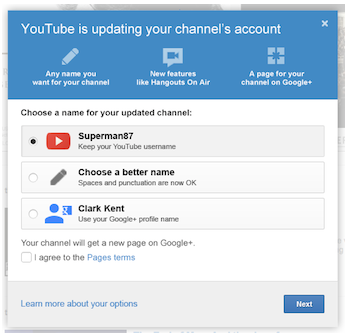
The original version of this article explained how to connect a Google+ page to a YouTube channel, organize audiences through circles, share videos with communities, and give managers access through the connected Google+ page. At the time, Google was bringing several identity and conversation features together under one account system.

That process is now obsolete. Google announced that the consumer version of Google+ would close in April 2019 and that the platform’s APIs would also be shut down. Google+ circles, communities, ripples, profile connections, and YouTube comment integration are therefore no longer part of a current video marketing strategy.

The basic marketing lesson behind the old article still matters. Video comments can help a business answer questions, strengthen customer relationships, identify audience interests, and make viewers feel heard. The difference is that the work now happens through YouTube’s own moderation and channel management tools.

Why update instead of deleting the page? Rebuilding an outdated article preserves the original topic and inbound value while ensuring visitors receive accurate guidance. It also avoids sending readers toward discontinued products and missing settings.

Old Google+ Integration vs Today’s YouTube Tools

The goals have not changed as much as the tools. Brands still need a recognizable identity, safe conversations, controlled team access, community distribution, and useful audience insight. The following comparison shows how those needs are handled now.

Marketing Need Old Google+ Method Current YouTube Approach
Brand identity Connect a Google+ page to the YouTube account. Manage the channel profile, branding, account, and permissions through YouTube and Google tools.
Comment control Use Google+ identity, circles, and integrated comments. Select a moderation level, review held comments, block words and links, and hide repeat offenders.
Team access Add managers through the connected Google+ page. Use channel permissions with defined roles instead of sharing the owner’s password.
Community reach Share videos with circles and Google+ communities. Use comments, Community posts, Shorts, playlists, live chat, social sharing, and paid distribution.
Audience insight Track +1s, reshares, circles, and ripples. Combine comment themes with YouTube Analytics, retention, traffic sources, leads, and conversions.

How to Manage YouTube Comments for a Brand Today

Effective YouTube comment management combines platform controls with human judgment. The objective is not to hide every disagreement. It is to keep discussion useful, protect viewers from scams or abuse, respond consistently, and prevent spam from overwhelming genuine audience interaction.

01

Choose a moderation level that matches the channel’s risk

YouTube StudioSettingsCommunity moderationContent controls

A low-risk educational channel may be comfortable with Basic moderation. A channel that attracts scams, harassment, impersonation, or sensitive discussion may need Strict moderation or Hold all. Select a level the team can realistically support.

02

Create focused blocked-word and link filters

Add words and phrases commonly used in spam, fraudulent contact offers, impersonation attempts, abusive messages, and unrelated promotion. YouTube can also hold comments containing URLs for review. Keep the filter targeted so ordinary customer language is not repeatedly caught by mistake.

03

Review held comments while the conversation is active

A legitimate question can lose its value when it remains hidden for several days. Check the Held queue regularly, approve useful comments, remove spam, report abuse, and hide repeat offenders. A short internal decision guide helps multiple team members moderate consistently.

04

Use moderators and permissions for different responsibilities

Standard or managing moderators can help with comments and live chat. Channel permissions are more appropriate when someone requires broader access to YouTube Studio, content, data, or channel tools. Give each person only the access needed for the work.

05

Stop sharing the channel owner’s password

Shared credentials make it difficult to identify who changed a setting or remove access safely when an employee or contractor leaves. Role-based permissions reduce security and privacy risks while keeping ownership under the correct account.

06

Connect comments with the wider content strategy

Repeated questions, objections, audience phrases, and misunderstood topics can inform future videos, website FAQs, sales material, and your SEO strategy. Moderation becomes more valuable when audience feedback improves the next piece of content.

What Do YouTube’s Comment Moderation Settings Mean?

When comments are enabled, YouTube offers several moderation choices. The strongest option is not automatically the best one. A setting that holds too much can slow down healthy discussion, while a setting that holds too little can expose the audience to unnecessary spam or abuse.

None

Comments are not held by the moderation filter. This requires close monitoring and may not suit channels with frequent spam.

Basic

YouTube holds comments it identifies as potentially inappropriate or spam-like for the channel to review.

Strict

A broader range of potentially inappropriate comments is held, increasing protection and manual review.

Hold all

Every new comment requires approval before becoming public. This gives maximum control but needs a dependable review schedule.

YouTube also allows a channel to pause comments on an individual video. Existing comments remain visible, but no new comments are accepted until the setting is turned back on. This is useful during a sudden surge, a sensitive event, or a temporary moderation backlog.

Build a YouTube Response Policy That Sounds Human

Moderation is only one part of community management. Brands often spend time removing bad comments while overlooking viewers who ask honest questions. A useful response can clarify the video, correct misinformation, show future viewers that the business is listening, and guide a potential customer toward the appropriate next step.

Decide who owns technical questions, when customer service issues should move to a private channel, and what must be escalated to leadership, legal, compliance, or public relations. Templates can provide structure, but the final reply should respond to what the person actually said.

Q
Questions

Answer directly, provide a useful resource, and save recurring questions for future content.

!
Customer problems

Acknowledge the issue and move private account details or support information to the correct channel.

×
Spam and impersonation

Remove or report deceptive content, hide repeat offenders, and update filters around repeated patterns.

↑
Sensitive issues

Pause before replying and route legal, reputational, safety, or regulated matters to an authorized decision-maker.

A consistent response process is easier to maintain when YouTube is part of a wider social media management strategy. The same voice, escalation rules, and customer care standards can then support Facebook, Instagram, LinkedIn, and other channels.

Use YouTube Comments as Audience Research

A comment section is a live record of what viewers understood, questioned, challenged, or wanted to learn next. That information can improve much more than the discussion beneath one video.

✓

Turn repeated questions into tutorials, explainers, Shorts, comparison videos, or livestream topics.

✓

Use the audience’s vocabulary in useful headings, FAQs, video descriptions, and search-focused pages.

✓

Identify unclear offers, missing proof, purchase objections, and landing-page questions that may affect conversions.

✓

Find messages that can support future organic posts and carefully targeted paid social campaigns.

Viewer language can also strengthen content designed for AI search visibility. Clear questions and direct, well-supported answers help establish the relationship between a brand, its expertise, and the problems it solves.

Common YouTube Comment Management Mistakes

Deleting every negative opinion

Reasonable criticism can make a discussion more credible and gives the brand an opportunity to respond constructively. Remove policy violations and harmful content, not every opinion that makes the company uncomfortable.

Leaving held comments untouched

A legitimate viewer may assume the brand ignored or censored the comment when it remains trapped in review for days. Select a moderation level that matches the team’s review capacity.

Using generic copy-and-paste replies

Repeated canned answers make engagement look automated. Use templates for structure, but personalize the response around the actual question, concern, or context.

Ignoring impersonation and fraudulent offers

Fake support contacts, investment schemes, giveaway scams, and unrelated links can harm viewers and the brand’s reputation. Report deceptive content and strengthen filters when a pattern becomes clear.

Measuring success by comment volume alone

A large number of low-quality comments is not automatically valuable. Look at discussion quality, useful questions, recurring themes, sentiment context, qualified interest, and the actions viewers take after engaging.

YouTube Comments and Google Plus FAQs

Can I still connect Google+ comments to YouTube?

No. Google closed the consumer version of Google+ and discontinued its APIs in 2019. YouTube comments and moderation are now managed directly through YouTube Studio.

Where are YouTube comments managed?

Use the Comments area in YouTube Studio to review published and held comments. Community moderation settings contain broader controls for moderation levels, blocked words, links, approved users, hidden users, and moderators.

What is the difference between Basic and Strict moderation?

Basic holds comments YouTube identifies as potentially inappropriate. Strict holds a broader range of comments and can create more manual review for the channel team.

Can comments be paused without deleting the existing discussion?

Yes. Pausing keeps existing comments visible while stopping new comments until the channel turns comments back on.

Can someone moderate comments without receiving full channel access?

Yes. Standard and managing moderator roles can support comment and live-chat work. Broader channel permissions should only be provided when a person needs additional YouTube or YouTube Studio access.

Should a brand delete negative YouTube comments?

Not automatically. Remove spam, abuse, impersonation, dangerous material, and policy violations. Reasonable criticism can remain and may deserve a calm, informative response.

Can YouTube comments help with SEO and content planning?

Yes. Comments reveal recurring questions, objections, language, and topic gaps that can inform videos, web pages, FAQs, search content, campaigns, and conversion improvements.

Turn Video Engagement Into a Stronger Brand Presence

AOK Marketing can help organize your social content, publishing, audience engagement, campaign support, and performance reporting around clear business goals.

Get Your Free Growth Plan

About The Author