Searching for current Google Plus image sizes can be confusing because many older guides still show dimensions for profile photos, cover images, shared posts and videos. Those measurements were useful when Google+ was active, but they should not be used for a new social media design in 2026.
Google closed the consumer version of Google+ on April 2, 2019. Content from personal accounts and Google+ pages was subsequently deleted, which means there are no current Google+ profile, cover or post image requirements.
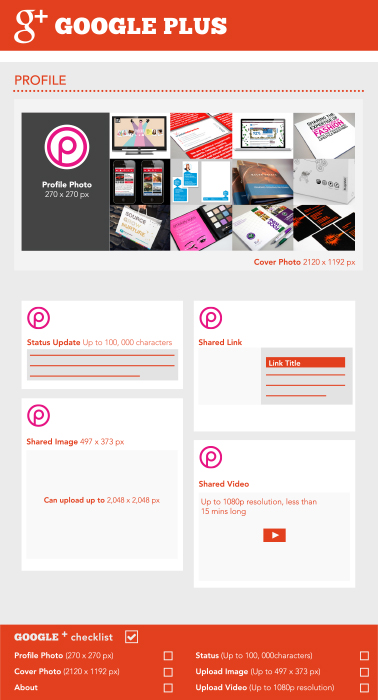
The original 2014 infographic on this page remains useful as a historical reference. It shows how brands once prepared their visual assets for Google’s social network. This updated guide explains what those dimensions meant, why they are no longer relevant and which Google platforms businesses should focus on today.
Is Google Plus Still Available in 2026?
No. Google+ is no longer available as a public social network.
The platform once allowed people and businesses to create profiles, publish updates, share links, upload images and organise contacts into Circles. Businesses also used Google+ pages to present their brands and participate in online communities.
Our original guide on how to become a Google Plus wizard reflects how marketers approached the platform while it was active. It should now be read as historical material rather than current social media advice.
Google initially kept an organisational version available to some business and education users. That service later became Google Currents. Google then closed Currents on July 5, 2023, after moving its community and collaboration focus to spaces in Google Chat.
This means neither Google+ nor Currents requires a social media sizing guide in 2026.
Your wider Google Account still exists, and products such as Gmail, YouTube, Google Maps and Google Business Profile continue to operate. The closure applied to Google+ rather than every service connected to a Google Account.
What Were the Google Plus Image Sizes in 2014?
The original Google Plus social media sizing cheat sheet recommended several dimensions for creating a complete profile.
These specifications should only be used to understand historical Google+ layouts:
| Google+ asset | 2014 dimensions or limit |
| Profile photo | 270 × 270 pixels |
| Cover photo | 2120 × 1192 pixels |
| Shared image display | 497 × 373 pixels |
| Uploaded image | Up to 2048 × 2048 pixels |
| Shared video | Up to 1080p and under 15 minutes |
| Status update | Up to 100,000 characters |
The cover photo provided a large area for brand imagery, while the square profile image appeared beside posts and account activity. Shared images were presented differently from today’s social feeds, and the exact display could vary depending on the post and screen.
Our earlier Google Plus marketing guide provides more context on how businesses used profiles, posts and communities at the time.
These dimensions should not be copied into a current design template. Uploading a 2120 × 1192-pixel banner to another platform does not guarantee that the important parts of the image will remain visible. Every active channel has its own aspect ratios, cropping behaviour and safe areas.
Why Old Google Plus Sizing Advice Is No Longer Useful
An image-size guide has value only when it reflects the platform’s current layout. Social networks regularly change profile designs, feed previews, advertising placements and mobile interfaces.
Google+ changed several times even before it closed. A dimension that fitted one version of the platform could be cropped or displayed differently after an interface update.
That is why old articles asking whether Google Plus was becoming a ghost town now provide historical insight rather than practical setup instructions.
The same issue applies to old sizing guides for active platforms. A graphic may still look professional, but its dimensions can become outdated. When reviewing an older guide, check:
- Whether the platform still exists
- When the specifications were last updated
- Whether dimensions come from official guidance
- How images appear on mobile
- Whether the design includes a safe area
- Whether organic and advertising formats use different ratios
The date in the page title is therefore important. Calling the original infographic “up to date” would mislead readers in 2026. It is better to identify it clearly as a 2014 resource and explain what has changed.
What Replaced Google Plus?
Google+ did not have one direct replacement. Its different functions now exist across several Google products.
Google Business Profile supports local business visibility in Google Search and Maps. Eligible companies can manage information such as their category, location, hours, contact details, photos and customer reviews.
YouTube provides public video publishing, channel branding and audience interaction. Channel owners can update their profile image, banner, description and other visual elements through YouTube Studio. YouTube currently recommends a banner image of at least 2560 × 1440 pixels for display across devices.
Google Chat provides messaging and spaces for team communication. Google describes Chat as a Workspace collaboration product that integrates with services such as Gmail, Drive, Calendar and Meet.
Your Google Account also has its own name and profile picture. However, changing the main Google Account photo does not automatically change the branding used by a YouTube channel.
The old Google Plus Ripples infographic shows how Google once tried to make public sharing and content distribution visible. Today, businesses need to choose a Google product based on the goal rather than searching for a direct Google+ replacement.
Which Google Platform Should Your Business Use Now?
The best option depends on what you are trying to achieve.
A local company that wants to appear when customers search for nearby services should focus on Google Business Profile. Keep the business details accurate, upload genuine photos and respond professionally to reviews.
A brand that regularly publishes demonstrations, interviews, tutorials or educational videos should build a properly branded YouTube channel. The profile image, banner and thumbnails should follow YouTube’s current requirements rather than the dimensions shown in the Google+ infographic.
A company looking for internal discussion and collaboration can use Google Chat spaces. These are designed for communication within teams and organisations rather than public social media marketing.
Businesses should also maintain a clear Google Account profile, but it should not be confused with a public social network page.
Our overview of important things to know about Google can help marketers understand why Google’s products should be treated as separate tools with different purposes.
Do not create the same design and upload it everywhere without checking the destination. A YouTube banner, Business Profile photo and Google Account image appear in different environments and serve different audiences.
How to Reuse an Old Google Plus Design
An old Google+ graphic does not always need to be discarded. The visual concept may still be useful even when the canvas size is outdated.
Begin by locating the original editable file rather than downloading a compressed image from the former profile. Keep the logo, photography and brand elements, but rebuild the layout using the dimensions required by the current platform.
Do not simply stretch or crop the full image. Important text may become unreadable, and faces or products may be cut off. Create separate versions for square, landscape and vertical placements when the campaign will appear across several channels.
A practical redesign process is:
- Identify the current platform and placement.
- Confirm its latest official dimensions.
- Place the main message within a central safe area.
- Reduce unnecessary text.
- Check readability at mobile size.
- Export a high-quality version in the appropriate file type.
- Preview the uploaded image before publishing.
The broader principles in the 36 rules of social marketing remain useful here. Visual consistency matters, but each platform should still receive content that fits the way its audience uses it.
Keep the original Google+ version in your archive if it has historical or portfolio value. Label it with the year so no one on the team accidentally treats it as a current template.
Should This Google Plus Page Remain Published?
An older Google+ article can still help readers when it is updated honestly. People continue to search for Google Plus image sizes, old account information and explanations of what happened to the platform.
The page should make the answer clear near the beginning: Google+ has closed, so its former image dimensions are no longer current.
Keep the page live when it has relevant backlinks, search visibility or historical value. Update the title, introduction, metadata and captions so visitors immediately understand the context.
Avoid changing the existing URL simply because it includes “2014.” An established URL may have accumulated links and history. A clearer title and updated content can address the age of the article without creating an unnecessary redirect.
However, the page should not claim that Google+ can still drive traffic, improve SEO or provide an active social community. Those statements belong to the period when the platform was operating.
Older content can continue attracting attention when it answers the modern version of the question. The same principle applies when reviewing why and how content goes viral: the original idea may remain interesting, but its examples and recommendations need current context.
Google Plus Image Size FAQs
The original 2014 digital marketing roadmap shows how quickly platforms and marketing priorities can change. The following answers address the questions people are more likely to ask today.
What is the current Google Plus profile picture size?
There is no current Google Plus profile picture size because the consumer version of Google+ closed on April 2, 2019. The historical infographic recommended 270 × 270 pixels.
What was the Google Plus cover photo size?
The 2014 sizing guide recommended a Google+ cover photo measuring 2120 × 1192 pixels. This measurement should not be used for Google Business Profile, YouTube or another active platform.
Can I still create a Google Plus business page?
No. New Google+ business pages cannot be created. Local companies should use Google Business Profile to manage how they appear across Google Search and Maps.
Did Google Business Profile replace Google Plus?
Not directly. Google Business Profile manages local business information in Search and Maps. It does not operate as a replacement public social network with the same features as Google+.
What happened to Google Plus for business users?
The organisational version eventually became Google Currents. Currents was later discontinued, and Google shifted its Workspace community features toward spaces in Google Chat.
Can I recover my old Google Plus posts and photos?
Google stated that content from consumer Google+ accounts and pages was deleted after the shutdown. Users were advised to download their information before deletion began. Old content may no longer be recoverable through Google+.
Can I use the old Google Plus cover image on YouTube?
You can reuse its visual elements, but you should rebuild the design using YouTube’s current banner guidance. YouTube recommends a banner of at least 2560 × 1440 pixels and advises keeping channel branding visually consistent.
Is Google Plus coming back?
Google has not announced the return of Google+ as a consumer social network. Current Google products offer separate tools for video, business listings, account profiles and workplace collaboration.
Google+ played an important role in the development of social media marketing, but its sizing requirements belong to an earlier period. Businesses should preserve the infographic as a historical reference while directing current branding efforts toward active platforms.
The useful lesson is not to memorise one set of image dimensions forever. Keep editable design files, confirm current requirements before publishing and create visuals around the real purpose of each channel.
Source: http://thepinkgroup.co.uk/
About The Author