Updated: Oct 16, 2025
If we were to choose one component that can make or break an SEO strategy, it would have to be keyword research. Despite this many marketers, SEO’s, and writers alike believe that finding target keywords and phrases should be done either once a year or when you run out of other ideas to generate content.
Yet research has shown that a much better strategy would be to re-evaluate keywords at least once every six months. And every three to four months before the start of a sale or promotion.
Not because you want to ride the wave of popular topics. But because you want to make sure your list stays current. And remains relevant to what people are searching for in your niche.
Let’s look at a couple of methods you can use to find the right target keywords for your marketing content:
1. Look at Search Suggestions from Google
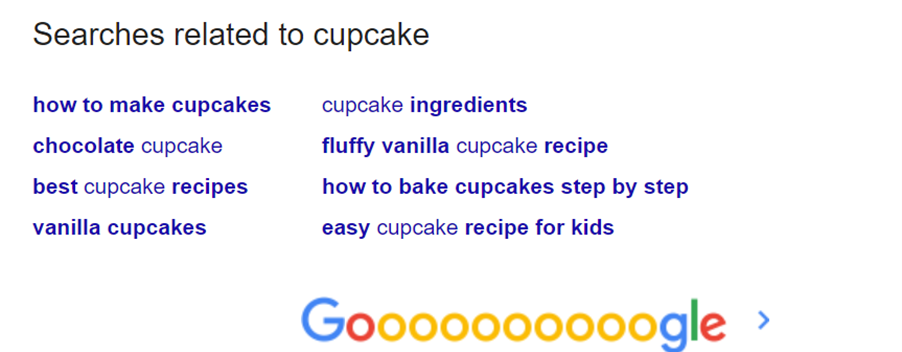
Google’s “Searches Related To” feature is a wonderful tool for keyword research. It not only lets users perform quick searches. It’s also an invaluable tool to anyone who wants to explore search intent.
Let’s say you recently added cupcakes to your bakery menu offering. And you’re now looking for ways to introduce the item to your online store. Either through your blog, guest posts, or even a simple new recipe on social.
A great way to find the right keywords to target would be to type ‘cupcake’ into Google’s search box, then scroll down to the bottom of the page:
2. Think of Questions Ideal Customers May Have
The internet is a funny place: it has made us seem so connected while in reality we are all disconnected. Removed from the simple act of walking into a store. Greeting the owner or sales clerk. And simply walking around and looking at what’s on offer.
Allowing any savvy business owner to tell which items interest you. And how much you’re willing to pay for it. Nowadays, because business owners don’t get to meet customers, we have had to get a little creative.
Replace greetings with polls on social media accounts. Joining online forums to find out what potential customers want to buy and at what price. And sometimes going so far as to run a survey to find out whether your idea is truly valid and your product marketable.
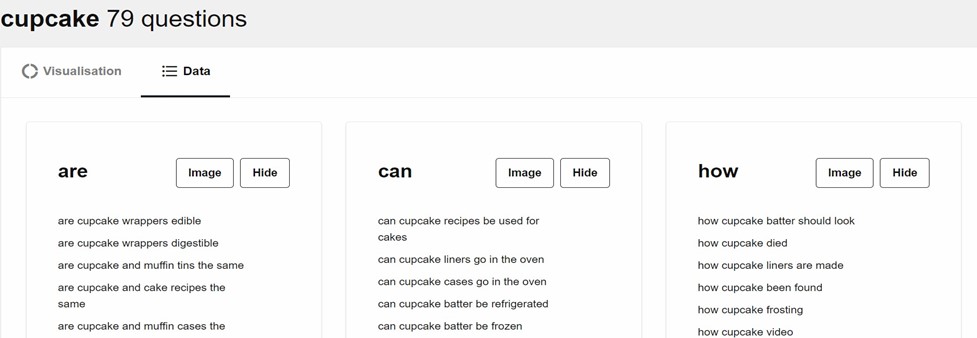
If all else fails, Answer the Public gives great insight into what people are asking. You’ll find topic ideas and main keywords to target. Plus, suggestions on different ways to expand on existing content. Making it more informative and relevant to your audience.
3. Check Google Keyword Planner
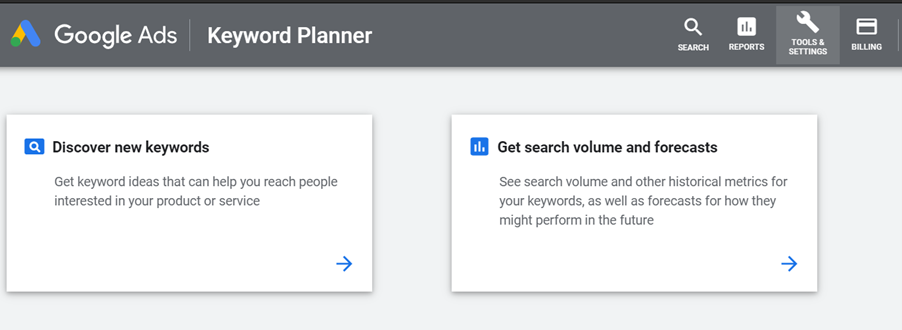
Another way to find the right target keywords is to use Google Keyword Planner. The powerful research tool from Google lets users discover new keywords and get search volume and forecast for target phrases.
So, you’ll need to be as specific as possible to get the most from this tool.
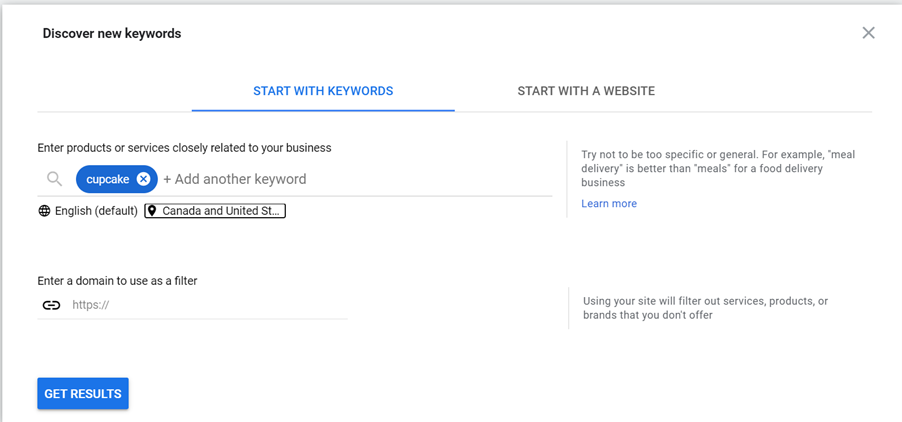
To begin with, you have the “Start with Keyword” search option. Here, using our previous example, you’ll select the option and type in cupcake. You can also input multiple keywords. Just add a comma after each word.
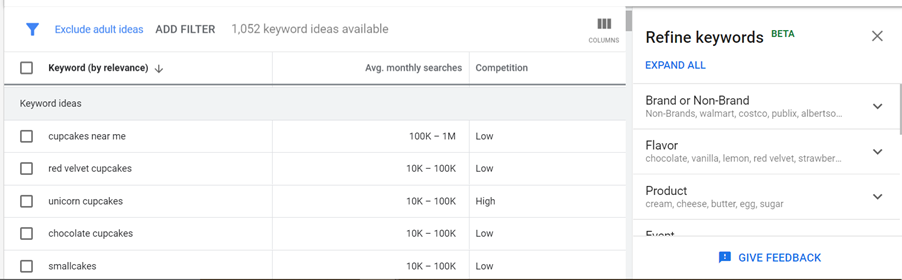
Then there’s the “Start with Website” option. Which was primarily intended for those running AdWords campaigns. But you can also find some keywords to target by analyzing your landing or home page and even a couple of your blog posts.
4. Find Trending Topics on Google Trends
Google Trends is by far my favorite keyword research tool from Google. It not only shows you possible keywords (see the Related Queries section) to target but can also be a font of ideas on how to name your products to optimize your blog posts. You’ll also be able to tell whether a phrase can have a long-term effect or is simply a fad.
For our bakery business, we would start by typing cupcake and searching by “Search Term”.

Examine the graph over a span of at least five years. Is it increasing? Decreasing? Or erratically fluctuating and seasonal?
Try typing in your keyword again and this time searching by “Topic”. Are the results the same? Look at the “Related Queries” section- you’ll find some solid ideas on keywords to target in your next blog posts.
5. Free Keyword Research Tools
In your search for the perfect keyword to target on your websites, you’ve probably run into the ever so popular likes of Ahrefs, Moz, and SemRush.
Maybe even signing up for the free trial- and loving it. Or hitting the paid wall benefits and wondering what bad karma you sent out into the universe.
But all is not lost.
There are still some amazing keyword research tools- you just need to know where to look…
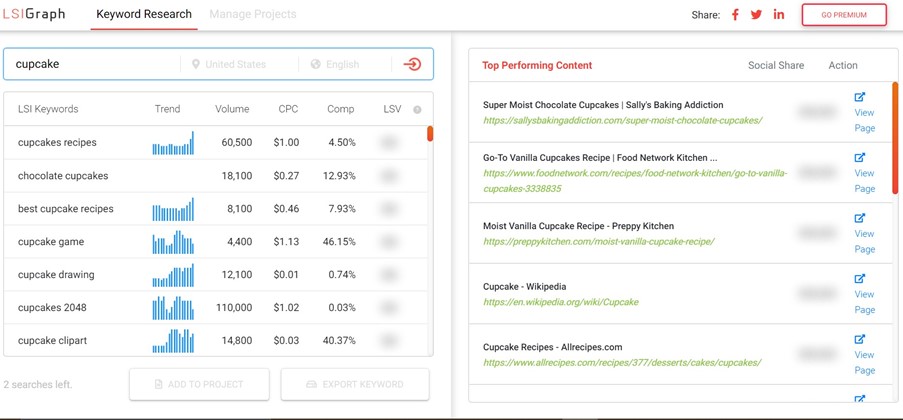
Ever wondered how Google can quickly sift through bad or plagiarized content?
And give searches (8 out of 10 times) for exactly what we’re looking for?
Well, the answer lies in latent semantic indexing (LSI).
Where search engines find keywords similar in context to the target phrases in your articles. Making a tool like LSI keyword generator a deadly weapon in your SEO strategy.
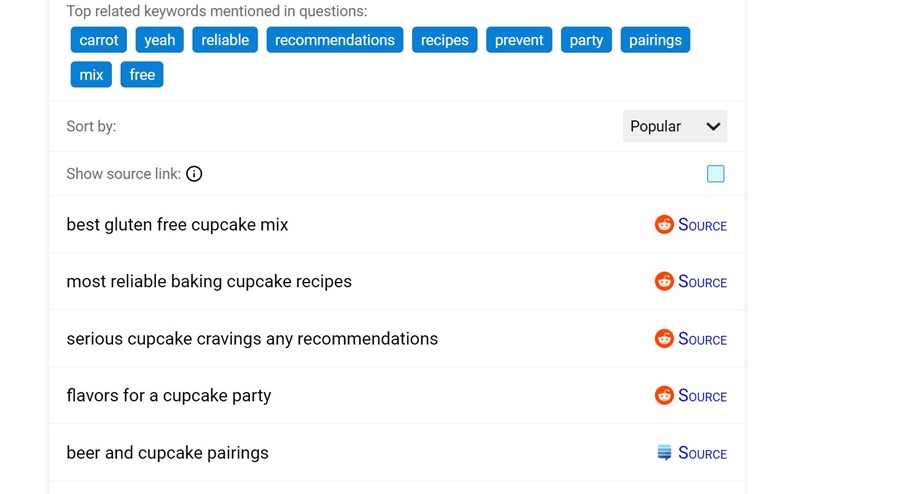
Early on, we mentioned the importance of finding out what your customers are searching for when looking for a business similar to yours. And there’s no better free tool to help you in your research than QuestionDB.
It pulls from a large database based on questions people ask on Reddit. Giving you the option to choose from “Popular” or “New” topics from any related category.
Now Go and Implement
Once you find the right keywords to target you need to implement them in line with SEO best practices. That means putting the phrases in some high-attention areas on your site.
Additionally, try to also use the keyword in the title of your page, URL, meta description, image file paths, and add variations in the content.
And if you don’t cram all your keywords into a handful of pages. You’ll enjoy high-organic quality search traffic and the resulting conversions- which mean the world for your business.
2025 Update:
1. Mine Google’s Autocomplete, People Also Ask, and Related Searches
When it comes to free and reliable keyword discovery, Google itself remains your best research partner. Modern search suggestions—across Autocomplete, People Also Ask (PAA), and Related Searches—offer direct insight into how real users phrase their queries.
Why This Matters in 2025
Google’s AI-driven autocomplete and question-suggestion systems are based on real user behavior and intent. They predict what people are likely to search next, making them a goldmine for understanding search patterns, conversational phrasing, and long-tail variations.
-
According to Backlinko’s SEO Trends 2025, search intent and “question-based” content are among the top drivers of organic visibility this year.
-
Zapier’s keyword tool comparison 2025 notes that many keyword tools now build their databases directly from Google’s autocomplete and PAA results.
Step-by-Step: How to Use Google’s Suggestions Effectively
1. Start with Autocomplete
Type your main term (for example, “cupcake”) into Google’s search bar. As you type, the dropdown suggestions will show what users commonly search for next—like “cupcake recipes easy” or “cupcake business ideas.”
-
On mobile, pay extra attention: mobile autocomplete tends to show more localized or question-based terms.
-
Try variations like “best,” “cheap,” “vs,” or even “2025” to uncover intent-rich keyword ideas.
-
Use an incognito window or a logged-out browser to reduce personalization bias.
Pro Tip: Tools like KeywordTool.io and AnswerThePublic automate this process, pulling hundreds of autocomplete results for any seed keyword.
2. Expand with People Also Ask (PAA)
Run your main query, then scroll down to the People Also Ask box.
Each time you expand a question, Google dynamically loads more related questions—revealing the semantic universe around your keyword.
For example, if you search “cupcake marketing ideas,” you might see questions like:
-
“How do I promote my cupcake business?”
-
“What are good slogans for cupcakes?”
-
“Is a cupcake business profitable?”
Answering these directly in your blog posts (especially as FAQs or H2 sections) increases your chances of ranking in those question boxes.
Quick Optimization Tip: Keep each answer under 60 words and include a short list or example—Google favors concise, structured responses.
3. Don’t Miss Related Searches
Scroll to the bottom of the results page. Google’s Related Searches offer synonymic and intent-adjacent terms, such as “cupcake ideas for small business” or “cupcake SEO keywords.”
These can be:
-
New blog ideas (“cupcake SEO strategy”)
-
Subtopics or secondary keywords to enrich your current content
-
Clusters for internal linking (e.g., create posts around each related theme)
4. Optimize for Mobile and Voice Searches
Search behavior has become more conversational. Roughly 1 in 5 internet users rely on voice assistants for information, and most voice queries are phrased as questions (“What’s the best cupcake recipe near me?”).
-
Use natural phrasing and full sentences in titles and H2s.
-
Include location-based keywords if your business serves specific regions.
Tools like AlsoAsked.com and Exploding Topics can show how voice-style queries and trending topics evolve over time.
How to Turn These Insights into Keyword Strategy
| Step | Action | Benefit |
|---|---|---|
| Collect | Export Autocomplete, PAA, and Related Search phrases | Build your raw keyword dataset |
| Group | Cluster by intent (informational, commercial, navigational, local) | Simplify content mapping |
| Optimize | Add question-style headings & concise answers | Win “People Also Ask” and featured snippets |
| Localize | Add geo modifiers or “near me” keywords | Capture voice and mobile searches |
| Refresh | Repeat every 3–4 months | Stay aligned with seasonal and trending changes |
Recommended Tools to Scale This Process
-
AlsoAsked – Visualizes PAA relationships in a mind map.
-
KeywordTool.io – Scrapes autocomplete data by platform (Google, YouTube, Amazon, etc.).
-
AnswerThePublic – Groups questions by who/what/why/how categories.
-
Semrush Keyword Magic Tool – Consolidates autocomplete, PAA, and SERP data.
About The Author