If you’ve ever uploaded a beautiful cover photo to Facebook only to watch it get cropped in all the wrong places, you already know why social media image sizes matter more than most people give them credit for. It’s a small detail, but it’s the kind of small detail people notice — a stretched logo, a header where your face gets cut off, a Pinterest pin that looks fine on your desktop and gets awkwardly clipped in someone’s feed. None of that is a huge deal on its own, but it adds up, and it quietly chips away at how professional your brand looks online.
We first put together a version of this cheat sheet back in 2014, when Google+ was still a thing brands worried about and Twitter hadn’t yet become X. A lot has changed since then. Some platforms have widened their headers, others have shifted toward taller, more vertical formats, and a couple of the sizes people still repeat online are flat-out outdated. So we went back through everything, checked it against current 2026 specs, and rebuilt this guide from scratch — swapping out Google+ for LinkedIn, since that’s the platform most of our clients actually need sizing help with these days.
Here’s everything you need to know, broken down platform by platform.
Facebook Image Sizes
Facebook is still the platform where sizing mistakes are most visible, mostly because there’s so much real estate to get wrong. Your cover photo is the first thing people see when they land on your page, and it’s also the one image most brands get slightly wrong, because it displays differently depending on the device.
On desktop, your Facebook cover photo shows up at 851 x 315 pixels. On mobile, that same image compresses down to about 640 x 360 pixels, which means anything sitting near the edges — text, logos, a person’s face — can get cut off entirely on someone’s phone. The safest move is to keep whatever matters most centered in the frame rather than pushed out toward the corners.
Your profile picture is a lot more forgiving. Upload at 170 x 170 pixels and Facebook will handle the rest, though keep in mind it actually displays smaller than that (128 x 128 on desktop, and even smaller on mobile), so simple logos and close-up headshots tend to hold up better than busy, detailed graphics.
For images you’re sharing in posts or using for link previews, 1200 x 630 pixels is the size to build around. This one’s worth paying attention to if you’re driving traffic back to your site, since it’s also the dimension Facebook uses to generate link preview thumbnails — get it wrong and your blog posts or product pages can show up with a cropped, awkward-looking preview image.
X (Twitter) Image Sizes
X has kept most of its core dimensions fairly stable, even through the rebrand, so if you already had Twitter sizing figured out, most of that knowledge still holds up.
Profile photos still display at 400 x 400 pixels, cropped into a circle, so avoid putting important details too close to the edges. The header image — the wide banner across the top of your profile — is 1500 x 500 pixels, a 3:1 ratio. One thing people often miss here: your profile photo overlaps the lower-left corner of that header, so if you’re placing text or a logo in your header design, keep it centered or shifted right so it doesn’t get covered.
For images you’re posting in-feed, 1600 x 900 pixels (a 16:9 ratio) is the standard for landscape photos, though square images at 1080 x 1080 also perform well and are a little more forgiving if you’re repurposing content from other platforms.
Pinterest Image Sizes
Pinterest works differently from the other platforms on this list, since it’s built entirely around tall, scrollable images rather than wide banners or square feeds. If you’re only remembering one number for Pinterest, make it this one: 1000 x 1500 pixels, a 2:3 ratio. That’s the sweet spot for standard Pins.
It’s tempting to go taller, since taller pins used to take up more space in the feed and get more attention. Pinterest has since started clipping pins that go beyond the 2:3 ratio, so a pin that looks great in your design software might get cut off once it’s actually live. Sticking to 2:3 keeps your whole image visible.
Profile photos on Pinterest display as a circle at 165 x 165 pixels, and if you’re setting up board covers, 600 x 600 pixels is the size to use. Since Pinterest is such a visually driven platform, and one that sends a lot of referral traffic if you use it well, it’s worth spending a little extra time making sure your board covers and pins are consistent with each other — a mismatched, inconsistent-looking profile tends to get scrolled past.
LinkedIn Image Sizes
LinkedIn has become the platform most of our clients ask about lately, which is part of why we added it here in place of Google+. Whether you’re managing a personal profile or a company page, there are a few different sizes worth knowing.
Profile photos, for both individuals and company logos, display at 400 x 400 pixels. Where LinkedIn gets more particular is with cover images — personal profile backgrounds use a very wide 1584 x 396 pixel banner, while Company Page covers are even narrower at 1128 x 191 pixels. Because both of these are so wide relative to their height, text needs to be noticeably larger than you’d expect in order to stay readable once it’s live.
For images you’re sharing in posts, 1200 x 627 pixels (a 1.91:1 ratio) works well for link previews, while a square 1080 x 1080 image tends to take up more room in the feed and can perform just as well, depending on the content.
Quick Reference
If you just want the numbers without the explanations:
- Facebook — Cover: 851 x 315 px · Profile: 170 x 170 px · Shared image: 1200 x 630 px
- X (Twitter) — Profile: 400 x 400 px · Header: 1500 x 500 px · In-feed: 1600 x 900 px
- Pinterest — Profile: 165 x 165 px · Pin: 1000 x 1500 px · Board cover: 600 x 600 px
- LinkedIn — Profile: 400 x 400 px · Personal cover: 1584 x 396 px · Company cover: 1128 x 191 px · Shared post: 1200 x 627 px
Why This Actually Matters for Your Marketing
It’s easy to treat image sizing as a minor design detail, but it ties directly into how well your content performs. A properly sized link preview image is one of the simplest ways to improve click-through rates on shared links — people are more likely to click on something that looks intentional than something that looks cropped or stretched. If you’re running paid campaigns, this matters even more, since our paid social media marketing team sees mis-sized creative drag down ad performance on a regular basis. A perfectly targeted ad with a poorly cropped image is still going to underperform.
It also connects to conversion rate optimization in a way people don’t always expect. If someone clicks through from social media and the image that brought them there looked polished and professional, they’re arriving with a slightly better first impression of your brand than if it looked thrown together — and first impressions carry through to whether they convert.
If Instagram is part of your strategy too, it’s worth checking out our breakdown of Instagram image sizing and optimization, which covers Stories, Reels, and feed posts in more detail than we could fit here.
Making This Easier on Yourself
Keeping track of four or five platforms’ worth of dimensions is genuinely annoying, especially if you’re posting frequently or managing multiple brand accounts. Rather than resizing everything by hand every time, we’d recommend using Pixelhunter, a free AI-powered image resizer that automatically crops and resizes your images to match each platform’s current specs. It’s saved our team a fair amount of time, and it’s worth bookmarking alongside the rest of the resources on our marketing tools page.
A Few Common Questions
What is the recommended Facebook cover photo size?
The recommended Facebook cover photo size is 851 × 315 pixels. Because Facebook may crop the image differently on mobile devices, keep important text, logos and people near the centre.
What size should an X header image be?
An X header image should be 1500 × 500 pixels. Avoid placing important content in the lower-left corner, as the profile picture may overlap that area.
What is the best Pinterest Pin size?
The recommended Pinterest Pin size is 1000 × 1500 pixels, using a 2:3 aspect ratio. This vertical format displays clearly in the Pinterest feed without appearing unnecessarily long.
What size should a LinkedIn Company Page cover image be?
A LinkedIn Company Page cover image should be 1128 × 191 pixels. This is different from a personal LinkedIn background image, which should be 1584 × 396 pixels.
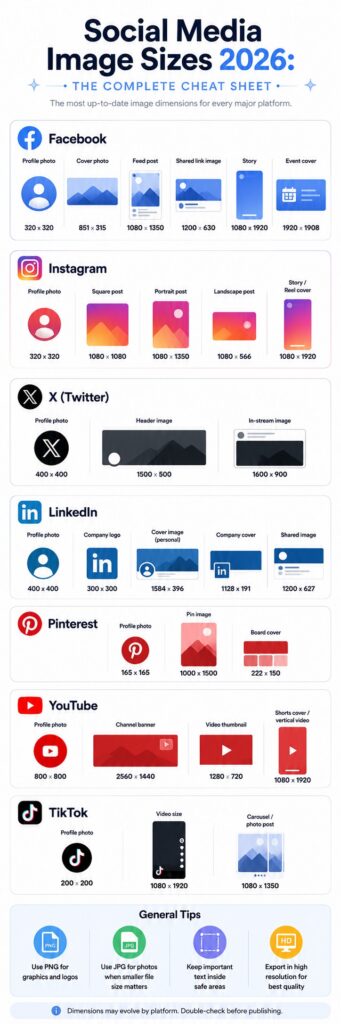
Source: http://www.infinpixels.com
About The Author