For a small business, Instagram can do much more than help you post attractive photos.
Your profile can function as a mini storefront, customer service channel, portfolio, local discovery tool, and sales funnel—all in one place.
But that only works when the account is set up properly.
A potential customer should be able to land on your profile and quickly figure out:
- what you sell
- where you are located
- how to contact you
- what your business looks like
- whether other customers trust you
- what they should do next
If people have to dig through old posts, search Google for your address, or manually type a phone number they saw in a caption, you are creating unnecessary friction.
Here is how to manage an Instagram Business Account:
Step 1: Optimize Your Profile Before Worrying About Content
Before planning Reels, Stories, or posting schedules, make sure the profile itself works.
Think of your Instagram profile as the front door of your business.
Someone may discover you through a Reel or recommendation and visit your profile for the first time.
Within a few seconds, they should understand who you are and what you offer.
Make Your Business Name Easy to Recognize
Your username and profile name should make sense to customers.
Whenever possible, use your actual business name rather than an unrelated nickname or complicated username.
If location is important to your business, consider including it naturally in your profile name or bio.
For example:
Bloom Dental | Austin
or:
North Shore Coffee – Vancouver
This gives potential customers immediate context.
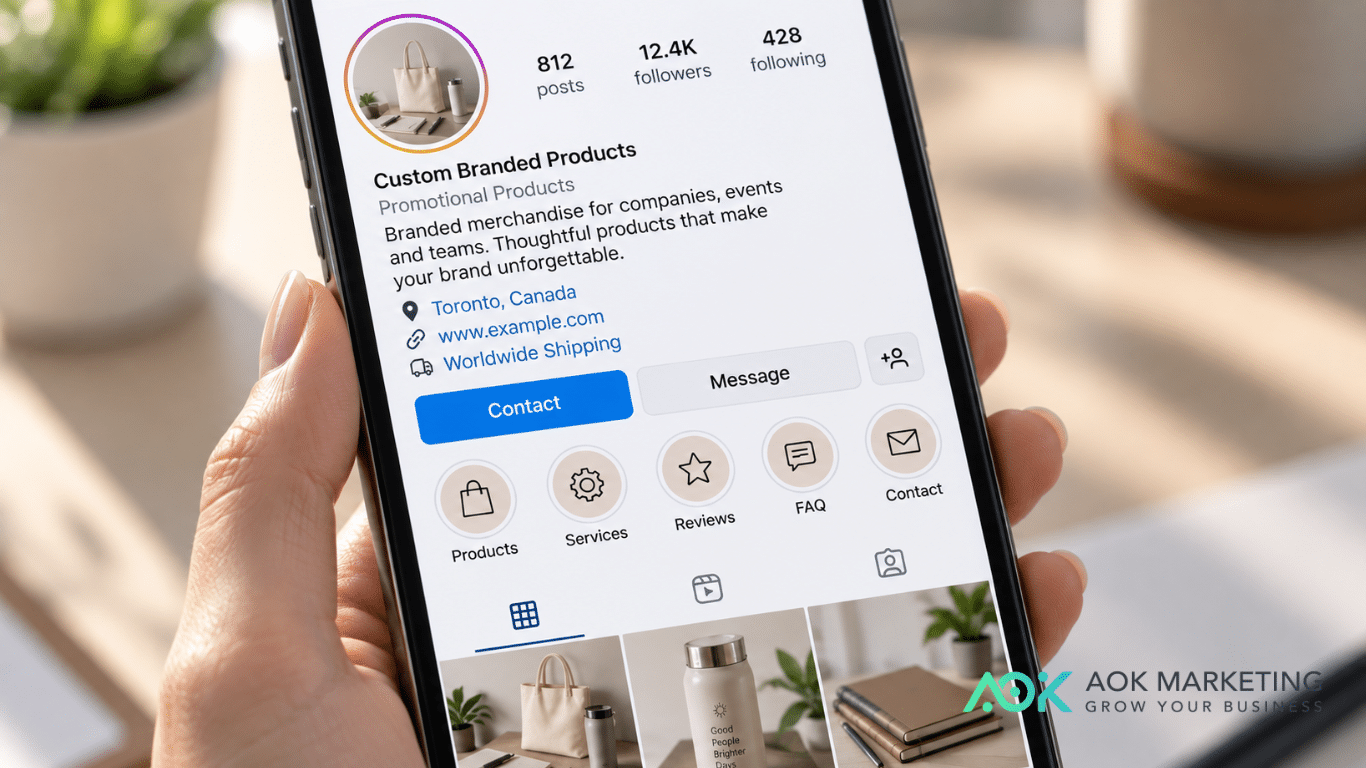
Put Your Location in the Bio
For local businesses, this is one of the simplest things you can do.
If you operate a:
- restaurant
- salon
- dental office
- retail store
- gym
- clinic
- repair shop
- photography studio
- local service business
your location should be obvious.
Do not make people search through your posts to figure out whether you are even in their city.
A simple bio might look like:
Custom cakes for birthdays, weddings & events
Serving Toronto & the GTA
Order below ↓
Or:
Family dental clinic
📍 Mississauga, Ontario
Appointments available ↓
If your business serves several areas instead of operating from one storefront, say that.
For example:
Serving Detroit & Metro Detroit
Location also gives visitors an immediate reason to decide whether your business is relevant to them.
Use the Profile Link Strategically
Your link should lead somewhere useful.
Depending on your business, that might be your:
- website
- booking page
- online store
- quote form
- menu
- services page
- contact page
Do not send every visitor to a generic homepage if there is a more useful next step available.
If your main goal is appointments, send people toward appointments.
If your main goal is ecommerce, send them toward products.
The fewer steps between interest and action, the better.

Step 2: Make Contacting Your Business as Easy as Possible
This is especially important for small businesses.
Someone may be ready to:
call
book
ask for pricing
request a quote
get directions
If contacting you feels inconvenient, some customers will simply move on.
Professional Instagram accounts can provide business features and contact information that personal accounts do not. Meta’s professional accounts also give businesses access to tools such as professional insights and business-management features.
Add a Contact Button
If the relevant contact option is available for your account and region, use it.
A visitor should ideally be able to tap and:
- call
- get directions
- message
- book or take another supported action
rather than copying information manually.
This matters because mobile users value convenience.
Imagine someone sees this in a caption:
Call us at 555-123-4567 to book.
Now they have to remember the number, switch apps, or manually enter it.
That is unnecessary friction.
Also, Instagram captions are not designed like normal webpage text where users can conveniently select and copy any piece of text. Even when users have workarounds, your marketing should not depend on them doing extra work.
If a customer is ready to contact you, give them a button they can tap.
Do Not Rely on Your Caption for Essential Information
Captions are useful for context.
They are not the best place for information customers repeatedly need.
Your phone number, location, booking link, and other essential contact information should be accessible from your profile.
Think:
Caption = persuasion and information
Profile = action
A caption might say:
Ready to schedule your consultation? Tap the contact option on our profile.
That is much easier than asking someone to manually copy a phone number from a post.
Test the Customer Experience Yourself
Open your business profile from another account.
Pretend you are a customer.
Can you figure out:
Where is this business?
How do I call?
How do I book?
How do I get directions?
How do I see prices or services?
If any of those take too many steps, simplify the profile.
Step 3: Organize Your Highlights Around Customer Questions
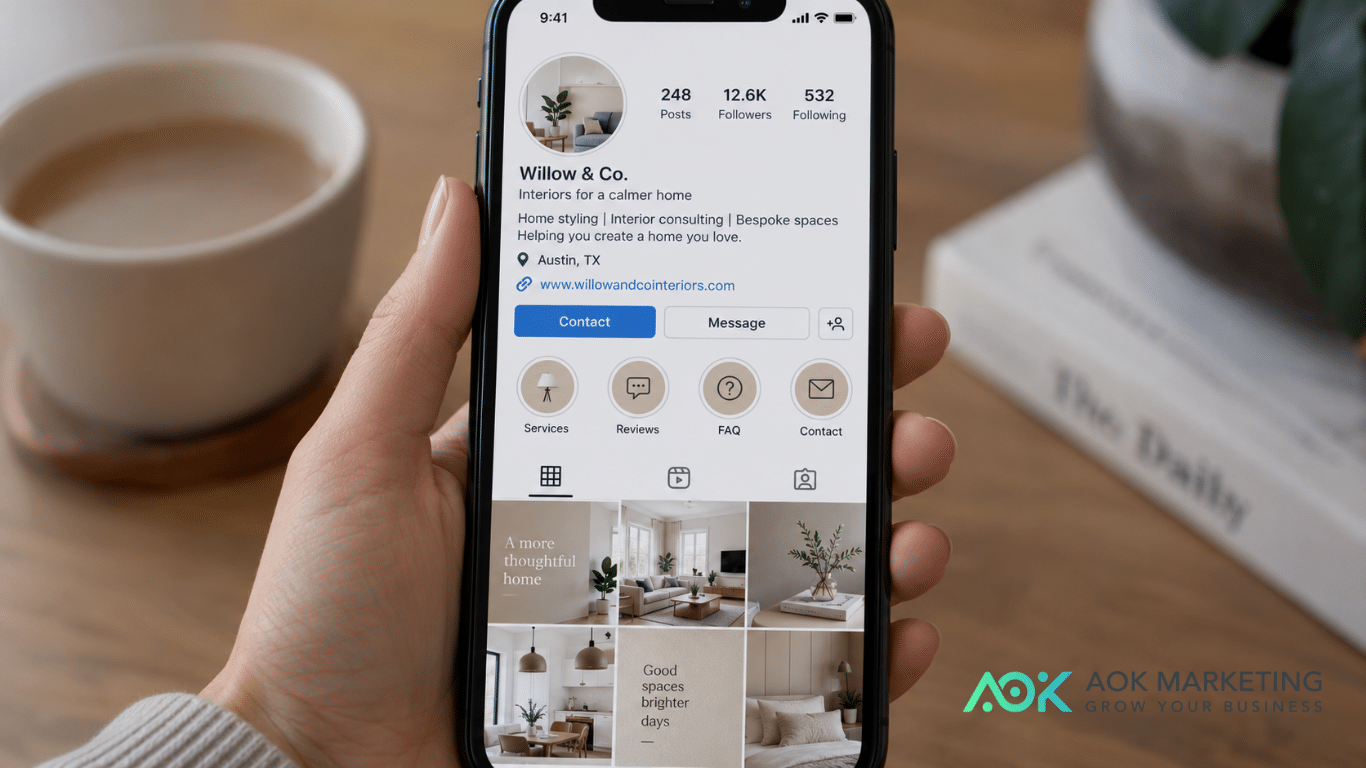
Instagram Highlights are especially useful for small businesses because they allow you to keep important Story content visible on your profile.
Do not treat them like random folders.
Organize them around the questions customers usually ask.
A service business might use:
Start Here
Services
Prices
Reviews
FAQ
Results
Contact
A restaurant might use:
Menu
Location
Hours
Reviews
Events
Reservations
A salon might use:
Services
Prices
Before & After
Reviews
Book
Location
The point is simple:
Someone should not have to scroll through six months of posts to find basic information.
Put the Most Important Highlights First
Think about the customer journey.
Someone new to your page may want to know:
What do you do?
Then:
How much does it cost?
Then:
Can I trust you?
Then:
How do I contact you?
A useful order might therefore be:
Start Here → Services → Reviews → FAQ → Contact
For a local business:
Services → Prices → Reviews → Location → Book
Keep Them Updated
Old information can be worse than no information.
Regularly check Highlights for:
- expired promotions
- old prices
- discontinued services
- old hours
- moved locations
- outdated phone numbers
- employees who no longer work there
Your profile should reflect the business people will experience today.
Step 4: Create Content That Helps People Buy, Not Just Content That Gets Likes
A small-business Instagram page should not exist only to collect likes.
Content should help potential customers move closer to a decision.
A simple content mix can include five categories.
Show What You Sell
Do not assume customers understand your services.
Show them.
A bakery can show:
custom cake options
sizes
flavors
event orders
pickup process
A contractor can show:
finished projects
before-and-after work
materials
different services
common problems they solve
Someone should be able to browse your profile and quickly understand what they can hire you for.
Answer Common Questions
Every question your customers repeatedly ask can become content.
For example:
Do you accept walk-ins?
How far in advance should I book?
Do you deliver?
What areas do you serve?
How much does it cost?
What should I bring to my appointment?
These posts are useful because they reduce hesitation.
They can also save you from answering the same DM repeatedly.
Show Real Customer Experiences
Small businesses benefit enormously from social proof.
Use:
- customer reviews
- testimonials
- before-and-after images
- completed projects
- customer photos
- case studies
- user-generated content
when you have permission to share them.
A potential customer wants evidence that real people have already trusted your business.
Show the People or Process Behind the Business
You do not have to turn every employee into an influencer.
But showing how the business works can make it feel more credible and approachable.
Show:
- how orders are prepared
- behind-the-scenes production
- your workspace
- products being packaged
- an installation in progress
- a service being prepared
- a team setting up for an event
This is particularly useful for businesses where customers are buying expertise or craftsmanship.
Give Every Post a Purpose
Before posting, ask:
What should someone do after seeing this?
Possible answers include:
visit our website
call us
book an appointment
send us a DM
visit our store
save this post
share it
request a quote
Not every post needs to push for an immediate sale.
But your overall content strategy should eventually lead customers somewhere.
Step 5: Respond, Measure and Improve
Your job is not finished when you publish the post.
Small businesses often win customers because they are responsive and personal.
Instagram gives you a chance to demonstrate that.
Respond to Real Questions
If someone comments:
Do you deliver to Mississauga?
answer them.
If someone asks:
How much is this?
give them useful direction instead of ignoring the comment.
If the answer depends on several factors, say something like:
Pricing depends on the size and customization. Send us a message through the contact option on our profile and we can help you with a quote.
Make it easy for the customer to continue.
Do Not Force Every Conversation Into DMs
Sometimes businesses reply to every comment with:
DM us.
That can be frustrating.
If the answer is simple and appropriate to share publicly, answer it publicly.
This also helps other people who may have the same question.
Use DMs when the conversation involves:
- personal information
- order numbers
- account details
- detailed custom quotes
- sensitive complaints
Check Instagram Insights
Professional accounts give businesses access to Instagram insights.
Use them.
Do not judge your entire strategy based on likes.
Look at:
- reach
- profile visits
- saves
- shares
- website taps
- contact actions
- follower growth
- Reel performance
- engagement
Then connect Instagram performance to what happens in the business.
Ask:
Are people calling?
Are they booking?
Are they requesting quotes?
Are they coming into the store?
Are they reaching the website?
A post with 30 likes and five genuine inquiries may be more valuable than a Reel with thousands of views and no business outcome.
A Simple Instagram Business Profile Checklist
Before spending more money or time creating content, check the basics:
Business name: Clear and recognizable
Bio: Immediately explains what you do
Location: City, service area, or storefront location clearly shown
Profile link: Leads to the most useful customer destination
Contact options: Easy to find and tap
Profile photo: Recognizable logo or business image
Highlights: Organized around useful customer information
Recent posts: Clearly show what you sell
Reviews: Easy to find
Call to action: Customers know what to do next
Small improvements here can make your existing traffic much more useful.
What Should a Small-Business Instagram Bio Look Like?
You do not need to overcomplicate it.
A simple formula is:
What you do
Where you are
Why choose you or what you specialize in
What to do next
For example:
Custom promotional products for businesses & events
📍 Toronto, Ontario
Apparel, drinkware, giveaways & more
Get a quote ↓
Or:
Family-owned Italian restaurant
📍 Downtown Detroit
Lunch • Dinner • Private Events
Reserve your table ↓
Or:
Residential plumbing & emergency repairs
Serving Calgary & surrounding areas
Call or request service below ↓
The bio is not the place for a long company history.
Its job is to orient the customer quickly.
The Biggest Mistake: Making Customers Work Too Hard
Small businesses sometimes focus heavily on creating content while overlooking basic convenience.
But imagine the customer experience:
They find your Reel.
They like your product.
They visit your profile.
They cannot tell where you are located.
There is no obvious contact option.
Your phone number is buried inside a caption.
The website link leads to a generic homepage.
The pricing information is three months deep in your feed.
Every additional step creates another opportunity for that person to leave.
Your Instagram account should reduce those steps.
Someone who wants to buy should be able to move from:
Discovery → Profile → Information → Contact
as smoothly as possible.
A Good Instagram Business Account Makes the Next Step Obvious
Managing Instagram for a small business is not about posting every day or chasing every new trend.
It is about making your business easier to discover, understand, trust, and contact.
Start with five things:
1. Optimize your profile.
2. Make contacting you effortless.
3. Organize your Highlights around customer needs.
4. Publish content that helps people make buying decisions.
5. Respond and measure what actually drives business.
You can build more advanced strategies from there.
But these basics matter because Instagram visitors are often already showing intent simply by visiting your profile.
Do not make them work to become a customer.
Make the next step obvious.
If your business needs help turning social media activity into a clearer customer journey, stronger content strategy, and measurable business growth, AOK Marketing can help you build a social media approach designed around what customers actually need to take action.
About The Author