Pinterest is often described as a social media platform, but people also use it as a visual discovery and planning tool. They search for ideas, compare products, save useful resources, organize future purchases, and return to Pins when they are ready to take action.
That behavior can make Pinterest valuable for businesses with visual products, helpful information, creative ideas, or services connected to an identifiable customer need. Retailers, publishers, designers, travel companies, food brands, home service providers, educators, consultants, and many other organizations can use the platform to improve visibility and send relevant visitors to their websites.
Learning how to set up a Pinterest business account is the first step. A business account provides access to features such as Pinterest Analytics, the Business Hub, advertising tools, and audience information that are not available in the same way through a standard personal account. Pinterest currently allows businesses to create a new account or convert an existing personal account while retaining its Pins and followers.
The setup process shown in the original screenshots on this page is no longer current. Those images should remain as a historical record, but the updated instructions below explain how businesses can create and prepare an account in 2026.

Why Use a Pinterest Business Account?
A personal Pinterest account is suitable for saving ideas and organizing private interests. A business account is designed for organizations, marketers, merchants, publishers, and creators who want to measure content performance or promote their work.
Pinterest states that its free business accounts provide access to Pinterest Analytics, the Business Hub, advertising features, and additional audience insights. Businesses can publish organic content without paying for advertising, then decide later whether promoted Pins fit their strategy and budget.
The benefits extend beyond having access to extra tools. A properly organized business profile can:
- Introduce your company to people searching for related ideas.
- Send visitors to product, service, and educational pages.
- Organize content into searchable topic-based boards.
- Show which Pins generate impressions, saves, and outbound clicks.
- Support product discovery and Pinterest Shopping campaigns.
- Strengthen brand recognition through consistent visuals.
Pinterest should not be treated as a place to upload random promotional graphics. The account needs a defined audience, useful content themes, clear website destinations, and a publishing plan connected to wider business goals.
Businesses selling physical products can also explore AOK Marketing’s guide to Pinterest Shopping for profitable advertising after completing the initial account setup.
Decide Whether to Create or Convert an Account
Pinterest currently provides two main ways to start using its business features.
You can create a separate business account with a new email address, or you can convert an existing personal account into a business account. Converting an account allows you to keep the Pins and followers already connected to it. Business accounts are public, so a private personal account must become public before it can be converted.
A separate account is usually the cleaner option when your current Pinterest activity is personal and unrelated to the company. It keeps private interests separate from business boards, team activity, advertising access, and brand content.
Conversion may be more practical when an existing account already represents the company, has relevant followers, or contains Pins that support the business.
Before deciding, review the existing username, boards, followers, saved content, and account ownership. An agency or employee should not create a business account using credentials that the company cannot recover later. The business owner should retain control of the main email address, password recovery options, website verification, and advertising information.

Create a New Pinterest Business Account
Pinterest currently requires the initial creation of a completely new business account to be completed on a desktop device. The email used for the new account must not already be connected to another Pinterest account.
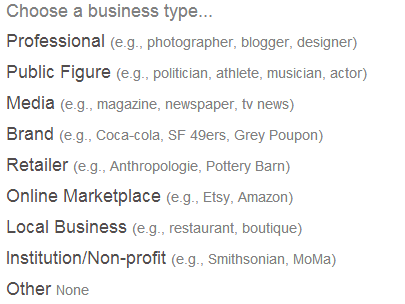
Begin by visiting Pinterest and selecting the signup option. Log out first when another account is already open in the browser. Choose Create a business account, then enter the requested email address, password, and age information.
Pinterest will guide you through several setup screens. You will be asked to build your profile, describe the business, and indicate whether you are interested in running advertisements. Choosing not to advertise during setup does not prevent the company from using ads later.
Use a professional email address that the business can continue accessing. Avoid registering an important company account through a temporary employee email or personal address that could be lost.
After completing the initial prompts, you will enter the Pinterest Business Hub, where you can continue editing the profile, publishing content, reviewing analytics, and accessing advertising tools.

Convert an Existing Personal Account
A personal Pinterest account can also be converted through the account-management settings.
On desktop, log in and open Settings. Select Account management, locate the option to convert to a business account, and follow the prompts to complete the business profile.
The conversion can also be started through the Pinterest mobile application. Pinterest’s current process asks for details such as the profile name, website, business description, and advertising interest. Existing followers and Pins remain connected to the account after conversion.
Review old boards before completing the conversion. Personal boards that do not support the business may need to be made private, reorganized, or removed from the public profile. Visitors should be able to understand the account’s purpose without sorting through years of unrelated content.
Complete Your Pinterest Business Profile
Creating the account is only the beginning. The profile should clearly explain what the company offers and what users can expect to find.
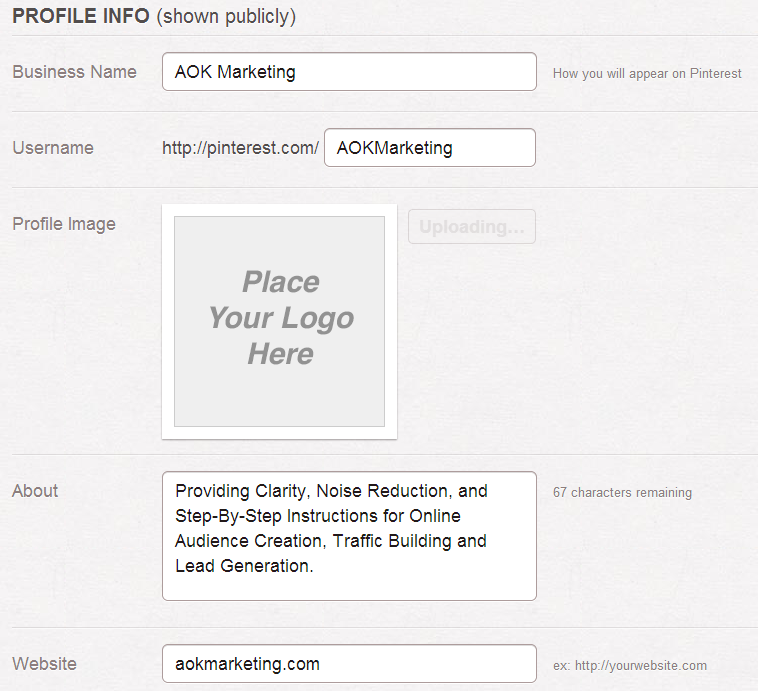
Use the official business name as the profile name. Add a recognizable logo or branded image that remains clear when displayed at a small size. The username becomes part of the profile’s Pinterest web address, so it should be simple, relevant, and easy to remember.
Write the profile description for potential customers rather than search engines alone. A keyword can help provide context, but the text should still sound natural.
A useful description generally communicates:
- What the company does.
- Who it helps.
- Which subjects its boards cover.
- What users may gain by following.
For example:
Practical digital marketing guidance for growing businesses. Explore ideas covering SEO, paid media, social strategy, content, and online visibility.
Avoid descriptions filled with disconnected keyword variations. Phrases such as “best company, top agency, expert service, affordable marketing, leading consultant” do not explain the account clearly and may make the profile appear promotional.
Add the company’s location when it is relevant and include the most appropriate website destination. The homepage may be suitable, but a focused service page, collection, resource hub, or current campaign page could provide a better experience.
Pinterest allows businesses to add a website directly through the profile editor. However, adding a link and claiming a website are separate actions.
Claim Your Business Website
Claiming your website is one of the most valuable steps after setting up the profile.
A claimed website helps connect content saved from your domain to your Pinterest account. Pinterest may display the profile picture with Pins saved from the claimed site, link those Pins to the business profile, and provide more information about how content from the domain performs.
Pinterest currently offers three main verification methods:
- Add an HTML tag to the website’s source code.
- Upload a Pinterest HTML verification file to the web server.
- Add a Pinterest TXT record through the domain’s DNS settings.
The exact process depends on the website platform and hosting provider. A WordPress, Shopify, Wix, or Squarespace website may use different menus, but the Pinterest verification information remains the same.
To begin, open the business account settings and locate the website-claiming section. Pinterest’s current instructions place this under Link to Pinterest or the claimed-account settings. Copy the provided verification code or file, add it to the website, return to Pinterest, and submit the domain for verification.
Only claim a domain that the business owns and can edit. Marketplace pages hosted on platforms such as Amazon, eBay, or Etsy generally cannot be claimed in the same way because the seller does not control the underlying domain source code.
Organize Boards Around Customer Interests
Boards should help users understand the subjects the business covers. Avoid creating boards only for internal company categories that customers would never search for.
A home improvement company might create boards around kitchen renovations, bathroom design, storage ideas, outdoor spaces, and home maintenance. A digital agency might use topics such as search marketing, social media planning, online advertising, content strategy, and website optimization.
Give each board a clear title and a useful description. A board named “Ideas” provides little context. “Small Business Social Media Ideas” explains what users will find and who the content serves.
Start with a manageable number of focused boards. A smaller collection of active, relevant boards creates a stronger profile than dozens of empty categories.
The goal is to establish clear relationships between the company, the audience, and the topics represented by its Pins.
Create Pins That Lead Somewhere Useful
Each Pin should have a purpose. It may educate, inspire, demonstrate a product, answer a question, or encourage someone to visit a relevant webpage.
Use a clear image or video, an informative title, a natural description, and the correct destination URL. The landing page should match the promise of the Pin. Someone clicking a Pin about a specific service should not arrive at an unrelated homepage and be expected to search for the information again.
Pinterest’s current publishing tools allow businesses to review performance for their content and see how people interact with their Pins.
Useful business content may include:
- Product demonstrations and collections.
- Step-by-step tutorials.
- Checklists and planning resources.
- Before-and-after examples.
- Blog article graphics.
- Seasonal ideas.
- Case studies and customer outcomes.
- Short educational videos.
Pinterest can also support longer-term customer acquisition. A well-designed Pin may continue sending relevant visitors to a useful resource after the original publishing date. AOK Marketing’s guide to Pinterest lead generation explains how businesses can connect visual content with enquiries and conversion opportunities.
Maintain Consistent Branding
Every Pin does not need to look identical, but the account should feel connected.
Use a consistent logo treatment, visual style, typography, and brand voice. Make sure text placed on graphics remains readable on mobile devices. Avoid overcrowding images with long paragraphs or several competing calls to action.
Consistency helps users recognize a company’s content when it appears in search results, home feeds, related Pins, and board recommendations.
It also contributes to the trust and recognition that create social currency. People are more likely to save or share content when it is useful, visually clear, and connected to a credible source.
Use Pinterest Analytics to Guide Future Content
A Pinterest business account provides access to Analytics, allowing businesses to review how Pins and boards perform. Available measurements may include impressions, saves, engagement, and outbound activity. Pinterest also offers audience information that can help marketers understand which content interests their viewers.
Do not measure success only by follower growth. A smaller account that consistently sends qualified visitors to high-value pages may contribute more to the business than an account with a large but inactive audience.
Review which topics earn attention, which designs encourage clicks, and which destination pages support meaningful customer actions. Use those findings to improve future content rather than continuing to publish the same format without reviewing the results.
Pinterest Trends can also help businesses explore growing search interests and seasonal subjects in supported regions. Use trend information to strengthen relevant content, not to force the company into unrelated topics.
Common Pinterest Business Account Mistakes
A Pinterest business profile can remain active without producing meaningful results when the setup lacks focus.
One common mistake is publishing only direct promotions. Pinterest users often begin with a question, idea, or future plan. Educational and inspirational content can introduce the brand before the user is ready to make a purchase.
Another mistake is linking every Pin to the homepage. Send users to the page that best matches the content they clicked.
Businesses should also avoid abandoned boards, broken links, blurry graphics, misleading Pin titles, duplicated images without added value, and keyword-heavy descriptions that are difficult to read.
Finally, do not create the account without assigning responsibility for it. Someone should manage content planning, publishing, website links, analytics, and account access.
Companies that cannot maintain those tasks internally may benefit from understanding why businesses outsource social media management.
Keep the Original Pinterest Screenshots
The existing images should not be deleted. They provide useful historical context and show how Pinterest’s original business onboarding process worked.
Place them beside the most closely related updated sections and add captions explaining that they show an earlier interface. This preserves the original value of the article while preventing readers from following outdated instructions.
Start Building a Useful Pinterest Presence
Knowing how to set up a Pinterest business account gives your company access to the platform’s business tools, but the account itself will not generate results without a clear content plan.
Choose whether to create or convert an account, complete every relevant profile field, add and claim the company website, and organize boards around topics customers care about. Publish Pins that are visually clear, genuinely helpful, and connected to accurate landing pages.
Then review the data. Pay attention to the topics that attract the right users, the formats that earn meaningful engagement, and the pages that turn Pinterest visits into business outcomes.
A strong Pinterest presence develops over time through useful content, consistent branding, and careful measurement. With that foundation in place, Pinterest can support brand discovery, website traffic, product visibility, and customer acquisition without making the account feel like a collection of advertisements.

Pinterest will send you a confirmation email – to confirm you are not a spammer.
And that’s it! Seriously, doesn’t get much easier.
Happy Marketing!
Dave Burnett
About The Author