You probably use ChatGPT to write emails, research topics, generate images, or brainstorm ideas. But did you know it can also let you play Snake?
Yes, the classic arcade game where you guide a growing snake around the screen has made its way into ChatGPT.
And there’s a fun twist: some users can play Snake while ChatGPT is generating an image.
Instead of staring at a loading animation, you might find yourself collecting dots and trying not to crash into your own tail.
It’s a small addition, but it’s one of the more unexpected features introduced to ChatGPT in 2026.
So, how do you find the game, how does it work, and why might it not appear on your screen?
Here’s what you need to know.
Can You Really Play Snake on ChatGPT?
Yes, ChatGPT has a built-in Snake mini-game that appears for some users during image generation.
OpenAI officially acknowledged the feature in its September 8, 2026 update introducing ChatGPT Images 2.5.
According to OpenAI’s official ChatGPT release notes, some users see animated dots and a Snake game while their images are being generated.
The experience varies depending on the platform and rollout, so it isn’t necessarily available to everyone.
The feature also isn’t available in ChatGPT Work mode.
It’s essentially a playful addition to the image-generation loading experience.
Instead of simply waiting for an image to appear, eligible users can interact with a familiar arcade-style game.

How to Play Snake on ChatGPT
Finding the hidden Snake game is relatively simple, provided the feature is available in your version of ChatGPT.
Step 1: Open ChatGPT
Visit ChatGPT and sign in to your account.
You can use the platform’s image-generation feature to try accessing the mini-game.
Step 2: Ask ChatGPT to Generate an Image
Enter an image prompt into a new conversation.
For example:
“Create a photorealistic image of a golden retriever sitting in a colourful flower garden, with beautiful morning sunlight and a cinematic photography style.”
Submit the prompt to begin image generation.
Step 3: Look at the Loading Animation
While ChatGPT generates your image, pay attention to the loading screen.
Some users will see animated dots or an interactive grid.
This is where the hidden Snake game may appear.
Step 4: Tap or Click the Animation
If the interactive Snake experience is available, try tapping or clicking the loading animation.
Users have reported that this activates the mini-game.
Depending on the interface, you may be able to control the snake through swipes or other directional controls.
Step 5: Play While Your Image Generates
Once the game starts, guide the snake around the screen and collect the available dots.
As in the familiar arcade game, the objective is to keep moving without colliding with yourself.
The game serves as a short diversion during the image-generation process rather than a replacement for the main ChatGPT experience.
Important: Not every user will see the Snake game. OpenAI describes it as a feature available to some users, with differences across platforms and rollout stages.
Why Can’t I Find the Snake Game on ChatGPT?
If you’ve tried generating an image but haven’t seen Snake, that doesn’t necessarily mean something is wrong with your account.
There are a few possible explanations.
1. The Feature Hasn’t Reached Your Account
OpenAI hasn’t described Snake as a universally available feature.
Its rollout can vary, so some users may have access while others do not.
2. You’re Using a Different Platform
The loading experience may differ between ChatGPT’s web interface, mobile apps, and other supported environments.
A feature available on one platform may not appear in exactly the same way elsewhere.
3. You’re Using ChatGPT Work Mode
OpenAI specifically states that the Snake loading game isn’t available in Work mode.
4. Image Generation Finishes Quickly
Because Snake is connected to the image-generation loading experience, the opportunity to play may be brief.
If an image finishes generating almost immediately, you may have little time to interact with the game.
5. Your Loading Screen Looks Different
OpenAI describes variations in the image-generation loading experience.
You may see animated dots or another loading indicator without being offered the Snake game.
There is no officially documented setting that guarantees the game will appear.
Why Did OpenAI Add Snake to ChatGPT?
OpenAI hasn’t provided a detailed public explanation of why it chose Snake specifically.
However, the feature demonstrates a simple idea: waiting for an AI-generated result doesn’t necessarily have to involve staring at an inactive loading screen.
Instead, users can be given something interactive to do.
Snake is particularly suited to a loading-screen mini-game because its basic mechanics are straightforward.
You guide a character, collect items, and try to continue playing for as long as possible.
The game doesn’t require an elaborate story or complicated instructions.
A Familiar Game in an Unexpected Place
Snake has been popular across computers, mobile phones, and gaming devices for decades.
Its appearance inside ChatGPT adds an unexpected element to a tool normally associated with writing, research, and productivity.
For users who discover it by accident, the experience can feel like finding a hidden feature.
Making AI Tools More Interactive
The game is also an example of how AI products can incorporate interactive elements beyond traditional text conversations.
In October 2026, TechRadar reported testing ChatGPT’s ability to create playable versions of several classic arcade games directly within conversations, including Snake, Tetris, and Pong.
That capability is different from the built-in Snake loading game, but both demonstrate how ChatGPT interactions can go beyond simple question-and-answer exchanges.
Can You Ask ChatGPT to Create Your Own Snake Game?
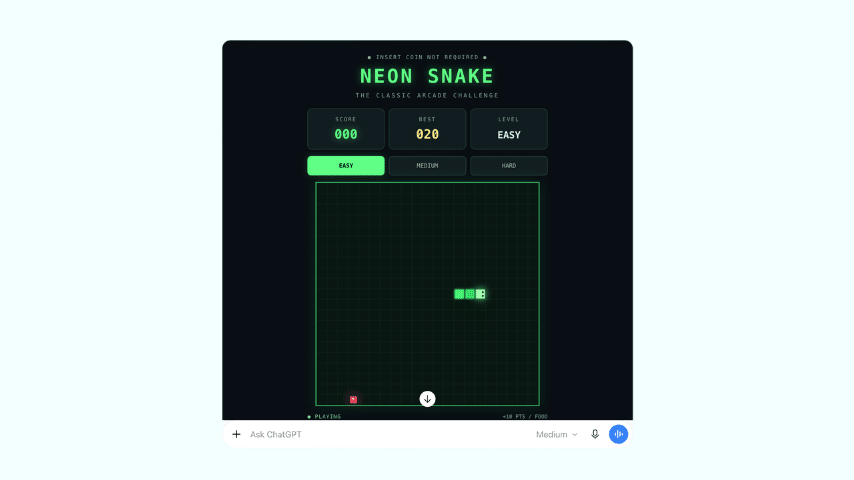
Yes. In supported ChatGPT experiences, you can also ask ChatGPT to create a customized version of Snake.
Unlike the loading-screen mini-game, this involves asking ChatGPT to build an interactive game specifically for you.
For example, you could try this prompt:
“Create a playable Snake game directly in this conversation. Use a retro arcade style with a dark background and bright green snake. Include a score counter, simple directional controls, a restart button, and three difficulty levels.”
Depending on the ChatGPT interface and available capabilities, you may receive a playable game or code that can be run in a browser.
A recent TechRadar experiment with games created in ChatGPT demonstrated customized arcade games, including a Snake variation with cyberpunk visuals and new gameplay elements.
However, the results were not always perfect on the first attempt.
This approach is different from accessing the hidden Snake game during image generation. You’re asking ChatGPT to create a new interactive experience.

What Does the Snake Game Tell Us About ChatGPT in 2026?
The addition of Snake is a small feature, but it reflects a broader shift in how people can interact with AI tools.
ChatGPT is increasingly capable of presenting information through visual and interactive experiences rather than text alone.
For businesses and marketers, this is worth paying attention to.
1. Interactive Experiences Can Capture Attention
Instead of presenting users with passive content, interactive elements give people something to explore.
This principle can also apply to websites, product demonstrations, educational content, and marketing campaigns.
2. Small Details Can Make Digital Products More Memorable
A loading screen isn’t usually the most memorable part of an application.
However, an unexpected mini-game can create a moment that users notice and discuss.
Businesses can take inspiration from this approach by considering how small interactions contribute to the overall customer experience.
3. AI Is Expanding Beyond Text Generation
ChatGPT can already assist with content creation, research, images, data analysis, and programming.
Interactive games demonstrate another way users can experiment with AI-generated experiences.
For marketers, this may create opportunities to explore interactive demonstrations, educational activities, and other content formats.
However, not every website or application needs gamification. Any interactive element should support the user’s goal rather than distract from it.
Other Ways to Experiment With Games on ChatGPT
Snake isn’t the only game-related experience you can try.
Depending on your ChatGPT environment, you can ask it to help create or run different types of games.
For example, you could request a trivia quiz about digital marketing, a text-based mystery game, a word-guessing challenge, or a simple browser arcade game.
You could also ask ChatGPT to explain the rules of an unfamiliar game or help modify existing game code.
The results will depend on the available interactive features.
These experiments can be an entertaining way to explore ChatGPT’s capabilities beyond everyday writing and research tasks.
Frequently Asked Questions About Snake on ChatGPT
Can you play Snake on ChatGPT?
Yes. Some ChatGPT users can access a Snake mini-game during image generation. OpenAI confirmed the feature in its September 2026 release notes.
How do you unlock the Snake game on ChatGPT?
Try generating an image and interacting with the loading animation if an interactive grid appears. The feature is not available to every user, and there is no guaranteed unlock method.
Is the ChatGPT Snake game free?
The mini-game is part of the image-generation experience rather than a separately purchased game. However, access to image generation and its usage limits depends on your ChatGPT plan and account.
Is Snake available on the ChatGPT mobile app?
Users have reported encountering the game on mobile, but OpenAI notes that the loading experience varies by platform and rollout. Availability is not guaranteed.
Why doesn’t my ChatGPT have Snake?
The feature may not be available on your account or platform. It also isn’t supported in ChatGPT Work mode.
Can ChatGPT make a custom Snake game?
Yes. In supported interactive experiences, ChatGPT can create a playable Snake game from a prompt. In other cases, it may provide code you can run separately.
Does playing Snake affect image generation?
Snake is presented as an activity during image generation. OpenAI hasn’t documented it as a way to speed up image creation or improve the quality of the generated image.
Final Thoughts: ChatGPT Has More Hidden Features Than You Might Expect
The next time you generate an image in ChatGPT, take a closer look at the loading animation.
You might discover that there’s a classic game of Snake hiding in plain sight.
Although the feature isn’t available to everyone, it’s an entertaining example of how ChatGPT continues to evolve beyond a traditional text-based chatbot.
And if the built-in game doesn’t appear, you can still experiment by asking ChatGPT to create a custom Snake game or another simple interactive experience.
Sometimes, discovering what an AI tool can do starts with something as simple as playing a game.
About The Author