Getting your LinkedIn Company Page image sizes wrong is one of the fastest ways to look unprofessional to a prospect’s first impression. A stretched logo or a cropped cover photo signals a page nobody’s paying attention to, which is the opposite of what you want when LinkedIn is often where a B2B prospect checks you out before ever visiting your website.
The specs below reflect LinkedIn’s current 2026 requirements, not the numbers that have been circulating in outdated guides (including, until now, our own) for years.
LinkedIn Company Logo Size
LinkedIn now uses a single square logo for Company Pages, rather than the separate horizontal and square logo setup older guides still reference.
- Recommended size: 400 x 400 pixels
- Minimum size: 268 x 268 pixels
- Format: PNG or JPEG
- File size: Under 3MB
Keep your logo simple enough to stay legible at small sizes, it displays as a small circle-cropped icon next to every post and comment your page makes, not just on the page itself.
LinkedIn Company Page Cover Photo Size
This is the spec that’s changed the most, and the one most guides still get wrong.
- Upload at: 4200 x 700 pixels
- Displays on the page at: approximately 1128 x 191 pixels
- Format: PNG or JPEG (not GIF, animated cover images aren’t supported for Company Pages)
- File size: Under 3MB
Uploading at the full 4200 x 700 resolution, rather than the older 1128 x 191 figure many guides still list, matters because LinkedIn scales your image down to fit the display area. Upload at the lower resolution and your cover photo will look soft or slightly pixelated on high-resolution screens. Upload at the correct higher resolution and it stays sharp.
Because the display ratio is roughly 6:1, extremely wide and short, keep any text or logo elements centered and away from the edges. Your Company Page logo overlaps the bottom-left corner of the cover photo, so avoid placing anything important there.
LinkedIn Company Page Character Limits
Text limits on Company Pages have expanded significantly since 2014, and getting these right matters just as much as image sizing for how complete and professional your page looks.
- Company Page summary/About: up to 2,000 characters. This is the one figure that hasn’t changed. Front-load your value proposition in the first couple of sentences, since LinkedIn (and Google, if the page gets indexed) truncates the visible preview well before the full 2,000-character limit.
- Company Page posts/updates: up to 3,000 characters, the same limit as personal profile posts. This is a major increase from the 700-character cap that applied when the original cheat sheet was published, and it opens up real room for short-form thought leadership content directly from your Company Page rather than just links and announcements.
- Company Page tagline: kept short and used as your one-line positioning statement, shown directly under your logo on search and page previews.
Setting Up a LinkedIn Company Page That Actually Converts
Getting the dimensions right is the baseline, not the whole job. A few things matter more once the sizing is correct:
Lead with a clear value proposition in your tagline and the opening line of your About section. Most visitors decide whether to keep reading within the first couple of sentences, both are truncated in previews, so don’t bury your value proposition in paragraph two.
Use your cover photo as real estate, not decoration. A well-designed cover photo can reinforce your positioning, highlight a current campaign, or showcase your product, rather than sitting empty or defaulting to a generic stock background.
Post consistently, not just occasionally. With Company Page posts now supporting up to 3,000 characters, there’s real room to publish genuine insight directly on LinkedIn rather than just linking out. Pages that post consistently build far more organic reach than pages that post sporadically.
Treat your Company Page as a landing page, not a directory listing. Every element, logo, cover photo, About section, and pinned post, should work together toward the same goal, usually driving a specific action like following the page, visiting your site, or reaching out.
If your Company Page is also running paid campaigns, note that LinkedIn ad creative uses entirely different specs from organic page assets, single image ads at 1200×627, carousel cards at 1080×1080, and video with specific aspect ratio requirements. Our comprehensive guide to LinkedIn paid ads covers the full breakdown for sponsored content, message ads, and carousel formats.
Common Mistakes That Make a LinkedIn Company Page Look Unpolished
Reusing a personal profile banner on the Company Page. Personal profile banners use a 4:1 ratio (1584 x 396), while Company Page covers use a much wider, shorter 6:1 ratio. The two aren’t interchangeable without a redesign.
Uploading the cover photo at display resolution instead of upload resolution. Uploading at 1128 x 191 instead of the recommended 4200 x 700 is the single most common reason Company Page covers look blurry on modern high-resolution screens.
Leaving the About section short or generic. With 2,000 characters available, a two-sentence About section is a missed opportunity to rank for relevant search terms and give visitors a real reason to follow the page. This is also where LinkedIn SEO overlaps with your broader SEO strategy, the same keyword thinking that shapes your website content should shape your Company Page description.
Treating the logo like an afterthought. A low-resolution or off-brand logo undermines everything else on the page, since it appears next to every single post and comment the page makes, not just on the page itself.
How AOK Marketing Helps With LinkedIn and Social Presence
Getting the technical specs right is step one. The bigger opportunity is using a properly set up Company Page as part of a coordinated paid social media and organic strategy, one where your page, your content, and your ad creative all reinforce the same message instead of working in isolation. Our guide on using LinkedIn for lead generation covers the organic side in more depth, from Company Pages through Showcase Pages and content strategy.
See how this has worked for B2B clients in our case studies, or get in touch if you want your LinkedIn presence, paid or organic, audited and rebuilt properly.
Frequently Asked Questions
What size should a LinkedIn Company Page logo be?
400 x 400 pixels is the recommended size, with 268 x 268 pixels as the minimum LinkedIn accepts. Use a single square logo; LinkedIn no longer uses a separate horizontal logo format for Company Pages.
What size should a LinkedIn Company Page cover photo be?
Upload at 4200 x 700 pixels for the sharpest result. LinkedIn displays it at roughly 1128 x 191 pixels on the page, but uploading at the higher resolution prevents blurriness on high-resolution screens.
How many characters can a LinkedIn Company Page post be?
Up to 3,000 characters, the same limit as personal profile posts. This is a significant increase from the 700-character limit that applied to Company Page updates in earlier years.
How long can a LinkedIn Company Page About section be?
Up to 2,000 characters. This limit has stayed consistent, but most pages underuse it. Front-load your value proposition since only the first couple of sentences show before the preview truncates.
Why does my LinkedIn cover photo look blurry after uploading?
This almost always means it was uploaded at the older 1128 x 191 spec instead of the current recommended 4200 x 700 pixels. LinkedIn scales the image to fit the display area, and lower-resolution uploads look soft on modern screens as a result.
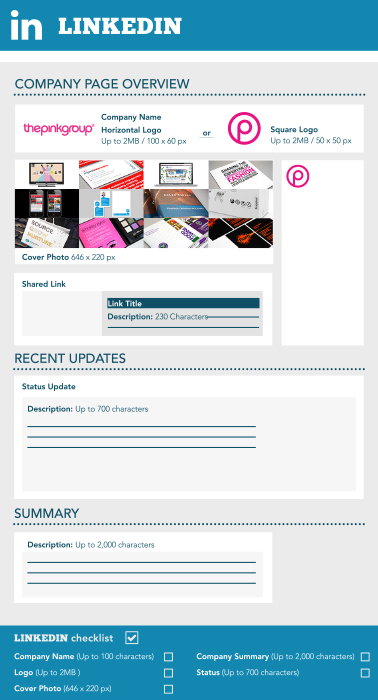
Source: http://thepinkgroup.co.uk/
About The Author