Subscribe to our Blogs

    Jana Legaspi

    Jana Legaspi is a seasoned content creator, blogger, and PR specialist with over 5 years of experience in the multimedia field. With a sharp eye for detail and a passion for storytelling, Jana has successfully crafted engaging content across various platforms, from social media to websites and beyond. Her diverse skill set allows her to seamlessly navigate the ever-changing digital landscape, consistently delivering quality content that resonates with audiences.

    About Jana Legaspi

    Jana Legaspi is a digital marketing specialist, PR professional, writer, educator, and brand consultant with a strong focus on SEO, content systems, and AI-assisted marketing. She is a Content Specialist and Social Media & SEO Lead for AOKMarketing.com and PromotionalProducts.com, where she works closely with executive leadership on pillar content, entity-based SEO, and multi-channel growth strategies across multiple industries.

    Based in the Philippines, Jana operates at the intersection of search, content, PR, branding, and education, helping companies translate complex marketing strategy into clear, scalable execution—while also mentoring students through science and environmental education.

    Early academic foundation & passion for communication

    Jana studied at Ateneo de Manila University, where she developed a strong foundation in communication, research, and storytelling. Early in her career, she gravitated toward content creation, public relations, and digital media—combining creative execution with analytical thinking.

    Parallel to her marketing work, she became actively involved in education, eventually teaching Marine Science to Grades 5–6 and developing structured learning modules focused on Philippine marine ecosystems, conservation, and youth engagement.

    Building authority in SEO, content systems & digital strategy

    Jana’s core expertise lies in SEO-driven content development, content clustering, and digital brand positioning. At AOK Marketing, she contributes to SEO and content operations.

    She is also deeply involved in the content and branding strategy of PromotionalProducts.com, leading long-form blog development, seasonal campaign content, product storytelling, and B2B gifting narratives designed to drive organic growth and conversions.

    PR professional & brand partnerships

    Alongside her agency work, Jana is also a public relations professional (“PR girly”) and brand collaborator, with hands-on experience working with major consumer and beauty brands across campaigns, product launches, and influencer activations. Her portfolio includes collaborations with:

    • Dove
    • Celeteque
    • Sperry
    • Pond’s
    • And many other local and international brands

    Her PR work spansbrand storytelling, influencer partnerships, product seeding, campaign coverage, and consumer trust-building, giving her a dual perspective as both a strategist and a front-facing brand ambassador.

    Educator, environmental advocate & youth mentor

    Outside of agency and PR work, Jana serves as a Marine Science teacher, where she designs lesson plans on mangroves, seagrass, coral reefs, and biodiversity for elementary students. Her work bridges digital education, environmental awareness, and youth leadership, integrating technology into science instruction.

    She also participates in environmental outreach initiatives and youth-focused sustainability programs, aligning communication strategy with real-world conservation education.

    Creator, brand collaborator & digital storyteller

    Jana is also an active lifestyle and travel content creator, collaborating with global and local brands across:

    • Beauty & personal care
    • Tech
    • Wellness
    • Travel & tourism
    • Consumer products

    Her creator work blends storytelling, user-generated content strategy, influencer marketing, and brand amplification, giving her a practical, front-line understanding of short-form video, audience psychology, and social-driven growth.

    Credentials & Professional Highlights

    • Content Specialist and Social Media Manager at AOKMarketing.com
    • Content & Social Media Manager for PromotionalProducts.com
    • SEO-focused long-form content and pillar page specialist
    • Digital marketing strategist for North American B2B and service brands
    • Experienced in structured data, AI search optimization, and content clustering
    • Lifestyle, beauty, travel, and tech brand collaborator
    • Environmental education and youth outreach advocate

    FAQ About Jana Legaspi

    Who is Jana Legaspi?

    Jana Legaspi is a digital marketing strategist, PR professional, SEO and content specialist, educator, and brand consultant working with AOKMarketing.com and PromotionalProducts.com. She also teaches Marine Science and creates brand-driven and educational digital content.

    What is Jana Legaspi known for?

    She is known for her work in SEO-driven content systems, AI-aligned search optimization, and PR-led brand storytelling, as well as her ability to bridge strategy, content, and public-facing brand communication.

    What industries does she work with?

    Jana works with digital marketing agencies, B2B and e-commerce brands, promotional products companies, beauty and lifestyle brands, education programs, and environmental organizations across North America and Southeast Asia.

    Where is Jana based, and who does she work with?

    Jana is based in the Philippines and works remotely with AOK Marketing, supporting content strategy, branding, and SEO initiatives.

    Blog Posts

    June 26, 2025

    Jana Legaspi

    A well-defined digital marketing strategy requires purposeful goals to direct efforts and measure success. But what should those goals be? This article explores the 8 essential goals you must consider when creating a strategy that resonates with audiences, drives growth, and wins in search engine rankings. 1. Build Brand Awareness Why It Matters Brand awareness ensures your target audience knows your brand exists—and more importantly, what it stands for. Without awareness, other goals such as traffic or leads are much harder to achieve. How to Set It Metrics: Online mentions, branded search volume, social reach. Tactics: SEO for branded terms, display and social ads targeting new audiences, influencer collaborations. Tip Consistent visuals and messaging across all channels strengthens brand recall and trust. 2. Drive Website Traffic Why This Goal Matters More traffic gives you more opportunities to engage, convert, and retarget potential customers. How to Set It Metrics: Sessions, unique visitors, referrals. Tactics: SEO content optimized for high-intent keywords, PPC ads, guest posts, partnerships, email campaigns with CTAs. Tip Diversify traffic sources to avoid over-reliance on one channel, and always mirror top-performing content across formats. 3. Generate Leads and Contacts Why This Goal Matters Leads are potential customers. They’re the most immediate path to revenue and scale. How to Set It Metrics: Form fills, content downloads, webinar signups, click-to-call. Tactics: Gated content, high-converting landing pages, effective CTAs, lead magnets (e.g., checklists, templates). Tip A/B test headline copy, form fields, and CTAs to pinpoint the most effective options. 4. Increase Conversions & Sales Why This Goal Matters Traffic and leads are just steps—sales impact your bottom line. How to Set It Metrics: Conversion rate, cost per acquisition (CPA), average order value (AOV). Tactics: Retargeting ads, email sequences, abandoned-cart recovery, social proof (testimonials, case studies). Tip Simplify the buying process: fewer steps, mobile-friendly pages, and clear benefits. 5. Boost Customer Retention & Loyalty Why This Goal Matters It’s more affordable to retain existing customers than acquire new ones—and loyal customers can become brand advocates. How to Set It Metrics: Repeat purchase rate, churn rate, customer lifetime value (CLTV). Tactics: Email loyalty sequences, exclusive discounts, VIP programs, post-purchase surveys, and support. Tip Use personalization in your messaging—reference past purchases and recommend relevant products or content. 6. Enhance Thought Leadership & Authority Through a Digital Marketing Strategy Why This Goal Matters Authority positions your brand as a trusted, industry-leading voice, increasing trust and media interest. How to Set It Metrics: Backlinks, domain authority, media mentions, social shares. Tactics: Publish comprehensive guides, host webinars, speak at industry events, contribute to reputable publications. Tip Well-researched pillar content boosts both SEO and perceived expertise. 7. Optimize Customer Experience (CX) Why This Goal Matters A seamless, intuitive online experience encourages visitors to stay, explore, and convert. How to Set It Metrics: Bounce rate, page load speed, time on site, user feedback scores. Tactics: Performance testing, intuitive navigation, mobile-first design, live chat support, accessibilty improvements. Tip Regularly audit site structure and user flows—look to remove friction points like slow pages or confusing CTAs. 8. Expand Into New Channels or Markets Why This Goal Matters Growth often requires exploration—whether through new platforms or geographic expansion. How to Set It Metrics: New channel traffic share, international sales, engagement metrics on new platforms. Tactics: Launch campaigns on emerging platforms (e.g., TikTok, LinkedIn audio), localize content, test OOH (out-of-home) digital. Tip Pilot campaigns before full launch to validate ROI before investing heavily. How to Prioritize & Integrate These Goals Consult Stakeholders – Align with company objectives and target personas. Audit Current Performance – Evaluate existing KPIs and channel performance. Balance Short-Term Wins with Long-Term Gains Quick wins: PPC campaigns, email opt-ins Long-term: SEO, thought leadership, CX enhancements Allocate Resources with Purpose – Budget and team assignments should fit each goal. Set SMART KPIs – For example: “Increase organic site traffic by 25% in 6 months” or “Improve email-driven revenue by 15% by Q4.” Track Progress & Optimize – Regular dashboards, A/B tests, performance tracking. Real-World Example Case: “EcoWear,” a sustainable e-commerce brand Brand Awareness: Influencer partnerships and Instagram ads raised branded search by 35%. Traffic: Blog + SEO = 40% increase in sessions over 6 months. Leads: Gated sustainability guides captured 5,000+ emails. Sales: Retargeting helped boost purchase rate by 12%. Retention: Loyalty program doubled repeat purchase rate. Authority: Published packaging waste study cited by 50+ external sites. CX: Page-speed optimization led to 20% drop in bounce rate. New Markets: Facebook and Pinterest ads resulted in 15% international sales growth. Conclusion Crafting a digital marketing strategy isn’t just about picking a channel—it’s about defining measurable goals, aligning them with overall business objectives, and executing in a balanced, data-driven way. By focusing on these 8 goals—from brand awareness to market expansion—your strategy becomes robust, scalable, and primed for success in search rankings and conversions.

    A well-defined digital marketing strategy requires purposeful goals to direct efforts and measure success. But what should those goals be? This article explores the 8 essential goals you must consider when creating a strategy that resonates with audiences, drives growth, and wins in search engine rankings. 1. Build Brand Awareness Why It Matters Brand awareness … Continue reading The 8 Goals to Consider When Creating a Digital Marketing Strategy

    Laptop displaying floating semantic HTML tags (h2, h3, p, ul, li) with a magnifying glass and an orange brain icon labeled “AI” connected to nodes against a blue gradient background

    June 19, 2025

    Jana Legaspi

    By Dave Burnett, AI Content Strategist. Last updated June 19, 2025. Key Takeaways Understand how LLMs learn and their limits. Use a search layer to supply fresh information. Optimize your content structure for AI crawlers. Embed your brand in future training via authoritative publishing. What will I learn from this guide? This guide shows you how large language models (LLMs) acquire knowledge, why they need external search for new data, and how to structure your content so AI crawlers can find and use it. It also covers advanced steps to publish authoritative, crawlable material that may be ingested into future model training. Key Takeaways Pretraining fixes a model’s knowledge cutoff date. Models learn like a student up to a certain grade. Different versions (e.g., GPT-3.5, Gemini 2.0) reflect training data scope. What is pretrained knowledge in large language models? Pretrained knowledge is the information an LLM absorbs during its initial training phase, up to a fixed cutoff date. The model learns language patterns, facts, and problem-solving methods—similar to a student studying through high school—and no additional world events occur in its training data after that point. Different model versions (such as OpenAI’s ChatGPT 3.5 or Google’s Gemini 2.0) simply indicate different cutoffs and datasets used. Key Takeaways LLMs cannot access new information beyond their training. A search layer supplies up-to-date content at query time. This is like a person reading today’s newspaper. Why do large language models need a search layer for up-to-date information? Because an LLM’s internal knowledge stops at its training cutoff, it cannot answer queries about events or facts that emerged afterward. A search layer—also known as retrieval-augmented generation (RAG)—connects the model to fresh sources like news articles or your website. It works like someone reading a newspaper: they understand new information using their existing language skills and then incorporate it into their response. Key Takeaways Pretrained knowledge is an accidental by-product of training. LLMs cannot “unlearn” facts like humans can’t unlearn basic math. Removing specific knowledge from a model is effectively impossible. What should I know about how LLMs store knowledge? By-product of training: Models learn general helpfulness, not specific facts intentionally. Hard to unlearn: Just as humans can’t unlearn “2 + 2 = 4,” models retain simple truths firmly. Impossible removal: We cannot pinpoint and delete one fact from a model’s weights, just as you can’t erase “blue” from a brain. Key Takeaways Break text into 100–300 token chunks. Use semantic HTML5 tags for structure. Headings should mirror user queries. How do I structure content for semantic chunking? Divide your content into logical units of approximately 100–300 tokens, each wrapped in semantic HTML5 tags such as <h2>, <h3>, <p>, <ul>, <ol>, and <li>. Give each chunk a clear heading that echoes natural user questions (e.g., “How do I structure content for semantic chunking?”). Pros vs. Cons of Semantic Chunking Pros Cons Improves AI retrievability Requires careful planning Makes content scannable May increase page length Key Takeaways Use plain, direct language. Expand acronyms on first mention. Remove jargon, metaphors, and idioms. How do I write clear, direct language? Write in simple sentences without unnecessary metaphors. On first use, expand acronyms (e.g., “Large Language Model (LLM)”). Avoid clever intros, idioms, and technical jargon unless defined. Phrase headings as user queries (e.g., “What is a Large Language Model?”). Key Takeaways Don’t hide content in JavaScript or PDFs. Allow GPTBot and other crawlers. Use schema.org markup for AI crawlers. How do I make content AI-crawlable? Publish all key text in HTML—not images or PDFs. Ensure your robots.txt does not disallow GPTBot or similar crawlers. Add schema.org markup (e.g., @type=“Article”, FAQPage). Key Takeaways Include byline and last updated date. Link to high-authority external sources. Use reputable outlets for every major claim. How do I build trust and authority signals? Add an author byline with credentials and a “last updated” date. For factual claims—for example, “LLM pretraining cutoff”—link to a reliable source such as the OpenAI Blog or academic papers. Reference high-authority publications for industry statistics and best practices. Key Takeaways Use consistent anchor text for internal hubs. Link key terms to glossary pages. Build a cluster around core topics. How do I create internal link structures? Use consistent anchor text—such as “vector database”—to link to related hub pages or in-depth guides. This builds topical clusters and helps AI crawlers understand the relationship between concepts. Ensure every mention of a concept points to your canonical content on that term. Key Takeaways Include modular blocks for different use cases. Keep each block self-contained and chunked. Use TL;DR, tables, FAQs, glossaries, etc. How do I use modular content blocks for AI retrievability? Enhance scannability and retrieval by including self-contained blocks: TL;DR summaries Pros vs. Cons tables Glossaries How-to guides FAQs Use-case overviews Comparisons Glossary Retrieval-Augmented Generation (RAG) architecture A method that combines an LLM’s pretrained knowledge with external search results at query time. Vector database A system optimized for storing and retrieving embeddings (numeric representations) of text or other data. Key Takeaways Use short, assertive sentences. Avoid vague modifiers like “might” or “could.” Add disclaimers separately if needed. How do I write with confident, declarative language? State facts directly. For example, write “Polarized lenses reduce glare” rather than “Polarized lenses might reduce glare.” If legal or medical accuracy is critical, follow the claim with a disclaimer paragraph immediately afterward. Key Takeaways Provide 2–3 alternative phrasings per key idea. Match likely user search variations. Keep paragraphs focused on one idea. How do I add natural rephrasings and create embedding-friendly paragraphs? Repeat each key idea in two or three forms. For example: “Use semantic HTML tags for better AI indexing.” “Semantic tags like <h2> help AI crawlers understand content structure.” “Clearly labeled headings improve AI retrieval confidence.” Each paragraph should cover only one concept in a short, declarative style. Key Takeaways Always clarify ambiguous names. Combine context with each claim. How do I clarify entities and combine context? When mentioning a term like “Claude AI,” write “Claude AI (Anthropic’s chatbot, launched in 2023)” so there is no ambiguity. Pair each claim with its relevant context in the same paragraph—e.g., “RAG architecture enhances retrieval by merging search results with model output.” Key Takeaways Summarize each major section in bolded bullets. Suggest related topics at the end. How do I summarize with key takeaways and suggest related content? At the end of each major section, include a **Key Takeaways** block with bolded bullets. After the final section, list “Related peripheral topics” as links, guiding users to deeper resources. Key Takeaways Publish frequent, crawlable updates. Manage Wikipedia and Wikidata presence. Distribute structured data and submit to AI vendors. How do I get embedded in a model’s original training data? A. Publish high-frequency, crawlable web content Write clear, factual updates on your blog, press releases, or executive statements. Distribute via high-authority channels like PR Newswire or industry publications. Ensure all content is in HTML with schema.org NewsArticle markup. Monitor crawls with Google Search Console or CDN logs. B. Manage your Wikipedia & Wikidata presence Register and verify your Wikipedia account; build small, constructive edit history. Draft in your sandbox following notability and sourcing guidelines. Move approved drafts to mainspace and set up a Watchlist for monitoring. Use QuickStatements or the Wikidata API to add structured facts with citations. Perform monthly audits for vandalism or outdated claims. C. Distribute structured data publicly Publish datasets in JSON-LD with schema.org markup, CSV, or XML. Host on public repos like GitHub with an open license (CC-BY, MIT). Register with data catalogs (data.gov, Kaggle). Automate regular updates and flag failures in a dashboard. D. Submit data to AI vendors and licensing channels Find intake portals (OpenAI Data Licensing, Google PaLM Partner). Prepare a machine-readable package (JSON, CSV, docs, changelog). Submit via official forms or contacts and request confirmation. Log ingestion confirmations and follow up after 6–12 months if not included. Track status with a dashboard showing ✅/❌ indicators. Key Takeaways Centralize monitoring of crawl and ingestion. Use Red/Green indicators for clarity. How do I build a unified monitoring system? Create a dashboard that tracks bot crawl success, Wikipedia edits, dataset updates, and AI ingestion status. Use color-coded indicators (✅ Green, ❌ Red) to highlight current state and flag issues for action. Frequently Asked Questions What is semantic HTML5 and why is it important? Semantic HTML5 (e.g., <section>, <article>) conveys meaning to crawlers and aids accessibility. It helps AI understand content structure for retrieval. Why should I use schema.org markup? Schema.org markup provides structured context (e.g., @type=”Article”, @type=”FAQPage”), making your content machine-readable and more likely to be surfaced by generative AI tools. How often should I update my content to stay current for AI models? Update key pages at least weekly or whenever significant events occur. Use your unified monitoring dashboard to trigger reviews when crawl status or ingestion indicators turn red. Related peripheral topics Best Vector Databases for 2025 Glossary of GenAI Search Terms How Retrieval-Augmented Generation Works

    By Dave Burnett, AI Content Strategist. Last updated June 19, 2025. Key Takeaways Understand how LLMs learn and their limits. Use a search layer to supply fresh information. Optimize your content structure for AI crawlers. Embed your brand in future training via authoritative publishing. What will I learn from this guide? This guide shows you … Continue reading How To Get Found Today And Tomorrow by AI: The TL;DR

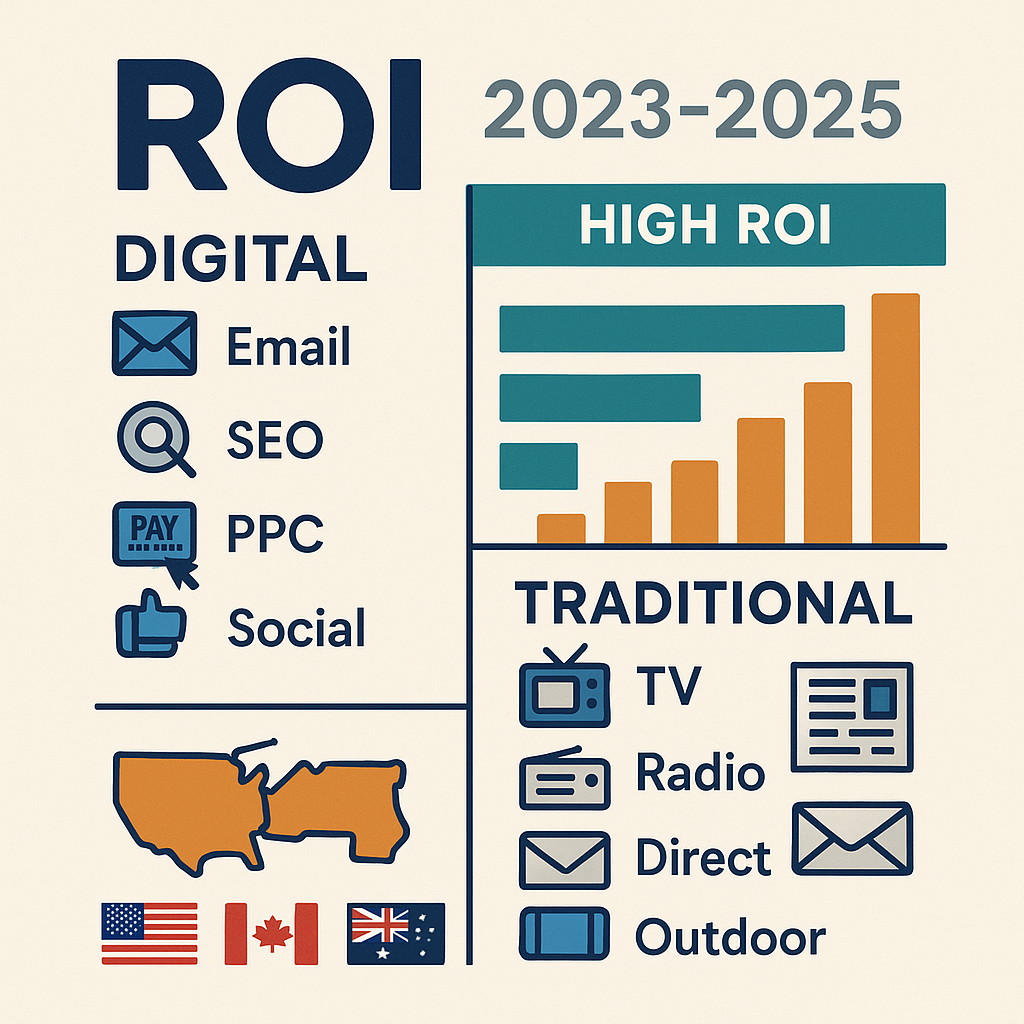
    Infographic comparing 2023–2025 ROI of digital marketing channels (email, SEO, PPC, social) versus traditional channels (TV, radio, direct mail, print, outdoor) across the US, Canada, UK, and Australia.

    June 13, 2025

    Jana Legaspi

    Introduction: Measuring the return on investment (ROI) across marketing platforms is critical as companies allocate budgets to channels that deliver the best bang for the buck. This report provides an in-depth comparison of ROI for major digital marketing channels (Google Ads, Facebook/Instagram, LinkedIn, email, influencer marketing, SEO, content marketing) versus traditional channels (TV, radio, print, direct mail, outdoor). We examine multiple performance metrics – cost per acquisition (CPA), conversion rates, customer lifetime value (CLTV), and dollar ROI (revenue per $1 spent) – using recent data (2023–2025) from the United States, Canada, United Kingdom, and Australia. Real-world examples and industry case studies (retail, healthcare, tech, finance, hospitality) are included to illustrate how ROI can vary by context. The goal is to help marketers understand which channels yield the highest returns and how to benchmark performance across metrics. ROI Metrics and Definitions Before diving into channel-specific ROI, it’s important to clarify the metrics used for comparison: Return on Investment (ROI) – Here we focus on return per dollar spent, i.e. how many dollars in revenue are generated for each $1 of marketing spend (sometimes expressed as a ratio or percentage). For example, an ROI of $5 per $1 means a 5:1 return (or 500%). We will cite ROI in this “revenue per $1” format for clarity. Cost Per Acquisition (CPA) – The average cost to acquire one customer (or lead) via the channel. A lower CPA indicates greater efficiency. CPA is influenced by conversion rates and media costs. Conversion Rate – The percentage of audience reached who take the desired action (e.g. purchase, signup). Higher conversion rates generally improve ROI by yielding more results per impression or click. Customer Lifetime Value (CLTV) – The total revenue a customer is expected to generate over their lifetime with the brand. CLTV isn’t a direct output of a channel, but certain channels tend to acquire higher-value customers (for instance, B2B channels often target customers with high CLTV). High CLTV can justify higher CPAs while still achieving strong ROI. In the sections below, we compare digital and traditional platforms across these metrics. A summary comparison table is also provided for quick reference. Digital Marketing Platforms: ROI and Performance Digital channels generally offer more immediate tracking of ROI and tend to be more cost-effective on a per-dollar basis (especially owned channels like email and SEO). However, ROI can vary widely by platform and industry. Below we detail each major digital channel: Google Ads (Search PPC) ROI: Google search advertising is a reliable but moderate ROI channel. On average, businesses earn around $2 in revenue for every $1 spent on Google Ads (a 2:1 ROI, or 200%).  Google’s own economic analyses sometimes claim higher (even up to 8:1 ROI in profit), but in practice 2:1 is typical once costs and margins are accounted for.  Well-optimized campaigns can achieve higher returns (some case studies report 5:1+ ROAS on search ads), but many advertisers initially hover around break-even until they refine targeting and bids. Cost & Conversion: The cost per click (CPC) on Google Search varies by keyword competitiveness – e.g. ~$1–$2 for many industries, but much higher in finance or legal where keywords like insurance or lawyers can cost $10–$50+ per click. Typical conversion rates on Google Search ads are ~3–5% on average,  but this differs by intent: branded search campaigns can convert around 18% (people searching your brand have high intent),  whereas generic keywords convert lower. For example, if an e-commerce retailer bids on “running shoes” at $1.50 per click with a 4% conversion rate and $100 average order value, they would spend ~$37.50 to acquire a sale, yielding about a 2.67:1 return on ad spend. High-intent searches and strong landing pages improve these metrics – paid search visitors are ~50% more likely to buy than random site visitors. Industry Variations: ROI from Google Ads tends to be strongest in transactional industries where search intent is directly tied to purchases. For instance, retail and hospitality see moderate CPCs (often <$1 in travel/tourism keywords) but somewhat lower conversion rates (~2–3% for travel), so CPA can be in the $30–$50 range for a booking. In financial services, CPCs are higher (insurance keywords often $10+), but those leads have very high CLTV (a customer might bring thousands in lifetime revenue), enabling positive ROI despite high CPA. Healthcare providers benefit from local search ads (e.g. someone searching “urgent care near me”), often converting at above-average rates due to urgent need; one healthcare marketing study noted SEO/PPC drive a 4x ROI in that sector by efficiently acquiring patients. Overall, Google Ads delivers fast, scalable lead generation – you can turn budgets up or down and see immediate effect – but it requires ongoing optimization to maintain a healthy ROI given the sometimes high CPC competition. Facebook & Instagram Advertising (Paid Social) ROI: Facebook and Instagram (both Meta platforms) offer huge reach, but their ROI per dollar is generally lower than search or email. Many businesses see roughly $2–$4 in revenue per $1 on Facebook Ads (200–400% return), though this varies widely. One survey found the average ROI for Facebook ads was ~200% (2:1) for general advertisers, but case studies in e-commerce often strive for higher (a “good” ROAS for an online store might be 4:1 or more to account for product margins). Notably, paid social ranked as the #2 ROI-driving channel for B2C brands in 2024 (after email) in a large marketing survey, underscoring its importance despite a lower pure ROI than some other channels. Cost & Conversion: Meta’s ad platform has relatively low CPCs – around $0.97 per click on Facebook on average (Instagram is similar, though sometimes slightly higher cost for some demographics). The conversion rate from click to desired action on Facebook is about 9.2% on average across industries.  However, this ranges from 2–3% in tech and retail (lower intent scrolling audience) up to 10–14% in niches like education, healthcare, or B2B where lead-gen forms are effective.  Average CPA (cost per action) on Facebook is about $18.68 across all industries, with easier conversions like newsletter signups costing only a few dollars, while a purchase in the tech sector might average a steep ~$55 CPA.  Instagram tends to have similar performance to Facebook since it uses the same Ads manager – advertisers often combine them – though Instagram can excel for visually appealing product ads (fashion, food) even if direct ROI is slightly lower than Facebook’s. Industry Variations: Retail & e-commerce: Facebook/Instagram are crucial for product discovery and retargeting; an apparel brand might see a 3–5:1 ROAS on dynamic product ads, but a conversion rate ~3–4% is common for cold traffic.  Hospitality (travel, hotels) also uses social for inspiration-stage marketing; their conversion rates (~2.8%) are on the low end, so social ads often serve to drive leads or site visits that are later converted via other channels. In healthcare and finance, strict privacy rules and targeting constraints apply, but these sectors can still leverage Facebook for lead generation (e.g. a local clinic promoting checkups). Notably, remarketing ads on Facebook (targeting people who visited your site) can significantly boost conversion rates beyond the averages – this tactic is used across industries to improve ROI. Overall, Facebook/Instagram shine for audience targeting and scale (over 2 billion daily users), but the ROI per dollar is moderate and usually improved by using the platforms for retargeting, lookalike targeting, and engaging ad creatives rather than expecting high immediate purchase intent. LinkedIn Advertising (B2B Social) ROI: LinkedIn is a more expensive ad channel but highly valued for B2B marketing. While not as commonly measured in straightforward ROAS due to longer sales cycles, 58% of marketers say LinkedIn provides the best return on ad spend for B2B campaigns.  Many B2B advertisers report solid outcomes – there are anecdotes of 5–10x ROI when LinkedIn ads successfully drive enterprise leads that convert to high-revenue deals.  The consensus is that LinkedIn’s ROI can surpass other social platforms for reaching decision-makers, despite higher upfront costs.  In fact, LinkedIn’s own benchmarking shows conversion rates can be up to 2× higher than other networks for B2B offers, as the audience is professionally oriented and often more receptive to relevant business offers. Cost & Conversion: CPCs on LinkedIn are high – typically $5–$8 per click in 2025 data for many audiences.  Average cost per lead (CPL) on LinkedIn was around $98 in 2023 for a B2B campaign targeting cold audiences. This is an order of magnitude higher than Facebook’s CPL, reflecting LinkedIn’s premium targeting of roles/industries. However, those leads are often much more qualified (e.g. a VP at a target company). Conversion rates on LinkedIn vary by objective: click-through rates on sponsored content are often low (0.5–1%), but lead form ads on LinkedIn can yield conversion rates in the 10–15% range because the platform can pre-fill the user’s info. LinkedIn claims conversion rates can be “2× higher” than other social platforms for comparable offers – for example, downloading a whitepaper or demo request might see 5–10% of clicks converting, versus half that on Facebook. The CPA effectively can be high (often $50–$200 per lead) given the costs, but if even a small fraction become customers, the ROI can work out favorably in high-value industries (e.g. one $50k software sale from 100 clicks can pay back the ad spend many times over). Industry Variations: LinkedIn is predominantly used in technology, enterprise software, financial services, consulting, and education marketing – any industry where reaching professionals or businesses is key. Tech startups and SaaS firms accept very high CPAs on LinkedIn because the CLTV of a customer (tens of thousands of dollars over years) justifies it. In contrast, a retail company wouldn’t use LinkedIn for consumer sales – the ROI would be terrible for a $50 product. For hospitality or healthcare, LinkedIn ads might be used for recruiting or B2B services (like recruiting doctors or marketing to corporate travel managers) rather than consumer patient acquisition. The platform’s strength is lead quality: in surveys, a majority of B2B marketers rank LinkedIn as more effective than other social channels for lead gen. To maximize ROI on LinkedIn, advertisers often use precise targeting (job title, industry, company size) and offer valuable content (webinars, case studies) to convert the clicks into leads. Despite a pricier CPA, the high conversion potential and lifetime value of those leads can yield a strong overall return. Email Marketing ROI: Email marketing is often cited as the highest ROI marketing channel. Across industries, email campaigns generate about $36–$42 in revenue for every $1 spent – an astounding 3600%–4200% ROI.  A 2024 study by Litmus found a median email ROI of 36:1 (i.e. $36 back per $1).The reason email is so ROI-efficient is that once you have built an opt-in list, sending emails is very low cost (few cents per recipient or less), and you are messaging people who already know or engaged with your brand. E-commerce brands often see ~$38 return per $1 on email, especially for promotional campaigns.  Notably, Australia reports similar figures – an email ROI of 3800% ($38 per $1) was highlighted as “money for jam” by one agency’s 2024 stats.  Email consistently ranks as a top ROI channel in the US, UK, Canada etc., and in HubSpot’s 2025 survey it was the #1 ROI-driving channel for B2C marketers.  Cost & Conversion: The costs for email are mainly in tools and labor: e.g. an email service provider subscription and time to design content. Thus, CPA via email can be extremely low – the ANA’s 2023 Response Rate Report found the lowest CPA of any medium was email to an existing house list (about $12.69 per acquisition). Essentially, beyond the sunk cost of creating the email, converting a portion of your list is very cheap. Conversion rates for email vary by industry and campaign type. Typical email open rates are ~20% on house lists. and click-through rates perhaps ~2–5%. The final conversion (e.g. purchase) might average around 2.5% for B2C emails (and ~2.4% for B2B emails) according to recent benchmarks. While 2–3% sounds low, remember that’s 2% of a large list for minimal cost – and those conversions often happen within hours of sending (email drives a quick surge of traffic and sales).  For example, a retailer’s Black Friday email blast might cost a few hundred dollars in platform fees but generate $500k in revenue (a 50:1 ROI). Industry Variations: Email is ubiquitous across all industries – from retail to finance to hospitality – for both customer acquisition and especially retention/upsell. Retail/e-commerce heavily use email for promotions, cart abandonment follow-ups, and loyalty campaigns – these drive repeat purchases (increasing CLTV) at virtually no marginal cost. Hospitality (hotels, airlines) use email for loyalty offers and win-back campaigns (e.g. “20% off your next trip” emails to past guests) which are very ROI-positive in filling capacity. Financial services (banks, insurers) leverage email to cross-sell new products to their customer base (far cheaper than acquiring a new customer). In B2B tech, email newsletters and lead-nurturing drips help convert prospects over long sales cycles – while harder to attribute, companies attribute substantial revenue to these email touches. One caveat: building a quality email list takes effort, and consumers are inundated with messages – average inbox open rates ~20% mean 80% ignore or delete.  Still, the “owned media” nature of email (no pay-per-click cost) makes it a perennial ROI champion. Companies that excel at personalization and list segmentation see the best results, as personalized emails can boost response rates significantly (adding a customer’s name, preferences, etc., can lift engagement – one study showed using names can increase response by up to 135%).  In summary, email marketing delivers exceptional ROI and is particularly effective for customer retention and repeat sales, leveraging the existing audience at very low cost. Search Engine Optimization (SEO) ROI: SEO – optimizing content to rank in organic search – is often considered a long-term “goldmine” for ROI. While not a paid ad channel, it requires investment in content creation and technical optimizations. On average, SEO yields about $22 in revenue for each $1 spent, roughly a 22:1 ROI (2200%).  This makes SEO the second-highest ROI digital strategy after email for many businesses. The catch is that SEO’s ROI typically materializes over time; it may take 6–12 months of investment before significant traffic and revenue flow in. But once high rankings are achieved, the ongoing clicks are “free” (no per-click charge as in PPC), so the incremental ROI becomes extremely high. First Page Sage research in 2025 showed that across industries, SEO delivers about a 22:1 average ROI in the long run.  In practical terms, a single well-ranking piece of content can generate thousands of visits and leads per month without additional spend – a compounding return. Cost & Conversion: The “cost” in SEO is content creation (blogs, videos, site copy), hiring SEO experts or agencies, and link-building efforts. These costs are upfront, and CPA is not immediately obvious because SEO traffic is not bought per click. However, one can calculate an effective CPA by considering SEO budget vs. conversions from organic traffic. Often, companies find organic leads have a very low effective CPA once the content is performing. For example, if a company spends $50k on SEO in a year and gains 5,000 website visitors from it, of which 100 convert to customers, the effective CPA is $500 – but in year two, that same content might bring another 5,000 visitors with little new spend, halving the CPA. Conversion rates of organic search traffic vary: generally slightly lower than paid search for commercial keywords (since organic also attracts information-seekers). One stat indicates paid search visitors are 50% more likely to buy than organic visitors, reflecting that organic results often include research articles, how-tos, etc. Still, if the right audiences are captured, organic traffic converts well – e.g. a FirstPageSage report noted content marketing ROI is highest when targeting prospects early and nurturing them. Many B2B marketers say SEO/blog content generates more leads than any other tactic (57% of B2B marketers), highlighting its efficacy in lead generation. Industry Variations: SEO is invaluable in industries with high search volumes for information – e.g. tech (users search for software solutions, and a company blog that ranks can capture those leads), healthcare (people search symptoms, treatments – hospitals with strong content can attract patients), finance (ranking for terms like “best credit card rewards” can bring valuable traffic). For e-commerce/retail, SEO for product keywords and category pages provides a steady stream of high-intent shoppers (ROI is great because those clicks would be costly on Google Ads). For example, an outdoor gear retailer ranking #1 for “best hiking backpack” will get thousands of free clicks that might convert 2-3% to sales – effectively a huge ROI compared to paying per click. Hospitality businesses (hotels, tourism) invest in SEO for local and travel terms (“hotels in London”) – while OTAs dominate some queries, direct SEO can save commission fees, yielding great ROI on direct bookings. A challenge is that SEO performance can differ by region; for instance, Google’s algorithm might favor local content, so companies often create region-specific content for the US, Canada, UK, etc. The key ROI factor for SEO is the longevity of content: unlike an ad that stops when budget stops, a top-ranking page can keep generating traffic for years. Businesses that patiently invest in quality content and link-building see enormous ROI over the long haul, far exceeding short-term channels. (One data point: companies that blog regularly report 13× higher ROI than those that don’t, because consistent content improves organic reach drastically.) Content Marketing (Blogs, Video, etc.) ROI: Content marketing overlaps with SEO but also includes non-search content (social content, videos, infographics). It’s a broad strategy, but the ROI can be measured in similar “organic” terms. Studies show content marketing costs ~62% less than traditional marketing yet generates ~3× as many leads, highlighting its efficiency. While direct ROI numbers for all content vary, businesses cite strong returns: for example, 73% of B2B marketers report that content marketing (blogs, whitepapers) is their best tactic for generating leads and sales.  The ROI of content comes from attracting and educating customers at a low cost. A specific case: Tiger Fitness (an online retailer) saw a 60% returning customer rate simply from investing in video content marketing on their site – content helped retain customers, boosting lifetime value (which amplifies ROI on all acquisition efforts). Also, content synergy with other channels improves ROI: adding informative videos to landing pages can boost conversion rates by up to 86%, meaning your existing ad traffic yields much better results and effectively multiplies ROI. Cost & Conversion: The costs for content marketing are in creation – writers, designers, video producers. Once content is produced, distribution through owned and earned channels is low-cost. Conversion rates from content engagement to actual purchase can be subtle to measure (often a multi-touch journey). However, good content warms up prospects so that later-stage conversions skyrocket. For instance, conversion rate optimization (CRO) tools combined with content personalization have a median ROI of 223% – showing that optimizing how content leads users down the funnel yields big payoffs. Additionally, content builds brand trust, which can increase CLTV (customers who engage with a brand’s educational content may stick around longer). A notable metric: 72% of marketers say content marketing increased engagement and is linked to higher ROI.  Also, 72% of highly successful companies rigorously track content marketing ROI, compared to only 22% of the least successful, indicating that focusing on content ROI correlates with better overall performance. Industry Variations: Tech and SaaS companies rely heavily on content (blog posts, webinars, whitepapers) to drive inbound leads – it’s not unusual for a SaaS firm to attribute, say, 50% of their marketing-sourced pipeline to content, with an ROI far greater than paid ads over time. Finance and healthcare also see huge ROI in content because trust and information are critical (e.g. a bank that provides useful budgeting tools/content can acquire customers at lower cost than via pure ads). Hospitality and travel leverage content (travel guides, destination videos) to inspire trips, which indirectly yields bookings. Retail/e-commerce use content like buying guides, lookbooks, and how-to videos (for example, a beauty retailer’s tutorial videos) that increase conversion rates and average order values – and those content pieces often rank in SEO or get shared on social, bringing in steady free traffic. While content marketing ROI can be harder to measure directly than an ad, its impact is seen across the customer journey: one study found that an omnichannel approach combining content with traditional campaigns in retail led to a 24% YoY increase in overall ROI. The bottom line: content marketing, when done consistently, yields a very high ROI through compound effects – attracting leads cheaply, improving conversion and retention, and enhancing brand equity. Influencer Marketing ROI: Influencer marketing leverages individuals with an audience (on Instagram, YouTube, TikTok, etc.) to promote products. It has emerged as a high-ROI digital channel in recent years. On average, businesses are seeing roughly $5.20 to $6.50 in revenue per $1 spent on influencer campaigns (a 520%–650% ROI).  This places influencer marketing’s ROI above many standard paid ad channels. In fact, 89% of marketers claim the ROI from influencer marketing is as good as or better than other channels.  Top-performing campaigns can greatly exceed the average – 3% of brands have seen $20+ per $1 spent in influencer ROI.  For example, a Dentsu case study in the Nordics found TikTok influencer ads delivered nearly 12× ROI in just 6 weeks for a brand launch. These high returns come from the strong trust and engagement that influencers have with their followers, which can translate into quick sales when a product recommendation is authentic. Cost & Conversion: The costs in influencer marketing include fees or commissions paid to influencers (or free product given) and sometimes agency management fees. Many influencers operate on a pay-per-post or pay-per-campaign model, though some programs use affiliate links (pay per sale, which inherently guarantees positive ROI). Because an influencer’s audience is tuned-in, conversion rates can be high when the fit is right. It’s not unusual to see conversion rates of 5–10% or higher from an influencer’s referral, far above typical ad conversion rates. However, measuring exact conversion is tricky without trackable links – often brands see the ROI in overall sales lift or using promo codes. Customer acquisition cost through influencers can be quite low if you factor that one post might reach tens or hundreds of thousands of people; for instance, a $5k Instagram post that yields 500 orders equates to a $10 CPA, which is very efficient for many industries. Additionally, influencer campaigns can have ancillary benefits – brands often see a bump in social followers and engagement which has its own long-term marketing value. Industry Variations: Influencer marketing is especially potent in retail, beauty, fashion, food & beverage, and travel – visually driven consumer categories where personal recommendations carry weight. For example, in beauty, an influencer’s tutorial can drive massive sales of a cosmetic product overnight (ROI can be huge – e.g. some cosmetics brands have reported >10:1 ROI from YouTuber collaborations). Hospitality and travel brands work with travel vloggers/Instagrammers to showcase destinations; while the sales cycle is longer, the content can significantly lift bookings or brand awareness. Tech gadgets and apps also use influencers (especially on YouTube/TikTok) to drive downloads or sales quickly through demo videos. One survey in Australia found 46% of consumers have purchased a product after seeing an influencer promote it, showing the direct impact on buying behaviorizea.com. It’s worth noting that micro-influencers (smaller niche audiences) often deliver the best ROI, as their engagement rates are higher and fees lower – a multitude of micro-influencers each driving modest sales can collectively beat one celebrity endorsement in ROI terms. To maintain ROI, brands must choose influencers whose audience aligns perfectly with the target market and ensure disclosures/authenticity so that the promotions come off as genuine recommendations. When done right, influencer marketing can combine the persuasive power of word-of-mouth with social media’s scale, yielding an ROI comparable to top digital channels for many consumer-facing brands. Traditional Marketing Platforms: ROI and Performance Traditional advertising channels – TV, radio, print, direct mail, and outdoor – are often used for broad reach and brand building. Their ROI is typically measured in terms of sales lift or long-term impact and can be harder to attribute than digital. However, recent research and benchmarks allow us to compare their effectiveness. Interestingly, some traditional media still boast competitive ROI, especially when used in synergy with digital efforts. Below we examine each major traditional channel: Television Advertising (Broadcast & Streaming TV) ROI: TV remains a powerful but costly medium. On average, TV ads deliver about $4.90 in revenue for every $1 spent. In other words, a 4.9:1 ROI is a general benchmark, though this varies by market and how ROI is measured (short-term vs long-term). An extensive UK study (“Profit Ability 2”) that included long-term effects found that TV had one of the strongest sustained ROIs, with profit ROI averaging £4.11 per £1 when accounting for prolonged effects beyond the immediate campaign. Nielsen’s analyses in the U.S. have similarly shown TV drives significant sales; one global meta-study of advertising found TV was often the #1 ROI contributor in the long term, as its broad reach not only converts some viewers immediately but also primes future sales. These numbers suggest that while TV ads are expensive, they can return roughly 4–5× the investment in sales, especially when considering the halo effect on brand awareness and customer lifetime value. Cost & Conversion: Costs for TV are high upfront – buying a national prime-time TV spot can cost hundreds of thousands of dollars. The concept of CPA in TV is usually inferred: for example, if a $500k TV campaign yields 50,000 incremental orders, the CPA is $10. But attributing those orders to TV alone is tricky without specific tracking (though techniques like unique promo codes or spikes during air times help). Conversion rates for TV are not like digital (there’s no immediate click-to-conversion); instead, TV is measured by response rate or lift. A response might be a website visit, a store visit, or phone inquiry after seeing a commercial. In terms of immediate response, TV is often lower efficiency than digital – e.g. a fraction of a percent of viewers might act right away. However, TV excels at reach (e.g. reaching millions in one flight) and at brand recall – studies show TV ads have strong memorability, which drives later conversions. One source notes that TV advertising’s impact occurs 58% in the long term (weeks 14 to 2 years after exposure) – meaning a lot of ROI comes from consumers remembering the brand when they’re ready to buy later on. This complicates direct CPA calculations but indicates that TV builds demand that pays off over time. For campaigns with immediate call-to-action (like a direct-response infomercial or a limited-time offer), short-term ROI can be measured; audio-visual messaging can convince a subset of viewers to act now. For instance, if a local car dealer spends $50k on TV ads and sells 100 cars that month attributable to the ads, the ROI can be estimated (say $2k profit per car = $200k return, 4:1 ROI). But more often, TV’s value is in mass awareness that lifts all channels’ performance (people are more likely to click your search ad or visit your site later because they saw your TV spot). Industry Variations: TV is a staple in consumer packaged goods (CPG), automotive, telecom, entertainment, and finance marketing – industries that need to reach broad audiences and build trust. Retail brands often use TV around holidays for brand campaigns (which later translate to store or online sales). Hospitality (like tourism boards or major hotel chains) use TV to inspire travel on a large scale (e.g. “Visit Australia” tourism ads airing in the US). ROI in these cases includes long-term tourist revenue that may come much later. Financial services (banks, insurance) advertise on TV to build credibility and top-of-mind awareness – e.g. GEICO’s famous ad campaigns; while one can’t measure each TV viewer’s conversion, GEICO’s massive sales growth correlates with continuous TV presence, indicating a positive ROI when modeled. Notably, integrating TV with digital can improve ROI: for example, running coordinated social media content or search ads alongside a TV campaign helps capture interested viewers. Many studies show multichannel exposure boosts overall ROI – one report noted that campaigns using TV plus other channels can see significantly higher profit returns than single-channel efforts. In summary, TV advertising can yield around $4–$5 per $1 in sales on average, making it one of the strongest traditional media for ROI, especially when you value long-term brand equity and have the budget to invest at scale. Radio Advertising (AM/FM and Audio Streaming) ROI: Radio (including traditional AM/FM and digital audio) often surprises advertisers with its ROI. Nielsen studies have shown radio can deliver roughly $6 in sales for every $1 spent on average. In fact, an analysis of various campaigns found radio’s ROI was double that of many digital channels – one Nielsen study (covering retail categories) reported an average 6× ROI for radio, which was higher than the best results of some recent digital campaigns. Some industry analyses claim even higher returns: Westwood One (a radio network) cited that according to newer data, AM/FM radio ranks among the highest ROI media with an average of $10.6 return per $1 in certain studies. These figures underline that radio, as an advertising medium, punches above its weight in converting ad spend to incremental sales. The high ROI is partly because radio ads are relatively cheaper to produce and place than TV, yet still reach a mass audience (93% of Americans listen to radio weekly). Cost & Conversion: Radio ad costs depend on market and time slot – a local radio spot might cost a few hundred dollars per airing, while national radio campaigns cost more. Radio often excels as a frequency medium (listeners hear ads repeatedly during their commutes, etc.). The immediate response rates to radio can be modest but steady. For instance, if 1% of listeners act on a radio ad for a sale, that can drive a substantial ROI given the large audience. A Nielsen example noted conversion rates of ~16% for radio – this likely refers to measured sales lift among exposed audiences. That is quite significant: if 16% of those who hear a campaign make a purchase, it indicates strong persuasive power (this might apply to specific categories like fast food or retail promotions where the offer is compelling). CPA for radio can be quite low in high-response categories: e.g. a direct-to-consumer brand might find that spending $50,000 on radio ads yields 5,000 orders (CPA $10). Radio’s advantage is that it’s often local and personal – listeners develop trust in their stations and hosts, so ads (especially host-read endorsements) can drive robust ROI by making ads feel like recommendations. Additionally, radio can target by format (e.g. sports radio for male 25-54 audience, etc.), which helps efficiency. Industry Variations: Retail and restaurants often get great ROI from radio – e.g. local car dealerships, furniture stores, or quick-service restaurants advertise on radio and see direct foot traffic or coupon redemptions. An example from the radio industry: a campaign for a department store or a fast-food chain might report $6-$12 in sales per $1 spent, as radio reaches people in-car right before shopping or dining decisions. Healthcare providers (like local clinics or insurance companies) also use radio for awareness – not as instantly trackable, but to remain top-of-mind (ROI in terms of new patient inquiries can be good, especially for urgent services). Finance (think local credit unions, etc.) use radio to reach community audiences relatively cheaply compared to TV. One interesting note: audio advertising’s effect is split between short-term and long-term similarly to TV – about half the profit impact of radio occurs within the first 13 weeks and half in the following months/year. This means radio does both immediate activation (hear ad -> visit store) and brand building. The synergy of radio with other media is worth noting too: audio can reinforce messages from TV or digital. Overall, radio’s combination of low cost, wide reach, and engaged audience (people often listen during work or driving with few other distractions) makes it a surprisingly efficient ROI medium, often second only to TV in traditional channels for short-term sales response. Print Advertising (Newspaper/Magazine) ROI: Print media (newspapers, magazines) has diminished in usage but can still deliver solid ROI, especially in certain demographics. The average ROI for print advertising is around 130%. This suggests that for every $1 spent on print ads, an average of $2.30 in revenue is generated – a 2.3:1 return. This ROI is lower than some digital channels but indicates print is far from ineffective. In fact, print’s credibility and tangibility give it an edge in trust: for example, 8 out of 10 people say they trust print ads most when making purchasing decisions. That trust can translate to conversions over a longer consideration period. Specific print formats can perform even better: magazine ads have been reported to provide an average return of $3.94 per $1 spent – nearly a 4:1 ROI. Magazines often target niche audiences with high engagement (e.g. a luxury goods ad in a fashion magazine can yield strong sales among its readers). Additionally, newspapers can amplify other media – one study found adding newspaper ads increased the effectiveness of TV campaigns by 64% (likely by reinforcing the message in another context). Cost & Conversion: Costs for print vary by circulation and placement – a national magazine full-page ad might cost tens of thousands, whereas a local newspaper quarter-page could be a few hundred dollars. Calculating CPA directly from print is challenging unless you use unique coupons or URLs. Direct response print ads (like “use code in catalog to order”) can be tracked – historically, catalogs and mail-order businesses measure ROI that way. The response rates for print are actually quite high in direct mail formats (addressed separately in the next section) but lower in mass print. General figures: print ads average a response rate ~9% (this stat may refer to direct mail specifically). For comparison, digital display ads get ~1% or less response. This indicates people are more likely to take action from a physical print ad than a typical banner ad. Brand recall is also higher: print has a 70-80% higher recall rate than digital ads, meaning consumers remember print ads more, which can lead to later conversions. In terms of conversion, print often works as a upper-funnel channel – someone sees a magazine ad and later goes online to purchase. Thus, the ROI might be realized indirectly. However, certain print ads with clear calls-to-action (like “Visit our store for a sale” or “Call now for a quote”) can see immediate returns. For example, a local furniture store might spend $5,000 on a newspaper insert and track $15,000 in sales from customers who bring in the ad – a 3:1 ROI. Industry Variations: Local services and retail still use newspapers effectively (think local real estate listings, car dealership ads, grocery store circulars) – these can drive footfall with measurable ROI (coupons redeemed, etc.). High-end brands (luxury fashion, watches, cars) use magazines to reach affluent consumers in a lean-back, glossy environment; while ROI in pure sales might be modest, the influence on brand prestige and subsequent purchases is valued. Print is also valued in sectors like education (private schools advertising in community papers) and healthcare (hospital ads in local magazines to build community trust). One interesting segment is directories or niche publications – for instance, B2B trade magazines where ads can directly generate leads (ROI can be high if one ad brings in a few big contracts). Regionally, older demographics in the US, Canada, UK, Australia are more responsive to print. Data shows 70% of households with income $100k+ read print newspapers, and many consumers find print ads more credible. Thus, while print’s average ROI (~130%) is lower than many digital channels, it remains a worthwhile part of the mix for targeting certain audiences. It also complements digital well – a consumer might see a print ad and later search for the product online (cross-channel attribution would credit both). The key to print ROI is targeting and integration: using print where it hits the right demo and having a clear mechanism to convert interest into action (coupons, QR codes, unique URLs, etc., which are increasingly used to bridge offline-to-online tracking). Direct Mail (Postal Mail Marketing) ROI: Direct mail is a traditional channel that has surprisingly strong ROI, especially for house lists (mailing to your existing customers or qualified prospects). According to the ANA’s 2023 Response Rate Report, direct mail to house lists yielded the highest ROI of all channels – about 161% on average. That implies roughly $2.61 in revenue per $1 spent. Other sources put direct mail’s ROI in a similar range: one report notes direct mail campaigns average 112% ROI, the highest of any medium analyzed, outperforming digital like paid search (88%) or social ads (81%). This high ROI is driven by the fact that physical mail, when sent to interested recipients, has a tangible impact – it gets a much higher open rate and response rate than email. For example, direct mail boasts an 80–90% open rate, whereas email averages 20–30%. That translates to more people seeing and acting on the message. It’s telling that marketers continue to achieve strong returns with mail; indeed, in the US and UK, many companies use mail for loyalty offers, reactivation, or high-value prospects where a personal touch pays off. Cost & Conversion: Direct mail is more expensive per contact than email or digital – you have printing and postage costs, often around $0.30–$0.60 per piece for bulk mail depending on format. So a campaign sending 10,000 postcards might cost $3,000–$5,000. However, the response rates to direct mail are the highest in direct marketing: about 5–9% on average (5% for prospect lists, up to 9% for house lists). By contrast, email or digital ad response rates are often <1%. This means if you send 1,000 mailers to customers, perhaps 50–90 will respond or convert – a huge lift relative to digital. The ANA report found the highest conversion rate of any campaign type was 18% for branded search, but direct mail was not far behind that in some cases.  CPA for direct mail can actually be quite competitive: if it costs ~$0.50 per mail and you get a 5% conversion, the cost per acquisition is $10 (50 mails to get 1 sale) – which rivals many digital channels. Indeed, marketers have noted that integrating direct mail with digital can amplify results: one study showed combining digital + direct mail boosted response by 63% and lead generation by 53% compared to digital alone. Direct mail also tends to attract high-quality leads – consumers often perceive mail offers as more legitimate. Direct mail pieces like postcards have the best ROI among mail types (one source notes postcards used on house lists have ~92% ROI) because they are inexpensive and instantly visible (no envelope to open). Letters can convey more detail (useful for financial or nonprofit appeals) but cost more. Industry Variations: Direct mail is heavily used in financial services (credit card offers, insurance), nonprofits/fundraising, retail catalogues/coupons, and services (like home services, cable/internet offers). For example, credit card companies mail millions of pre-approved offers; the response rate might be 1%, but given the lifetime value of a credit card customer, the ROI is substantial. Nonprofits often see a significant portion of donations via mail campaigns, with older demographics responding generously – the ROI in terms of dollars raised vs. mailing cost can be very high when the mailing list is well-targeted. Healthcare providers use mail to reach local patients (for example, a hospital might mail a wellness magazine or screening offer to residents – these have a high engagement and lead to appointment bookings). Hospitality/travel sometimes use direct mail for high-end segments (e.g. a luxury resort sending a brochure to past guests, which can reactivate a loyal customer). Retail: brick-and-mortar retailers still send postcards about store openings or sales to ZIP codes around their location; these often drive in-store traffic with a coupon in hand – an easily traceable ROI. In the UK and Canada, direct mail is also effective; Royal Mail research in the UK shows that mail is the third largest media channel by spend and has unique impact (people spend 25 minutes with mail they receive on average). Importantly, direct mail’s tactile nature means brand recall and persuasion can be stronger – Canadian neuromarketing research found direct mail is easier to understand and requires 21% less cognitive effort to process than digital media, leading to better memory of the message.  All this explains how direct mail, though “old school,” achieves ROI comparable or even superior to many digital channels when used smartly (especially for customer retention and high-value acquisitions). Outdoor Advertising (Out-of-Home) ROI: Outdoor advertising (billboards, transit ads, digital signage) is often used as a mass awareness tool. It’s historically been harder to pin an ROI on, but marketing mix models indicate it contributes positively to the advertising ROI mix. While exact figures vary, one major analysis by the Outdoor Advertising Association of America found that OOH can deliver approximately $5.97 in product sales for every $1 spent (this was a finding in a specific study context) – though this number can range a lot by industry. Generally, OOH’s ROI in isolation is not usually as high as targeted channels; however, its incremental lift in a multi-channel campaign can be significant. For example, one analysis recommended that increasing OOH from a token ~1% of budget to around 5–20% could substantially improve brand metrics and overall ROI.  This suggests that while the direct ROI of a standalone billboard might be modest, OOH amplifies other media and helps capture additional consumers, thus improving the total ROI picture. Cost & Conversion: Costs for outdoor vary by location and format. A high-traffic highway billboard can cost thousands per month, whereas a bus stop poster in a smaller city might be a few hundred. There is no direct conversion or CPA because OOH is typically a broad reach medium with no immediate call-to-action (aside from perhaps prompting a web search or store visit). However, new digital out-of-home can use QR codes or short URLs to track some response. Effectiveness is often measured in impressions (how many people see it) and brand lift. If 100,000 people see a billboard daily and a fraction of those recall the message and eventually purchase, the attribution is murky but real. In terms of ROI metrics, companies often look at footfall or regional sales lift when outdoor is in-market. For instance, a retail chain might see a sales uptick in cities where they ran bus shelter ads, implying a positive ROI. Mobile data tracking nowadays can help – e.g. showing that a certain percentage of people who were exposed (passed by the billboard) later visited the store or website. These analyses often find that OOH has a comparatively low CPM (cost per thousand impressions) and when used to reinforce a campaign message, it yields a solid ROI by pushing marginal consumers down the funnel. For example, a movie studio might spend $1M on outdoor ads for a film and attribute maybe $5–$10M in ticket sales to those exposures, which is in line with industry ROI benchmarks for media mix. Industry Variations: OOH is common for consumer branding – think Coca-Cola, McDonald’s, tech gadgets, movies, etc. Hospitality and tourism boards use it (those “Visit XYZ” billboards), though the ROI is long-term in increased tourism revenue. Local service businesses (lawyers, realtors) use billboards for awareness – the ROI there might be simply needing one big client to justify the spend. Real estate developers often use outdoor signs to sell property – a certain number of leads can directly result, making it easier to gauge ROI (e.g. if a $10k billboard lease helps sell two condos, that’s a clear return). In finance, you’ll see banks doing outdoor ads to stay top-of-mind (brand ROI more than immediate). Tech companies even invest in OOH (witness the many tech startup ads in subway stations); they do this for brand credibility and reach – one could argue this indirectly lowers their digital acquisition costs by building brand search and trust (a type of ROI that shows up as improved performance in other channels). One study on OOH and online activation found that outdoor ads can drive online searches and social media mentions, thereby boosting the ROI of digital efforts. For instance, consumers often search a brand after seeing a billboard – these are free organic searches that might convert at a high rate, effectively adding to ROI. In sum, while outdoor advertising’s exact ROI per dollar is harder to pin down (and probably lower than finely targeted channels), it plays a supporting role that increases overall marketing ROI. Companies typically evaluate OOH as part of the mix: if total marketing ROI improves with a bit of outdoor included, it’s deemed successful. As of 2025, with more digital screens and better data, OOH is becoming more measurable and programmatic, likely improving its ROI accountability in English-speaking markets and beyond. Comparative ROI: Digital vs. Traditional (Summary Tables) To summarize the above findings, below are tables comparing key ROI metrics for various platforms. These figures are generalized; actual performance will vary by industry and campaign specifics. They provide a high-level snapshot of how the channels stack up in recent benchmarks (2023–2025): Table 1: Average ROI (Revenue per $1 Spent) by Channel – Digital channels generally lead in raw ROI multiples, with email and SEO far ahead. Traditional channels like direct mail, TV, and radio also show solid returns when executed well. Marketing Channel Average ROI (Revenue per $1) Notes (Region/Source) Email Marketing $36–$42 per $1 (3600%+ ROI) Highest ROI of any channel (Litmus 2024, global) SEO (Organic Search) ~$22 per $1 (2200% ROI) Long-term ROI; ~22:1 average (FirstPageSage 2025) Content Marketing High (varies) – e.g. 13x higher ROI for companies that blog Indirect benefits (leads, CLTV); 3x more leads vs. traditional Affiliate Marketing ~$15 per $1 (1500% ROI) Performance-based; only pay on conversion Influencer Marketing ~$5.20–$6.50 per $1 (520–650%) Above most paid ads; top cases $12–$20 per $1 Facebook/Instagram Ads ~$2–$4 per $1 (200–400%) Moderately lower ROI; broad B2C reach (NA/EU) Google Search Ads (PPC) ~$2 per $1 (200% ROI) Reliable, quick results; Google claims up to 8:1 in ideal cases LinkedIn Ads Harder to avg.; many report 5–10x ROI in B2B High CPL (~$100) offset by high-value leads (US/UK) TV Advertising ~$4–$5 per $1 (400–500%) Strong long-term ROI(Nielsen, global); broad reach in US/UK Radio Advertising ~$6 per $1 (600%) High ROI in studies(Nielsen, US); captive local audiences Print Advertising ~$2.3 per $1 (230%) Avg. 130% ROI; magazine ads ~$3.9:$1 Direct Mail ~$2.5 per $1 (250%+) 161% ROI to house lists(ANA 2023, US); very high response rates Outdoor (OOH) Ads ~$2–$6 per $1 (est.) Highly variable; often supports multi-channel ROI (US/Canada data) Sources: Industry reports and studies from 2023–2025, including HubSpot, ANA, Nielsen, Statista, etc. (as cited in text). Digital ROI is typically measured in revenue per dollar; traditional ROI often from econometric modeling or case studies. Table 2: Typical Conversion Rates & CPA by Channel – How efficiently each channel converts and at what cost per acquisition (figures are broad averages; actual results depend on industry and campaign specifics). Channel Avg. Conversion Rate Approx. Cost Per Acquisition (CPA) Notes/Context Google Search Ads ~4% (general); up to 18% branded Varies by keyword; e.g. $30–$50 per sale common in retail High intent traffic yields low CPA if optimized. Facebook Ads ~9.2% average (ranges 2–14%) ~$18.68 average CPA(across industries) CPA low for simple leads, higher for purchases (tech CPA $50+). Instagram Ads Similar to Facebook (slightly lower CVR for some e-commerce) Similar to Facebook – often managed together Strong for visual products; uses FB benchmarks. LinkedIn Ads 2–5% click-to-lead (lead forms ~10%) High: often $50–$200 per lead Expensive clicks, but leads are high-value B2B. Email (to house list) ~2.5% purchase conversion (B2C) Extremely low marginal CPA (e.g. ~$13 per acquisition) Cost mainly in content creation; huge ROI on blasts. Influencer Marketing Varies widely (5–10% conversion common when aligned) CPA can be low (many sales from one fee); e.g. micro-influencers <$10 CPA Trust factor drives above-average conversion. SEO (Organic) ~2%–3% conversion of organic visits (varies by intent) Low effective CPA (traffic is “free” after investment) Initial content costs, then very low per-click cost. Content Marketing N/A (aiding other channels) Low cost per lead when content pulls inbound traffic (e.g. whitepaper download <$5) Improves conversion of all stages (difficult direct CPA). TV Advertising ~0.5–2% immediate response (estimated) CPA depends on scale: e.g. ~$5–$20 per conversion in measured campaigns Strong lift in retail/CPG sales; many sales come later (not immediately). Radio Advertising ~1–2% immediate response (varies by offer) CPA can be single-digits (e.g. $6–$15 per sale) in local campaigns Often used for promo codes; good at driving store traffic. Print (Newspaper/Mag) ~1–5% response (higher if coupon or specific call-to-action) CPA moderate: e.g. $20–$50 per conversion for a print coupon campaign High trust medium; works for older demographics. Direct Mail 5% (prospects) – 9% (house) response Can be <$10 CPA to house list (very efficient) High engagement; best for existing customers or targeted prospects. Outdoor (OOH) N/A (no direct action usually) CPA not direct – used to influence other channels’ conversion Increases search and site traffic; hard attribution, usually a portion of overall CPA. Note: Conversion rate = desired actions divided by audience reached (for ads, typically post-click conversion). CPA = cost per acquisition (per sale or lead), which is influenced by media cost and conversion rate. These figures are illustrative; actual results can differ across sectors (e.g. retail vs. finance). Figure: Average ROI of marketing campaign by medium (percentage net profit return). Direct mail leads with ~112% ROI, followed by SMS, email, paid search, etc., as per ANA’s 2021–2022 data. Traditional channels like print and mail remain very competitive with digital in ROI. Key Takeaways and Best Practices Digital Dominance with Email & SEO: Email marketing delivers the highest ROI (often $40:$1), thanks to minimal costs and targeting an interested audience. SEO/content offers the next-best long-term returns (~$22:$1), by capturing “free” organic traffic. Businesses should invest in these owned media channels for compounding returns – e.g. regularly emailing customers and publishing SEO-optimized content can dramatically lower overall customer acquisition costs. Paid Ads – Efficient but Manageable ROI: Paid digital ads like Google Search PPC and Facebook/Instagram ads tend to produce $2–$4 for each $1 spent in revenue on average. They are highly scalable and great for quick results, but their ROI is modest relative to email/SEO, so they require careful optimization (A/B testing, bid management, targeting) to maximize profit. Use these channels for reach and immediate conversions, but improve their ROI by integrating with high-ROI channels (e.g. capture PPC leads and nurture via email to increase CLTV). Specialty Digital – High ROI in the Right Context: Influencer marketing (average 5-6:1 ROI) and affiliate marketing (15:1 ROI) can outperform standard ads if aligned well. Influencers provide authentic promotion – best used in B2C industries where social proof drives sales (beauty, apparel, etc.). Affiliates essentially guarantee ROI by paying only on conversion, making it low-risk/high-return if commission rates are set wisely. LinkedIn Ads are expensive but potent for B2B – focus on big-ticket conversions where a high CPA is acceptable for a large eventual payoff. In summary, tailor use of these channels to scenarios where their strengths match your product and audience. Traditional Media Still Matters: Don’t write off traditional channels – they often hold their own in ROI. Direct mail in particular has excellent ROI (~2.5:1 on average, and often higher for house lists), due to high response rates and personal touch. It’s extremely effective in English-speaking markets for customer re-engagement (e.g. a mailed coupon to existing customers) and should be part of an omnichannel strategy. Radio and TV deliver broad reach and strong returns when looked at holistically (each around 4–6:1 ROI), and they excel at boosting brand awareness which lifts the performance of all other channels (the halo effect). Print and outdoor have more modest direct ROI, but can be the trust and awareness anchors of a campaign – use them to target demographics less active online or to reinforce messaging (print for credibility, billboards for mass reminder) and measure their impact via lift in other channels. Industry and Regional Differences: The optimal mix and ROI of channels can differ by industry: retail and hospitality benefit hugely from email, paid search, and social ads (for targeting deals to consumers), but also see omnichannel gains (integrating online offers with in-store promotions yields ~24% higher ROI). Healthcare and finance might rely more on SEO/content and direct mail for education and trust-building – e.g. healthcare providers see ~4x ROI via SEO/content strategies. Tech and B2B should double down on content marketing and LinkedIn, which produce the best leads, and use email nurturing – 73% of B2B marketers find content the top ROI driver. Regionally, the US, Canada, UK, and Australia all exhibit similar trends (high email and digital ROI), but local media consumption matters: e.g. print and mail tend to have slightly higher impact in regions or demographics where digital saturation is lower (rural areas, older populations). Always consider your target audience’s media habits – for instance, Australians have high social media usage, so influencer campaigns there can be very fruitful, while in Canada direct mail is unusually effective due to consumer receptiveness (Canadian households often respond favorably to mail offers). Metrics to Track for ROI Improvement: To ensure you’re getting strong ROI, track CPA and conversion rates closely per channel. For example, if Facebook’s CPA starts rising above your profit margin, refocus spend to higher-ROI channels or refine your targeting. Monitor customer lifetime value by channel – e.g., customers from SEO might have higher LTV than those from coupon sites; this can justify spending more on SEO efforts. Additionally, measure the incremental ROI of combining channels: integrated campaigns (e.g. follow up a direct mail piece with an email series and a Facebook retargeting ad) often yield better results than siloed efforts, as evidenced by the 63% higher response when coordinating mail with digital. Marketing mix modeling or multi-touch attribution tools can help assign credit across channels so you understand the true ROI drivers in a multi-channel world. Conclusion: In 2025, marketers have a plethora of channels – the key is to allocate budgets to the mix that maximizes ROI across both short-term acquisitions and long-term value. Digital platforms like email, SEO, and content marketing are ROI powerhouses that should be foundational in English-speaking markets. Paid digital ads (search and social) deliver scalable results and decent ROI, especially when optimized and used in tandem with high-ROI owned channels. Meanwhile, traditional media still plays a valuable role: channels like TV, radio, print, and direct mail can complement digital, reaching audiences and building brand equity in ways digital alone might not, often with ROI that justifies their cost when properly targeted. The best strategies in the US, UK, Canada, and Australia are leveraging an omnichannel approach – for example, using TV/radio to build broad awareness, digital ads to capture intent, content and SEO to educate, and email/direct mail to retain and upsell – thereby capturing customers at multiple touchpoints and maximizing the overall marketing ROI. By continuously measuring metrics like CPA, conversion, and CLTV by channel, and referencing industry benchmarks, marketers can refine their tactics to ensure each marketing dollar is yielding the highest possible return

    Introduction: Measuring the return on investment (ROI) across marketing platforms is critical as companies allocate budgets to channels that deliver the best bang for the buck. This report provides an in-depth comparison of ROI for major digital marketing channels (Google Ads, Facebook/Instagram, LinkedIn, email, influencer marketing, SEO, content marketing) versus traditional channels (TV, radio, print, … Continue reading Marketing ROI Analysis: Digital vs. Traditional Channels (2023–2025)

    Digital illustration of LinkedIn Paid Ads concepts: a central monitor displaying the LinkedIn logo and an ad unit, surrounded by icons (charts, a target, a gear, and a neural‐network motif), all in blue and white.

    June 10, 2025

    Jana Legaspi

    LinkedIn has grown into a powerhouse for B2B marketing, boasting over 1 billion members worldwide.  Crucially, 4 out of 5 LinkedIn members drive business decisions, and the platform’s audience has 2× the buying power of typical web audiences. LinkedIn’s users are also highly engaged with professional content – for example, about 40% of users engage with business pages each week.  These facts make LinkedIn an invaluable channel for marketers seeking to boost brand awareness, generate quality leads, and drive conversions. This guide provides an exhaustive look at LinkedIn’s paid advertising solutions in 2024–2025, including ad format breakdowns, step-by-step campaign setup, strategic planning (funnel approaches, budgeting, segmentation), analytics and optimization tips, real-world case studies, the latest benchmarks, and the growing role of AI in LinkedIn advertising. Let’s dive in. LinkedIn Ad Formats and Use Cases LinkedIn offers several ad types, each suited for different goals and placements. Choosing the right format is an important first step in campaign planning.  Below is a detailed breakdown of the major LinkedIn ad formats – Sponsored Content, Sponsored Messaging, Dynamic Ads, and Text Ads – along with their subtypes and ideal use cases. Sponsored Content (Native Feed Ads) Sponsored Content (also known as native ads) appears directly in users’ LinkedIn feeds on desktop and mobile, labeled as “Promoted” content.  These in-feed ads blend in with organic posts and are excellent for broad reach and engagement among a professional audience. Sponsored Content supports several formats: Single Image Ads: A single photo with an accompanying headline and text, shown in the feed. This straightforward format is great for top-of-funnel awareness campaigns, driving traffic or engagement with a strong visual. A compelling image and concise text can increase brand awareness and entice users to click your call-to-action.  Use Case: promoting a blog post, whitepaper, or product update to a wide audience. (Tip: Use a 1200×627 image – larger visuals can boost CTR by up to 38%.  Keep intro text <150 characters and headlines <70 characters to avoid truncation.) Video Ads: A video clip that auto-plays in the feed, with a short intro text. Video is ideal for storytelling and building brand affinity. Marketers use video ads at all stages of the buyer’s journey – for example, to showcase thought leadership or demonstrate a product.  Use Case: a 30-second brand story or customer testimonial video for mid-funnel engagement. Video ads can significantly lift brand favorability and purchase consideration when done well. Ensure the video grabs attention quickly (the first few seconds matter) and include captions for viewers watching on mute. Carousel Ads: A swipeable series of 2–10 cards, each with an image (or video) and caption. Carousel ads encourage interactive engagement by letting users scroll through multiple slides. This format is perfect for showcasing multiple products or telling a sequential story.  Use Case: a SaaS company highlighting 5 key features (one per card), or a content piece broken into a step-by-step carousel. By increasing user interaction, carousels often drive higher engagement rates than single images.  Keep each card’s headline brief (≤45 characters) and imagery consistent in style. Document Ads: A format that lets you promote a multi-page document (PDF, PPT, etc.) directly in the feed for users to read or download. This is effective for lead generation via content marketing, since users can preview a few pages and are prompted to fill a Lead Gen Form to download the full document.  Use Case: offering an industry research report or ebook. It’s a way to collect leads by providing valuable content without requiring users to leave LinkedIn. (Documents can be up to 300 pages; consider using <10 pages for best engagement. ) Event Ads: These promote a LinkedIn Event (such as a webinar or virtual conference) to increase event registrations. The ad can show event details (date, time) and a “Attend” or “Register” CTA.  Use Case: driving sign-ups for a webinar series targeted at a specific industry. Event Ads amplify reach to your target audience and can significantly boost attendance for your LinkedIn Events. Thought Leader Ads: A newer format (introduced in 2023) that allows brands to sponsor posts from their executives or subject-matter experts.  These ads feature a “thought leader’s” LinkedIn post in the feed, helping build brand credibility by leveraging individual voices. Use Case: a CEO’s post about industry trends, promoted to increase its visibility beyond the organic follower base. This format is useful for thought leadership and engagement, especially in B2B contexts where personal expertise drives trust. In summary, Sponsored Content is versatile across the funnel. Use Single Image and Carousel ads for broad awareness and traffic; Video ads for engagement and education; Document and Event ads for lead generation; and Thought Leader posts to humanize your brand and boost credibility. All appear natively in the feed, making them ideal for reaching professionals during their normal LinkedIn scrolling. To maximize Sponsored Content impact, follow best practices: include a clear CTA, use high-quality visuals, and keep text short and impactful. Sponsored Messaging (Message Ads and Conversation Ads) Sponsored Messaging lets you reach members directly in their LinkedIn inbox, creating a personal, one-on-one communication channel. There are two formats under this category: Example of a LinkedIn Message Ad delivered to a user’s inbox, with a concise personalized message and a clear call-to-action button. Message Ads (formerly Sponsored InMail): These are direct message advertisements delivered to a user’s LinkedIn Messaging inbox. A Message Ad includes a subject line, a brief message body (often formatted like an email), and a single CTA button or link. It appears similar to a normal DM, which makes it hard to ignore. Use Case: inviting target prospects to a webinar or offering a personalized product demo. Because LinkedIn only delivers Sponsored Messages when the user is active online, these ads enjoy high open and engagement rates.  For example, one company used Sponsored InMail to drive webinar sign-ups and saw a strong uptick in engagement. Best practices: Keep the message concise and conversational (1000 characters or less), use the member’s first name in greeting (LinkedIn inserts this automatically), and include a clear CTA (e.g. “Register now”). Also, avoid sending to the same user too frequently – LinkedIn enforces a limit so members receive at most one Sponsored Message every 45 days, preserving novelty. Conversation Ads: A more interactive form of Sponsored Messaging where the recipient sees a chat-like message with multiple choice buttons. Essentially, it’s a “choose your own path” ad – the message presents 2–5 CTA buttons so the user can respond or navigate to different outcomes (like a mini chatbot). Use Case: a recruitment firm might use a Conversation Ad to ask “What are you interested in? [Job opportunities] [Free career webinar] [Download salary guide]” – each button leads to a tailored follow-up message or link. Conversation ads are great for engaging mid-funnel prospects by providing personalized options. They create an interactive experience that can yield higher engagement than one-way messages.  When designing a Conversation Ad, map out a simple conversation flow, keep the tone friendly, and ensure each option ultimately drives to a meaningful next step (landing page, Lead Gen Form, etc.). Sponsored Messaging is highly effective for lead generation and nurturing, given its personal touch. It’s often used in consideration or conversion stages – for example, to send a special offer or content download to a hand-picked audience segment. Many marketers pair Message Ads with Lead Gen Forms (a built-in form that auto-fills a user’s info) to capture leads without the user leaving the message. In fact, LinkedIn reports this format has excellent engagement, likely because the messages arrive when users are active and feel more direct.  Case studies show success: BlackLine used a combination of Sponsored InMail and feed ads to boost webinar registrations and saw higher marketing engagement as a result.  Just be sure your targeting is precise (so the message is relevant to the recipient) and avoid coming across as spammy or overly salesy in tone. Dynamic Ads (Personalized Right-Rail Ads) Dynamic Ads are automatically personalized ads that appear in the right-hand sidebar of LinkedIn (desktop only). They pull in profile data of each viewer – like their name, profile photo, company name, etc. – to customize the creative for that person.  This personalization can capture attention effectively. Dynamic Ads come in a few subtypes: Example of a Dynamic “Follower Ad” on LinkedIn’s desktop sidebar, personalized with the member’s name and profile photo to invite them to follow a Company Page. Follower Ads: These promote a LinkedIn Company Page (or Showcase Page), aiming to increase your company’s followers.  The ad typically includes the member’s profile picture next to your company logo, plus text like “<Name>, join the <Company> community.” This use of the member’s name and photo makes the invitation more eye-catching and personal. Use Case: growing your page audience among a targeted set of professionals (e.g. people in certain industries or roles). Follower Ads are primarily awareness-oriented, helping to build an organic audience that you can later reach with your page posts. According to LinkedIn, they’re effective for acquiring engaged followers and “growing your influence” with those who follow your content. Spotlight Ads: These drive traffic to a specific landing page or website with a personalized call-out. A Spotlight Ad might say “<Name>, check out [Your Product/Service]” alongside the member’s profile photo, your logo, and a short description.  Clicking the ad takes the user to your chosen URL (landing page, signup form, etc.). Use Case: promoting a specific offer, event, or product trial to a defined audience. For example, a B2B software company could use a Spotlight Ad to invite targeted prospects to download a case study or start a free trial, using the prospect’s name in the ad for impact. Spotlight Ads are great for mid-funnel or bottom-funnel campaigns because they can be tailored and include a direct CTA (“Learn More”, “Download”, etc.). They have been shown to effectively drive traffic and conversions due to the personalized element. (Dynamic Job Ads and Content Ads: In LinkedIn’s ecosystem, there are also dynamic formats for talent acquisition and content download. Job Ads can dynamically show a member open positions at your company (often used by recruiters). Content Ads were a format to auto-promote content downloads with a pre-filled form. However, these are more specialized; for marketing campaigns, Follower and Spotlight are the primary dynamic ads to consider.) Why use Dynamic Ads? They are highly engaging and effective at driving traffic and conversions by leveraging profile information.  For instance, Dynamic Ads are excellent for account-based marketing – you can target a list of specific companies or individuals, and the ad will address each viewer by name. They’ve been especially useful for advertising job opportunities (personalizing “See jobs at Your Company, <Name>”) and for prompting users to follow your page.  A major advantage is that LinkedIn shows only a limited number of these right-rail ads at a time (usually two), so your Dynamic Ad isn’t lost in a crowd.  Moreover, dynamic formats can include a Lead Gen Form functionality: members can submit their name and email directly within the ad unit (pre-filled from their profile) to download content or express interest.  Upon submission, the content can automatically download for the user – creating a seamless lead capture flow. From a performance standpoint, Dynamic Ads often have a lower reach than feed ads (since they’re desktop-only and right column) but a lower CPM, meaning cost-efficient impressions.  They’re a good choice if you want a quick, easy campaign to boost brand awareness or drive a specific action from a niche audience. For example, CA Technologies used Dynamic Ads to deliver higher-quality leads at a lower cost, leveraging the format’s personalization to improve lead capture. When using Dynamic Ads, ensure you have an eye-catching headline and consider using the member’s first name in the text (LinkedIn provides macros for that) to capitalize on the personalization feature. Also double-check that your company logo or ad image looks good at the small scale (100×100 px for the image is typical). Text Ads (Right-Rail PPC Ads) Text Ads are the simplest LinkedIn ad format – small, text-based ads that appear on the right sidebar (desktop only) or at the top of LinkedIn pages. A Text Ad consists of a short headline, a brief description, and an optional 100×100 image/logo.  These ads operate on a PPC or CPM model in a self-serve interface, making them a low-cost way to drive traffic. Text Ads are often compared to classic pay-per-click search ads (though they appear on LinkedIn’s site rather than search results).  You can create multiple text ad variations in one campaign and let LinkedIn automatically optimize for the best performer, which makes A/B testing easy.  They only show to desktop users in the right column, so they won’t reach mobile-only audiences. Use cases: Text Ads are ideal for budget-conscious advertising and broad brand awareness. They tend to have lower click-through rates than eye-catching feed ads, but they also come with lower costs – often the lowest CPM of LinkedIn’s ad products.  This makes them a cost-effective way to keep your brand visible to your targeted audience. For instance, if you want to continuously promote your company’s tagline or a simple offer (“Free demo of X software”) to a specific job title in a cost-efficient manner, Text Ads can do that. They’re also quick to set up: you can launch a text ad campaign in minutes, making them great for testing messaging. One strategy is to run Text Ads as a supplement to larger campaigns – they can reinforce your message on the sidebar while users also encounter your Sponsored Content in the feed. Another is to use them for retargeting (via Matched Audiences) on the cheap: e.g., re-show a small ad to people who visited your site, reminding them of your brand, without spending much. Keep in mind the creative space is very limited – typically ~25 characters for the headline and ~75 for the description – so focus on a clear value proposition or CTA. For example: “Boost Your PMP Skills – Free eBook” might be a headline paired with “Download our Project Mgmt guide. ” In practice, advertisers have found text ads useful for quick experimentation and affordable lead acquisition. LinkedIn notes that text ads are great for simple, self-serve campaigns and brand awareness due to their lower costs.  While not as “glamorous” as video or carousel posts, they appear prominently on desktop and can deliver a steady flow of clicks for the price. Dynamic Ads vs. Text Ads: Both appear in the right rail on desktop. The key differences are personalization and format. Dynamic Ads include profile-based customization (and have specific templates like follower/spotlight), whereas Text Ads are generic. Dynamic Ads have images and often automatically generated elements, while Text Ads are more like static PPC ads. If you need personalization or a follow button, go Dynamic; if you just need a basic ad with a link and want full control of copy, use Text Ads. You can also run both simultaneously – LinkedIn typically shows at most two ads on the side at once, so having a mix can increase your chances to occupy those slots. In summary, Text and Dynamic Ads are both valuable for right-column advertising. Use Text Ads for quick, low-budget campaigns and broad reach (often top-of-funnel awareness). Use Dynamic Ads to capture attention with personalization and drive specific actions (like following your page or visiting a landing page). Both only incur costs when clicked (if you choose CPC bidding), so you can run them continuously to maintain presence without breaking the bank. As one guide noted, “If you are looking to run a quick campaign that is easy to set up and manage, Text Ads are right for you… they typically have a lower CPM, making them great for brand awareness”.  On the other hand, “Dynamic ads are highly engaging and very effective at driving traffic… great for advertising job openings or getting users to follow your page”.  Marketers should leverage these formats according to their goals. Step-by-Step: Setting Up a LinkedIn Ad Campaign Now that we’ve covered ad types, let’s walk through how to create a LinkedIn ad campaign in Campaign Manager. LinkedIn’s Campaign Manager is the self-serve platform where you define your campaign parameters, target audience, budget, and ads. Below are the steps to set up a campaign, with notes on targeting options, bidding strategies, and ad creative best practices along the way. (Note: We assume you’ve already created a LinkedIn Page for your business, which is required to run Sponsored Content and Message Ads.) Access Campaign Manager: Log in to LinkedIn and click “Advertise” (or go to Campaign Manager directly). If it’s your first campaign, you may need to create an account by selecting your LinkedIn Page and currency. Once in Campaign Manager, click Create and choose to create a new Campaign Group or use the default group. Campaign Groups help organize spend; you can set an overall group budget or schedule if desired, though it’s optional. Give your campaign (and group) a clear name for reference (e.g. “Q3 Lead Gen – Webinar Campaign”). Tip: Toggle on Group Budget Optimization if you have multiple campaigns in one group – LinkedIn will auto-distribute budget among them for better ROI. Select a Campaign Objective: LinkedIn uses objective-based advertising, meaning you start by choosing what goal you want to achieve (Awareness, Consideration, or Conversion).  The objective you pick will determine which ad formats and optimization options are available, so choose carefully. Objectives are grouped into: Awareness: e.g. Brand Awareness – maximize reach and impressions to get your name out there. Consideration: e.g. Website Visits, Engagement, Video Views (and previously Messaging). These aim to drive middle-funnel interactions – clicks, social actions, video watches, or message opens. Conversion: e.g. Lead Generation, Website Conversions, or Job Applicants. These focus on bottom-funnel outcomes like form submissions, purchases, or applications. Choose the objective that best matches your desired action. For instance, if you plan to use a Lead Gen Form and collect leads directly on LinkedIn, select Lead Generation. If you want to send people to your website or content, Website Visits is appropriate. If you’re mostly trying to get your content seen and shared, Engagement might fit. Example: A company promoting a product demo signup might choose “Website Conversions” (with the conversion being the demo sign-up on their site). In contrast, a company promoting a thought leadership video might choose “Video Views” under Consideration. Remember that LinkedIn will optimize delivery based on objective – e.g. a Conversion campaign shows ads to people likely to convert according to LinkedIn’s data. (Note: As of late 2024, the standalone “Messaging” objective was deprecated.  To use Message Ads or Conversation Ads now, you can use other relevant objectives like Brand Awareness, Engagement, or Lead Gen which support those formats.) Choose Your Ad Format: After selecting an objective, you’ll be prompted to pick an ad format for the campaign.  The options here depend on the objective. For example, with Brand Awareness you may see Single Image, Carousel, Video, Text Ad, Spotlight, Follower, Document, Conversation, or Event ad options.  Select the format that aligns with the creative you plan to use and the objective. If multiple formats suit you, pick one to start with – you can always run separate campaigns to test different formats. For instance: To run Sponsored Content in the feed, choose Single Image, Video, Carousel, Event, or Document (whichever you prepared). To send Sponsored Messages, choose Conversation Ad or Message Ad format (under an objective that supports them, like Engagement or Brand Awareness). For Dynamic Ads, choose Spotlight or Follower Ad format (note: these might be available under certain objectives like Brand Awareness or Website Visits). For Text Ads, simply select Text Ad format. Campaign Manager will only show formats compatible with your chosen objective.  For instance, if you chose “Lead Generation” objective, you’ll see formats that allow Lead Gen Forms (Single Image, Video, Carousel, Message, etc.) but perhaps not Text Ads (since text ads can’t have a lead form – although you could still use them under Website Visits objective to drive to a lead form landing page). Select your desired format and proceed. Tip: The interface often shows a preview or requirements for each format. If you have the creatives ready (images/videos), ensure they meet LinkedIn’s specs (dimensions, file size) at this point. (For quick reference: Single images 1200×627; videos ≤ 30 minutes, under 200MB, common aspect ratios 16:9, 1:1, 9:16; carousel cards 1080×1080; message ads require a 300×250 optional banner image, etc. Consult LinkedIn’s ad specs guide for details.) Define Your Target Audience: Targeting is where LinkedIn truly shines for B2B marketers. In the Audience section, choose the criteria that define who should see your ads.  LinkedIn’s targeting options include: Location: Required. Set the geographic location (by country, region, city, etc.) of your target audience. Company: e.g. target by specific company names, industry, company size, or even by Matched Audience list of company IDs (for account-based marketing). Demographics: such as member age or gender (limited use in B2B; often not the primary filters). Education: e.g. fields of study, degrees, or specific schools (if relevant to your product). Job Experience: Most powerful for B2B. You can target by Job Titles, Job Functions (department roles), Job Seniority (e.g. entry, manager, VP, CXO), Years of Experience, and Skills. For instance, you might target “IT Managers” by selecting Job Function = IT + Seniority = Manager, or simply by common job title keywords. Interests and Traits: e.g. Member Groups (LinkedIn Groups), Interests (inferred from content interactions), or Member Traits (like “frequent contributor”). Matched Audiences: Upload your own data or use LinkedIn’s, such as Contact Targeting (upload a list of emails or integrate with your CRM to reach specific people), Account Targeting (upload a list of company names or IDs to reach employees of those companies), Website Retargeting (reach people who visited your website via the LinkedIn Insight Tag), and Engagement Retargeting (target users who engaged with your LinkedIn content or watched your videos). Combine these criteria to hone in on your ideal buyers. For example, you might target: Location = United States; Company Industry = Software; Job Function = Finance; Seniority = Director+ if you sell a fintech B2B solution for CFOs. The platform will show an estimated audience size as you add filters – aim for an audience large enough to scale, but not so broad that it reaches irrelevant users. LinkedIn recommends choosing at least 2–3 targeting facets (e.g. location + job function + industry) but avoiding over-segmentation.  If your targeting gets too narrow, your ads may not deliver well or costs could spike due to limited inventory. A good rule of thumb is to start with an audience of at least ~50,000 members if possible (LinkedIn’s A/B testing recommends minimum 300 members, but practically, a few tens of thousands gives the algorithm room). You can also Exclude criteria (e.g. exclude your own company’s employees, or exclude junior roles if you only want decision-makers). Use the Exclusions section to filter out segments that might waste budget. Additionally, LinkedIn offers pre-built audiences (“Audiences” drop-down with templates) and Audience Expansion, which, if enabled, allows LinkedIn’s algorithm to include members with similar profiles to your target to improve reach.  Audience Expansion can help if you want to let the algorithm find lookalike prospects beyond your strict criteria; however, use it cautiously if you require tight control. Example: Suppose you are running a campaign to get HR professionals to download an ebook. You set Location = North America, Job Function = Human Resources, Seniority = Manager or higher, Company Size = 200+ employees. You might also upload a Matched Audience of email contacts from a prior webinar to use either in the campaign or to exclude (to avoid advertising to people you already have as leads). The targeting interface will indicate your estimated reach and key audience insights (like top industries or job titles in your selection). LinkedIn’s targeting capabilities are a key differentiator – “you are able to target by location, company, contact, industry, title, skill, degree, and more”. Take advantage of this to zero in on the people who matter most to your goals. But also remember to keep it broad enough in initial campaigns to gather data. One pro tip: for a top-of-funnel campaign, go broad with your criteria (e.g. just industry + seniority) to cast a wide net and raise awareness. For middle and bottom-funnel, you can retarget those who engaged (e.g. visited your site or opened your Lead Gen Form) to concentrate on warmer prospects. After setting your targeting, you have options to Save Audience (to reuse later) or use boolean logic (AND/OR) for more complex combinations if needed. Once you’re satisfied with the audience definition, move on. Set Budget, Schedule, and Bidding Strategy: Next, configure how much you want to spend and how LinkedIn should bid in the ad auction on your behalf. Budgeting on LinkedIn has a minimum daily budget of $10 USD and minimum total (lifetime) budget of $100 USD, so be sure to meet those at least. You have a few settings to adjust: Budget Type: Choose either a Daily Budget (e.g. $50/day) or a Lifetime Budget for the campaign (e.g. $2,000 total). You can also set both – a daily budget with a total cap. Daily budgets ensure consistent pacing, while lifetime budgets let LinkedIn optimize spend over the campaign’s duration. If you use lifetime, also specify a start and end date for the campaign (e.g. run from Jan 1 to Jan 31). Schedule: Decide if the campaign will run continuously from the start date or only within specific dates. For time-sensitive promotions, set an end date. Otherwise, you can let it run indefinitely (especially for always-on campaigns like continuous lead gen). Remember you can pause any campaign manually anytime. Bidding Strategy (Auction Type): LinkedIn Ads run on an auction system, where advertisers bid to show ads to target users. LinkedIn offers multiple bidding strategies: Maximum Delivery (Automated bid): LinkedIn’s algorithm automatically bids optimally to use your budget and get the most results. This is a hands-off approach – good for simplicity, but it may spend your budget relatively aggressively. It aims to maximize the campaign’s objective (clicks, impressions, etc.) given your budget. Manual Bidding: You set a maximum bid (cost) you’re willing to pay per click (CPC) or per 1,000 impressions (CPM), depending on objective. For example, you might bid $10 per 1,000 impressions or $5 per click. Manual bidding gives you more control over cost per result – you can start with LinkedIn’s suggested range and adjust. With manual bidding, if you bid too low, you might get fewer impressions (your ad might lose auctions), but you ensure a cost ceiling. Bidding at the high end of LinkedIn’s suggestion can help win more impressions early, then you can lower bids gradually if needed. Cost Cap: You set a target cost per result (like a target CPA or CPC), and LinkedIn will try to get results at or below that cost. It provides some control while still using automation to adjust bids. In theory, cost cap prevents overspending on expensive clicks, but some advertisers find it can limit delivery if set too low. For beginners or for awareness campaigns, Maximum Delivery (auto bidding) is often a fine choice – it’s the simplest and ensures you spend your budget to get results. For more precise control (and often for lead gen or conversion campaigns), many advertisers prefer Manual Bidding, as it can yield cheaper clicks if you optimize regularly.  For instance, you might notice LinkedIn suggests a bid of $8–$15 per click for your audience; you might start at $10 and watch performance. If you’re consistently winning impressions and getting clicks easily, you could try lowering to $8 to see if you still get enough delivery, thereby lowering cost. Conversely, if you get low impression volume, you may need to raise your bid. Choose the strategy that fits your comfort level. You can also set an Optimization Goal (like “landing page clicks” vs “impressions”) in some cases, which aligns with your bidding. E.g., if your objective is Website Visits, you might optimize for Clicks (CPC bidding) or for Impressions (CPM if purely awareness). If using Lead Gen objective, you might optimize for Lead Form Opens or Leads. LinkedIn will then suggest the best bidding approach for that (often auto). Tip: Keep an eye on LinkedIn’s forecasting tool (the sidebar that estimates results given your budget/bid). It’s not perfectly accurate, but it can hint if your bid is too low (it might show “low” expected reach). Scheduling settings: Optionally, you can specify day-parting (only show ads on certain days/hours) if you have data that certain times are better. Otherwise, default is 24/7 delivery. As you set budget and bids, note LinkedIn is one of the more expensive PPC platforms – average CPC is about $3–$6 (and can be higher in competitive niches), significantly above platforms like Facebook where it may be <$1.  High costs are offset by LinkedIn’s professional targeting and higher conversion rates in many B2B cases, but you’ll want to budget accordingly. Don’t be alarmed if you see recommended bids of several dollars per click – it’s normal on this platform. Plan your budget to accommodate meaningful test results: e.g., if a click might cost $5, a daily budget of $50 would yield ~10 clicks per day. Ensure that’s enough for your goals, or increase budget if needed. Lastly, set your campaign duration. If you have a lifetime budget, the schedule is likely already defined. If daily, decide whether to run continuously or end after a period. For initial tests, you might run for 2-4 weeks and then evaluate performance. You can always extend or pause early. Craft Your Ad Creative and Content: Now it’s time to create the actual ads that users will see. In Campaign Manager, you’ll either create new ads or select existing sponsored content from your Page (if you already posted organically and want to sponsor it). The interface will prompt you to add the creative elements: Ad copy (text): This is the introductory text that appears above a feed ad, or the message text in a Message Ad, etc. Make it compelling and concise. LinkedIn suggests keeping feed ad intro text under ~150 characters for best engagement (and under 100 chars to avoid truncation on some devices). For Message Ads, get to the point quickly in the first sentence to hook the reader. Always include a clear call-to-action or value proposition in your copy (e.g. “Download our free guide to X” or “Register for the webinar by Sept 30”). Highlighting an offer, statistic, or question can increase interest. Headline: For ads that have a headline field (Single Image, Carousel, Text Ads, etc.), use a short, attention-grabbing headline (usually 50–70 characters max for feed ads, 25 for text ads). This is often the bold text under the image. Make it benefit-oriented or ask a question. Example: “Boost Your Sales Pipeline by 30%” or “Free Demo – Project Management Tool”. Description: Some formats have an extra description or snippet (Text Ads have a 75-char description, Message Ads allow a brief body, etc.). If available, use this to support the headline with a bit more detail or a second benefit/CTA. Keep it punchy. Imagery/Media: Upload the creatives for the format: For image ads, upload a high-quality image (1200×627 px recommended for horizontal) that is relevant and visually appealing.  Avoid too much text on the image (LinkedIn doesn’t have a strict text rule like Facebook’s old 20% rule, but less text is usually better for clarity). Use contrast and perhaps include your logo if it fits naturally. For carousel ads, upload 2–10 images (1080×1080 px each) and provide a headline for each card (45 chars max). Ensure a cohesive story or theme across the cards. You can also include a different destination URL per card or all the same, depending on use (e.g. multiple product links vs one campaign link). For video ads, upload your video file (MP4, under 200MB). Provide a thumbnail (or let LinkedIn pick a frame) and ensure you have subtitles if needed. Aim for videos that are between 15 seconds to 1 minute for best completion, unless it’s a deeper content piece. For Message/Conversation Ads, you don’t have an “image” per se for the message body, but you can include a Banner Image (300×250 px) that appears in the message window sidebar. This is optional but can reinforce branding or show a small graphic/offer. For Dynamic Ads, most creative elements are generated automatically (like profile image insertion). However, you’ll provide the base ad text and a fallback image or your company logo. Make sure to upload your logo (100×100) in the ad if it’s not already on your LinkedIn Page, and craft the ad copy fields (which often have placeholders for name/company). For Text Ads, upload a 100×100 image if you want (e.g. your logo or a product image). Sometimes simple logos perform well; other times an image of a person or product can draw the eye. You can test variations. Destination URL: Enter the landing page URL where the ad should click through (for feed ads, text ads, dynamic spotlight ads, etc.). If you are using Lead Gen Forms, you won’t need an external URL for that action – instead, you’ll configure a form (see below). But you can still have a landing page URL as backup or for users who click parts of the ad not covered by the form. Lead Gen Form (if applicable): If you chose Lead Generation objective or want to attach a lead form to your ad (supported on Single Image, Video, Carousel, Message, and some Dynamic Ads), you’ll create the form now. This involves: a form headline, up to 12 fields (LinkedIn auto-fills fields like Name, Email, Company, Job Title, etc. – you choose which to include), and a privacy note and confirmation message. Keep the form short (the fewer fields, the more likely people submit – often Name, Email, Company, Job Title is enough). According to LinkedIn, Lead Gen Forms are one of the easiest and most effective ways to get leads on the platform, since users can submit with a couple of clicks without leaving the site. Make sure to offer something valuable in return (e.g. “Get the free eBook” or “Request a quote and we’ll reach out”). Set up the form thank-you screen with a clear next step or a link (perhaps link to the asset or to your site). Preview your ads: Campaign Manager will show previews of each ad variation for desktop and mobile. Double-check that text isn’t cut off, links work, and the formatting looks right. Common things to watch: long text that gets truncated (if so, shorten it), images that look off-center or low-resolution (use recommended sizes), or missing personalization tokens for dynamic ads (ensure you included the macros like %FIRSTNAME% where needed). LinkedIn allows you to create multiple ads under one campaign (especially for Sponsored Content and Text Ads). It’s strongly recommended to create 3-5 ad variations per campaign.  This way, LinkedIn will rotate them and automatically favor the better-performing ads. Having multiple creatives can significantly increase your reach and give you data on what messaging resonates. For example, you might try two different headlines, or one ad with a blue image vs one with a green image, etc. Over time, you can pause the lower performer. According to LinkedIn, campaigns with at least 4 ads tend to reach more people in the target audience (because if one ad doesn’t appeal to someone, another might). Creative Best Practices Recap: From LinkedIn’s own tips and industry experience, keep these in mind: Write clear, succinct ad copy. Make the value proposition or ask obvious. Front-load important words in case text is truncated on smaller screens. Use an eye-catching visual. An image with bright colors or showing a person can draw the eye. If targeting a certain industry, imagery reflecting that field can resonate. Ensure any text on images is legible (and not too much). Include a strong CTA. Whether it’s “Download now”, “Sign up”, “Learn more”, or “Apply today”, tell the user what to do next. You can embed the CTA in the ad text and also use LinkedIn’s CTA buttons (like the button on Lead Gen Forms or Message Ads). Tailor the content to the audience. If you have multiple personas, consider separate campaigns or at least separate ads speaking to each. The more relevant the ad feels to the viewer’s role or needs, the better it will perform. Leverage social proof or stats if possible (e.g. “Join 5,000+ peers” or “Rated #1 by CIOs”) to build credibility in ad copy. For video ads, keep them short and ensure there’s a hook in the first 2–3 seconds (like an intriguing question or bold statement in captions). Maintain consistency between the ad and landing page – the messaging and imagery should align so when someone clicks through, they feel they’re in the right place. Once your ads are created and look good in preview, you’re nearly ready to launch. (BONUS) Set Up Conversion Tracking: If your objective involves driving actions on your own website (like form fills, downloads, sign-ups), it’s highly recommended to use LinkedIn Conversion Tracking. This feature uses the LinkedIn Insight Tag (a snippet of code on your site) to track what LinkedIn ad viewers do on your website (purchases, leads, etc.).  By setting up conversion tracking, you can attribute conversions back to your LinkedIn campaigns and see metrics like cost per conversion in Campaign Manager. It also enables LinkedIn to optimize delivery for conversions (for campaigns using the Website Conversions objective). To set it up, ensure the Insight Tag is installed on your site (it’s a JavaScript tag you can get from Campaign Manager settings – similar to a Facebook pixel). Then in the Conversion Tracking step of campaign setup, define a Conversion Action: choose what type (lead, add-to-cart, purchase, etc.), set the URL or criteria that signifies a conversion (e.g. thank-you page URL contains “/thank-you”), and assign a name and optional value. Once saved and your campaign launches, LinkedIn will start recording conversions when users from the ad complete that action. Why do this? Advertisers who use LinkedIn’s conversion tracking see on average a 13.5% lower cost per acquisition compared to those who don’t, because it allows better optimization and measurement.  Essentially, you’re giving LinkedIn’s algorithm feedback on which clicks turned into real results, and you’re getting richer data to optimize with. If you cannot install the tag or have a primarily offsite goal, you might skip this; but for most lead gen or sales goals, it’s extremely useful. Even for awareness campaigns, having the tag lets you do website retargeting later on, which is valuable. If your campaign uses Lead Gen Forms within LinkedIn, you don’t need conversion tracking for those (LinkedIn will show lead counts natively). But you might still track downstream site actions if applicable. In the Campaign Manager workflow, setting up conversion tracking is often the final step (labeled optional, but again, use it if you can). Pick the relevant conversion actions you’ve created that apply to this campaign (you can have multiple, like “Lead (Lead Form)” and “Lead (Website)” and “Purchase” etc., and attribute one or multiple to the campaign). Review and Launch the Campaign: Before hitting the final launch button, review all your settings on the summary page. Check that: The correct LinkedIn Page is associated (especially for Sponsored Content ads – it will show which Page posts as the ad). Objective and targeting are as intended (no inadvertent broad or narrow settings). Budget and schedule are correct (watch for AM/PM on times, time zones, and budget decimal points). Ads are properly set up and not showing any errors. LinkedIn will flag if something is missing. Your bid strategy is set as you want. Sometimes after entering, you might reconsider e.g. switching from automated to manual with a specific bid – you can still adjust it now. If all looks good, click Launch Campaign (or “Next” then “Launch”). Your campaign will submit for review. LinkedIn’s ad review process usually takes anywhere from a few minutes to a few hours (occasionally longer, but often within 24 hours you get approval). They check for compliance with advertising policies (e.g. no prohibited content, proper grammar, no misleading claims, etc.). Assuming no issues, your ads will start running as scheduled. Monitoring right after launch: Once live, keep an eye on the campaign’s initial performance. It’s normal for LinkedIn’s algorithm to take a bit of time (a few days) to “learn” and optimize delivery, especially if using automated bidding. Don’t panic if results are slow on day 1. However, verify that impressions are coming in. If after a day or two you have very low impressions and you used manual bidding, you might need to raise your bid. Or if your targeting was extremely narrow, consider broadening it. LinkedIn provides a relevance score (formerly called “Ad Relevance Score”) and other metrics – but those appear after some data has accumulated. We’ll discuss optimization in detail in a later section, but at the campaign setup stage, the key was to configure everything correctly for a strong start. After launch, you can edit many settings on the fly (except objective). You can also add new ads or pause ads anytime. Campaign Manager’s Reporting & Analytics section will start showing results (clicks, impressions, CTR, spends, etc.) as they come in. Make sure to utilize those insights, which leads us to strategic management and optimization topics below. Planning an Effective LinkedIn Ads Strategy Setting up a campaign is one thing – planning the overall strategy is equally important for achieving great results. In this section, we provide strategic guidance on how to use LinkedIn ads across the marketing funnel (awareness → consideration → conversion), how to allocate budgets smartly, and how to segment audiences for maximum impact. These practices will help ensure your LinkedIn campaigns aren’t just well-built technically, but also aligned to your marketing objectives and customer journey. Full-Funnel Approach: Awareness, Consideration, Conversion Successful LinkedIn advertising often employs a full-funnel marketing strategy. This means designing different campaigns or ads for different stages of buyer readiness: Top-of-Funnel (Awareness): At this initial stage, your goal is to introduce your brand or content to the right audience and build trust, rather than pushing for an immediate sale. Use Brand Awareness campaigns or other broad objectives to maximize reach. Content should be lightweight and valuable – think educational blog posts, infographics, industry insights, or brand storytelling. Sponsored Content formats like Single Image Ads and Carousel Ads work great here, as they appear natively and can spark interest. Video Ads are also powerful for awareness, as they can deliver a brand message quickly and boost metrics like ad recall and favorability. The targeting at this stage should cast a wider net (while still focusing on relevant job roles/industries). As one expert notes, “this pool of potential people… is the largest” in awareness, so don’t narrow it too much initially.  For example, if you sell HR software, a top-of-funnel campaign might target all HR professionals at mid-large companies with a whitepaper about “Future HR Trends” – purely informative content to position your brand as a thought leader. Success metrics here include impressions, reach, engagement rate, and traffic. (You might monitor CTR, but expect it around ~0.3–0.5% as a baseline – awareness ads are often optimized for views rather than clicks.) Aim to build a retargeting pool from this audience (e.g. via website visitors or video viewers) to use in the next stage. Mid-Funnel (Consideration/Interest): In the consideration stage, the audience is somewhat aware of your brand or problem space and is open to learning more or comparing options. Here your objective might be Website Visits, Engagement, or Video Views – focusing on driving deeper interaction. You’ll likely target those who engaged in the awareness phase (using Matched Audiences retargeting) as well as new people in your niche with more specific criteria. Content in this stage should highlight your value proposition, address pain points, or offer something of value in exchange for contact. Great tactics include LinkedIn Lead Gen Forms offering webinars, free trials, ebooks, etc., or driving traffic to case studies and product pages. Effective ad formats for mid-funnel include Video Ads (to share product demos or customer testimonial videos), Carousel Ads (to showcase multiple features or solutions in an interactive way), Conversation Ads (to personally engage interested prospects via messaging), and even Text Ads (as cheap reminders or supplemental calls-to-action).  For instance, you might run a Conversation Ad to all users who clicked your earlier whitepaper, inviting them: “Hi <Name>, since you’re interested in HR trends, would you like a free guided demo of our HR platform? – Yes / No / Maybe later”. Simultaneously, you could have a feed ad campaign with a case study (“How Company X achieved 50% faster hiring with [Your Product]”). The goal is to nurture leads and evaluate interest. Metrics of focus include click-through rates (CTR), landing page views, social actions (likes/comments if engagement-focused), and lead form submission rates. LinkedIn’s median CTR is ~0.52% across industries, but mid-funnel ads can often exceed that if well-targeted and compelling. Monitor cost per click (CPC) as well – LinkedIn CPCs average ~$3.94 globally, but can range widely; ensure the engagement is worth what you pay. You’ll likely spend more per user to keep them moving down the funnel (retargeting can have higher CPC, but higher intent). According to one guide, mid-funnel audiences may require more budget per person on LinkedIn, so allocate budget to retargeting knowing the CPC might be higher but the audience is warmer. Bottom-of-Funnel (Conversion): At this decision stage, the audience is familiar with your offering and possibly comparing or ready to act. Your campaigns should aim for conversion actions – whether it’s filling a sales contact form, starting a trial, purchasing a product, or submitting an application. The LinkedIn objective here is typically Lead Generation or Website Conversions. Targeting will be tight: often you’ll use conversion retargeting, such as people who opened but didn’t submit a lead form, or website visitors who reached a pricing page but didn’t sign up, etc. You might also target lookalikes of your best customers. The content/ads need to have strong, direct CTAs – e.g. “Get Started Now,” “Contact Sales,” “Limited Offer: 20% off first year.” You can also use Account-Based Marketing (ABM) tactics here: create campaigns for specific key accounts (with customized messaging for each account’s pain points). Best formats in this stage include Lead Gen Forms (pre-filled with user info for a low-friction experience), Conversation Ads (to handle last objections or schedule meetings through an interactive chat), Carousel Ads if demonstrating ROI or multiple testimonials might push them over the line, and even Dynamic Ads like Spotlight if you want to directly call out someone (“<Name>, ready to upgrade? →”). According to LinkedIn’s recommendations, effective formats for conversion goals are Conversation Ads (for direct interaction), Lead Gen Forms (for easy capture), and occasionally Text Ads or Job Ads for relevant use cases. For example, a bottom-funnel campaign might be a Lead Gen Form ad in the feed offering “Request a Free Consultation” targeted to people who previously engaged with your content or are high-fit (Director+ in target industries). Or a Remarketing Single Image Ad saying “<Name>, still evaluating [Product]? See how we compare to others,” linking to a comparison page or offering a custom demo. At this stage, measure Conversion Rate (either form submission rate or website conversion %). LinkedIn’s conversion rates vary – in some B2B campaigns, a 5-15% conversion on a well-optimized Lead Gen Form is achievable, often higher than typical web landing pages due to auto-filled data.  Keep an eye on Cost Per Conversion (Cost Per Lead or Cost Per Acquisition). This is ultimately what you’ll judge success by: e.g., $50 per lead might be good for a high-value enterprise product, whereas $5 per lead might be the target for an ebook download. LinkedIn’s stats show brands have seen up to a 2x higher conversion rate on LinkedIn vs other platforms thanks to the professional targeting– but costs per lead can also be higher, so tracking ROI is key. Use the data to optimize, which we’ll cover in the next section. In implementing a full-funnel strategy, ensure that each stage flows to the next. Use LinkedIn’s Matched Audiences to move people down the funnel: e.g., build an audience of “anyone who watched 50% of my video ad” and target them with a lead-gen offer next. Also, keep messaging consistent but appropriately evolved – the awareness stage might focus on industry problems, the consideration stage on your solution’s benefits, and the conversion stage on why to choose you now (USP + offer). As HawkSEM advises, tailor your LinkedIn audience and content by each stage of the funnel to avoid mismatching content with the wrong audience. For example, don’t show “Get 20% off – Buy Now!” to someone who has never heard of you (top-of-funnel); that’s best reserved for bottom-funnel where purchase intent exists. Many advertisers budget in a funnel shape as well: a larger portion for awareness (to feed lots of people in), a moderate portion for consideration, and a smaller but focused portion for conversion. However, LinkedIn’s high CPC can mean awareness is costly at scale. Some strategies invert it (spend more on retargeting known interested users, rather than cold outreach). The right mix depends on your goals and audience size. If budget is limited, you might start with one campaign per funnel stage and not dilute it further.  In fact, an expert noted that “one campaign for each stage of the funnel is typically all you need for a lower budget scenario… sticking to one per stage helps avoid spreading budget too thin”.  You can always expand later. Also, monitor frequency – on LinkedIn, users might see your ads repeatedly due to smaller audiences; you want to stay present but not annoy. Refresh creative or rotate ads especially in retargeting pools to keep the message fresh (more on that in optimization). Budget Allocation and Bidding Strategy Tips Budget allocation on LinkedIn should align with your funnel and campaign priority. If your objective is lead generation and you know a lead is worth $X to you, work backward to how many clicks or impressions you’d need and budget accordingly. A common approach is to start with a test budget (say $1,000–$5,000 spread over a month for a pilot campaign) and gather benchmarks for your metrics, then scale up on what works. Keep in mind: LinkedIn’s high CPCs mean you will pay more per click, but often for higher-quality clicks (LinkedIn claims conversion rates can be 2-5× higher than other platforms in many cases). In one analysis, average LinkedIn CPC was ~$5.39 vs Google Ads $2.96, but conversion rate was 5–15% on LinkedIn vs 3% on Google, meaning those clicks often converted better. Budget with that trade-off in mind. Decide how to split budget across funnel stages. If awareness campaigns serve mainly to build retargeting pools, you might put 50% budget there and 30% to consideration, 20% to conversion. Or if you already have brand awareness and a database, you might spend more on bottom-funnel to drive immediate results. The key is to avoid starving any stage that needs volume. For example, retargeting (bottom-funnel) often has limited audience size, so even a small budget might be sufficient. Top-of-funnel might require more spend to gather data. Continually reallocate based on performance. If you see your consideration campaign has a very high cost per click with few conversions, you might pause it and reallocate budget to the better-performing awareness or conversion campaign, or try new creative. LinkedIn allows budget edits on the fly, so optimize monthly or bi-weekly. On bidding, a few best practices: If using Manual Bidding, LinkedIn will show a suggested bid range based on competition. Bidding at least in the middle or high end of that range initially can ensure your ads enter the auction strongly. You can then observe your average CPC and adjust. If you find you’re winning impressions easily (high delivery and average CPC well below your bid), you can try lowering the bid to save money. “Lower your bid slowly. Monitor performance and stop lowering if you see a dip in key metrics like click volume”. If using Maximum Delivery (Auto), watch your daily spend and results. Auto-bid will try to use the full budget and get as many results as possible. This is convenient but sometimes can result in paying higher CPC than necessary, especially in less competitive auctions. Some advertisers observe that auto-bidding can overspend for marginal gains, so they prefer manual to cap CPCs. You can A/B test bidding methods by running duplicate campaigns (one manual, one auto) if budget allows, to see which yields a better cost per result. Cost Cap can be useful if you have a strict CPA target. But note that if you set the cap too low, LinkedIn might throttle your delivery significantly. Some have reported manual bids outperform cost cap in practice.  Use cost cap as a guardrail, but ensure the cap is realistic given LinkedIn’s cost levels. Bid type (CPC vs CPM vs CPV): For most objectives, LinkedIn will optimize on CPC (pay per click) or CPM (pay per 1000 impressions). If you care about clicks or actions, CPC bidding (or auto optimization for clicks) makes sense – you pay only when someone clicks. If you purely want awareness/impressions, CPM could be more cost-efficient to get eyeballs, but then you pay regardless of engagement. Many lead gen marketers stick to CPC to ensure they only pay for interest shown. For video views objective, you might have CPV (cost per view) options – weigh if you want to pay for 2-second views vs 100% completed views, etc. Frequency capping: LinkedIn doesn’t let you explicitly cap frequency per user, but with bidding you indirectly influence it. A high bid with a small audience can lead to the same person seeing the ad many times (LinkedIn tries to balance reach vs frequency, but smaller audiences will naturally have higher frequency). To manage this, either expand the audience or periodically refresh ads. You can also manually check frequency metrics in campaign reports. A note on smaller vs larger audiences and cost: As mentioned earlier, very granular targeting (like <10k people) often means LinkedIn’s auction has fewer opportunities, potentially raising CPC due to less competition but also less algorithmic optimization. “Smaller, more customized audience sizes tend to be costlier in terms of CPC,” one LinkedIn strategist advised.  Starting with a larger audience can keep costs lower, then you can narrow as needed. In practice, find a balance – target those who matter but avoid ultra-tight filters that make LinkedIn struggle to find enough prospects. Finally, don’t overspend too fast. It’s easy to burn through budget on LinkedIn given the costs. It often helps to phase your spend: perhaps run a pilot, analyze which ads and audiences yield the best CPL or engagement, and then double-down on those. Also consider the lifetime value of a lead or customer for you – LinkedIn leads may cost more, but if they convert at a higher rate or bring higher value deals, the ROI can be very positive. In fact, 82% of B2B marketers report that LinkedIn is their most successful social platform for achieving their goals, and 40% say it drives the highest quality leads.  These stats justify investing on LinkedIn if you carefully target the right people. Audience Segmentation and Targeting Strategies We touched on targeting during campaign setup; here we emphasize strategic approaches to audience segmentation to improve ad relevance and performance: Persona-Based Segmentation: If you have distinct buyer personas (e.g. HR Manager, Sales VP, IT Director), consider separate campaigns or ad sets for each, with tailored messaging. LinkedIn’s targeting makes it straightforward to isolate these groups (by function, seniority, etc.). For instance, an HR persona ad might lead with “Empower your HR team with…”, while a Sales exec ad for the same product highlights a different benefit. Persona-specific campaigns ensure each audience sees content that speaks directly to their pain points, likely boosting engagement. Just be mindful of budget – splitting too thin among many segments might reduce efficiency. Start with the largest 2–3 segments first. Industry or Account Segmentation: You can run campaigns focused on specific industries or even specific key accounts. For industries, you might have one campaign targeting Finance industry folks, another targeting Healthcare industry, etc., each with industry-relevant creatives (case studies from that industry, for example). This is useful if your product has different value props per vertical. For Account-Based Marketing (ABM), LinkedIn is gold – use Account Targeting to upload a list of target companies (or select by company name filter) and tailor your ads to say “Attention <industry> leaders: [Your Product] can help <company name>” (LinkedIn even allows a dynamic placeholder for company name in some dynamic ads). ABM campaigns can drive very high ROI if you land those accounts – one LinkedIn case study showed an asset management firm gained new deposits worth 5,454× the cost of the campaign by reaching the right investors at the right companies. Make sure to use Matched Audiences for these – upload CSVs of company or contact lists you want to hit. Stage-of-Funnel Segmentation: We’ve covered funnel stage targeting (cold vs retargeting). Technically, you achieve that via Matched Audiences: e.g., create a Website Audience for “visited product page but not pricing page” to represent mid-funnel researchers vs “visited pricing page or started signup” as bottom-funnel intenders. You can then serve different messages to each (education vs final offer). Similarly, create an audience of “People who opened my Lead Gen Form but didn’t submit” – those are hot prospects to re-engage perhaps with a Message Ad like “Need more info? Let’s chat.” Exclusion strategies: Good segmentation also means excluding irrelevant eyeballs. Utilize the exclude function to refine who not to show ads to. Common examples: excluding students or entry-level if you only sell to managers+ (exclude seniority “Unpaid” and “Training/Entry”); excluding small companies if you target enterprise (exclude company size <50, for example); excluding competitors (you can exclude people who work at certain companies by Company Name filter – useful to avoid wasting budget if competitors might click your ads out of curiosity). Also exclude current customers if you don’t want to advertise to them (you can upload a list of customer emails to exclude, or exclude by if they follow your company page assuming mostly customers do – not foolproof though). Tight exclusions help spend go to the right people. Utilize Pre-built Segments: LinkedIn sometimes provides pre-curated segments called “Audience Templates” (e.g. “Facebook Page Admins” or “Recent College Grads in Engineering”) and “Interest Targeting.” These can be layered or tested, but in B2B scenarios, role-based targeting tends to outperform interest-based. Still, interest categories (like “Cloud Computing”) could help expand reach to those who engage in certain topics. Use them if they make sense, but prioritize first-party criteria (job, company, etc.) for precision. Lookalike Expansion: After you have some conversions, consider using Lookalike Audiences. LinkedIn can find users similar to a source audience you provide (like a list of customers or leads). This can be great to scale out to “net new” people with similar traits to those who already converted. Often it improves prospect quality versus broad targeting. Use lookalikes on larger seed lists for best results. Keep Audiences Fresh: If you run always-on campaigns, revisit your audience definitions periodically. LinkedIn’s membership is always updating profiles – new people become managers, switch industries, etc. Also, your product focus might change. For retargeting audiences, check their sizes; they might grow or shrink with your web traffic patterns, so adjust budgets accordingly. If an audience saturates (the same people have seen your ads many times), it may be time to expand criteria or rotate to a new segment for a while. In summary, audience segmentation is key to relevance. LinkedIn’s data – “real, member-generated professional data” – is very accurate, so leverage it. One more tip: Start broad, then narrow. If unsure who will respond best, you might launch a broader campaign (e.g. all industries, multiple job functions) and see from analytics which segments engage most (LinkedIn’s reports can break down performance by job title, company, etc.). Then you can segment in future campaigns around the winners. Always be testing new slices of the audience as well – e.g., maybe you assumed only tech companies are your clients, but try targeting healthcare and you could unlock a new market. A LinkedIn study found that 85% of B2B marketers rely on LinkedIn for lead generation because it lets them reach decision-makers effectively.  By precisely segmenting and targeting, you ensure your ads get in front of those decision-makers when it matters. This precision targeting is one reason LinkedIn advertising yields high-quality leads – 40% of B2B marketers say LinkedIn produces the highest quality leads of any social network. Use that to your advantage by reaching the right people with the right message. Measuring and Optimizing Campaign Performance Launching your LinkedIn campaigns is just the beginning. To achieve sustained success (and justify the ad spend), marketers must continuously analyze performance, run experiments (A/B tests), and optimize their campaigns. In this section, we’ll cover key campaign analytics to monitor, methods for A/B testing on LinkedIn, and optimization techniques to improve results over time. Key Metrics and Analytics in Campaign Manager LinkedIn’s Campaign Manager provides a range of metrics to evaluate your ads. Here are the core ones to watch and what they mean: Impressions: The number of times your ad was shown. This indicates reach and how well the ad is entering auctions. If impressions are much lower than expected given your budget, that could signal an issue (e.g. bid too low, audience too small, or ad relevance issues). Clicks: How many clicks your ad received (for Message Ads, it might be opens and clicks on links; for video, LinkedIn also shows views at certain quartiles). Clicks measure immediate engagement. Click-Through Rate (CTR): The percentage of impressions that resulted in a click (Clicks / Impressions * 100). This is a critical indicator of ad effectiveness. A higher CTR means your ad is resonating with the audience. As noted earlier, the median CTR on LinkedIn is ~0.52%. Image and text ads often see 0.3–0.8% CTR on average. But your goal should be to beat the benchmark for your industry. If your CTR is significantly below average, it may mean your creative or targeting are not hitting the mark (or perhaps the objective is purely impressions). On the other hand, if you have a CTR of 1% or higher, that’s typically very good on LinkedIn – it means your content is quite engaging to your target audience. Cost Per Click (CPC): How much you paid on average for each click. This is your spend divided by clicks. It depends on your bidding and competition. Average CPC across industries is around $3.94 as of 2025, but it might range from $2 to $10 or more. A high CPC could be due to a small niche audience or high competition; it can be acceptable if those clicks convert well. Watch CPC in tandem with CTR: a low CTR can lead to higher effective CPC because you must pay more to get a few clicks. Optimizing your creative to improve CTR can reduce CPC, as LinkedIn’s auction rewards relevant ads (which get clicked more) with better rates. Conversions: If you set up conversion tracking or are running lead gen forms, track the number of conversions (leads, sign-ups, etc.). This is ultimately what matters for ROI. Look at Conversion Rate (conversions divided by clicks or opens). For Lead Gen Forms, LinkedIn will show your form submission rate. For website conversions, you’ll see conversion counts and you can calculate rate = conversions / clicks. A high conversion rate means your post-click experience is solid and the audience was well-targeted. For example, if 10 out of 100 clicks convert (10% conversion), that’s strong; if only 1 out of 100 (1%), maybe the landing page or offer needs improvement. Cost Per Conversion (CPA/CPL): The cost divided by conversions – effectively how much each lead or action cost you. This is vital for judging efficiency. If your target CPL is $50 but you’re seeing $100, you need to optimize to bring that down. Compare with your customer LTV or lead values to determine if it’s profitable. LinkedIn often has higher CPLs than other channels, but if those leads are high quality, the ROI can still be good. Use CPA as a primary KPI for bottom-funnel campaigns. Engagement Metrics: For awareness/engagement campaigns, track things like Likes, Comments, Shares on your Sponsored Content. High engagement can amplify your reach (when people like or share, their network might see it), effectively giving you some free impressions. It also indicates resonance. Additionally, LinkedIn provides an Engagement Rate that includes clicks plus social actions divided by impressions. Video-specific metrics: If running video ads, note the View Through Rate (VTR) – how many people watched 25%, 50%, 75%, 100% of your video. LinkedIn reported that vertical videos have an 11% higher CTR than horizontal, and video ads can boost brand consideration. If many people start the video but few finish, maybe it’s too long or not captivating; consider optimizing the video or its introduction. Relevance Score: LinkedIn has an internal ad relevance score (1–10) visible in reports. It’s based on your ad’s performance relative to others competing for the audience (CTR, conversion, etc. versus expected). If your relevance score is high (8–10), you’re doing well, and LinkedIn likely rewards you with better delivery and prices. If it’s low (1–4), the platform considers your ad not very relevant to the target, and you should improve creative or targeting. One optimization approach is pausing low relevance ads and testing new variations frequently to keep this score up. Demographics and Placement Data: LinkedIn’s analytics let you break down results by various dimensions: job title, company, industry, location, etc. Use these to glean insights. For instance, you targeted 5 industries – you might find 80% of your conversions came from just 2 of them. That suggests you could refine targeting to those two in future or tailor creative per industry. Or maybe Senior Managers clicked a lot but Directors actually converted more – maybe targeting higher seniority yields better leads. Also check device breakdown (desktop vs mobile); if you find mobile CTR is low, ensure your content is mobile-friendly or maybe mobile users need a different approach. Frequency: Although not always front-and-center in LinkedIn’s interface, you can see how many times on average each member saw your ad. If frequency gets high (e.g. 5+ in a short span) and engagement has plateaued, it may be time to refresh creatives or rotate ads. High frequency with low CTR can also contribute to “ad fatigue,” hurting performance. Regularly download or check campaign reports (LinkedIn allows exporting data). Establish a cadence (weekly or bi-weekly) to review metrics. Look for trends: is CTR improving after you changed an image? Did CPC drop after you adjusted bidding? Is one ad variant accounting for most conversions? A/B Testing on LinkedIn A/B testing (split testing) is the practice of running two (or more) versions of an ad or campaign to see which performs better, holding other factors constant. On LinkedIn, you can A/B test various elements: ad creatives, headlines, CTAs, targeting criteria, bidding strategies, and even landing pages. Here’s how to do it and best practices: Ad Variation Testing: The simplest form is testing multiple ad creatives within the same campaign (LinkedIn will auto-optimize, but you can manually compare). However, to truly A/B test, you might want to isolate variables: Create separate ads that differ in only one element (e.g. same image, different headline; or same text, different image). Run them concurrently in the same campaign and see which gets higher CTR or conversion rate. Because LinkedIn tends to auto-optimize to the better ad, keep an eye early – if one ad gets significantly more impressions, it’s likely the algorithm identified it as better. You can then confirm its metrics are better. For more scientific testing, you might temporarily turn off optimization (LinkedIn now always optimizes by default, but you could try splitting into separate campaigns to force equal delivery). Test headlines and text: As an example, you might test a question headline (“Struggling to hire developers?”) vs a statement (“Hire Developers 2x Faster”). One might yield a higher CTR or lead rate. Use the one that wins in future ads. Test imagery: Try an ad with a person’s image vs. one with a product screenshot, or different color schemes. See which draws more clicks. Visuals often have a big impact on performance. Test format (when possible): Maybe you’re unsure if a video ad or image ad would work better for your content. You could run both under the same campaign objective in parallel (note: LinkedIn’s A/B tool doesn’t directly let you test different formats in one test, but you can do a manual test by running two campaigns). Audience/Targeting Testing: You can A/B test targeting by duplicating a campaign and changing the targeting in one, while keeping everything else identical (ads, budget, etc.). For example, Campaign A targets “Marketing Managers” and Campaign B targets “Sales Managers” with the same ad and budget for a period, to see which group responds better (in terms of CTR or CPL). Or test broad vs narrow: one campaign with only “Software Industry, all seniorities” vs another with “Software Industry, Directors+ only.” Ensure each campaign has enough budget to yield conclusive results over the test period. Bidding/Delivery Testing: You might test manual bidding vs auto by running two campaigns to the same audience with similar creatives and budgets, one using manual CPC (bid $X) and one max delivery. Compare results like CPC and conversions to decide which strategy is optimal. Similarly, test using LinkedIn’s new Accelerate (AI optimize) vs a classic campaign (more on Accelerate in the AI section). LinkedIn’s A/B Testing Tool: LinkedIn has an A/B Testing feature (in beta for some accounts, under “Test & Learn” or via the Campaign Manager interface) that allows you to run a formal split test between two campaigns. It requires the campaigns to have the same objective and then it will split the audience and budget evenly, differing by the variable you choose (e.g. creative A vs B). It ensures statistical rigor by separating audiences so there’s no overlap. If available, it’s a great way to get clear results. LinkedIn even supports testing a Classic vs Accelerate campaign with this too.  Make sure to follow the recommended durations and audience sizes for A/B tests: LinkedIn suggests running tests for at least 14 days (or 21 days for more confidence) and ideally having an audience of at least ~300 members per variant (though realistically more is better). They also specify minimum budgets (e.g. $700+ per campaign for meaningful results). Plan tests such that you can reach significance; don’t try to test too many things at once with tiny budgets. Monitor and Conclude Tests: When running an A/B test, watch metrics but let the test run its course (unless one variant is performing so poorly it’s wasting a lot of money – in that case, you might stop early for ethical reasons). Check the p-value or significance if provided (LinkedIn’s tool might give you confidence levels). If doing manually, look for sizable differences. For example, Ad A CTR 0.80% vs Ad B CTR 0.40% over a few thousand impressions is a meaningful difference – likely Ad A is better. But if they are 0.50% vs 0.45%, that might not be statistically significant; more testing or other variables might influence. Apply Learnings: Once you identify a winner (e.g. a certain headline consistently yields lower CPA), use that insight in future campaigns. But don’t stop testing – something that works now might fatigue later, or a new idea could beat the current champion. Aim for continuous improvement. LinkedIn itself emphasizes the value of testing: “Run A/B tests to compare multiple messages or versions of your ad creative. You’ll see which resonates most”. Also test targeting: “Create a campaign, duplicate it, and alter the targeting slightly… run both to learn which audience is more receptive”. This systematic approach ensures you optimize not on guesswork, but on data. A final note: ensure you don’t run overlapping campaigns that compete for the same audience unintentionally (unless you intentionally are splitting via a tool). If two campaigns target very similar audience with different ads and you’re trying to test creative, one user might see both – which can bias results or simply cause inefficiency. Use test controls: e.g., if not using LinkedIn’s split feature, you could split by geography or by audience attribute to make mutually exclusive groups for each variant. Ongoing Optimization Techniques Optimizing LinkedIn ads is an ongoing process. Here are techniques and best practices for improving performance over the life of your campaigns: Creative Refresh and Rotation: Don’t let your ads go stale. LinkedIn users can experience ad fatigue if the same creative is shown repeatedly. A good rule is to introduce new creative every 2–4 weeks. LinkedIn suggests pausing the lowest engagement ad every 1–2 weeks and replacing it with a new one. Over time, this practice improves your campaign’s relevance and performance score. For example, if you launched with 4 ads, check after 2 weeks: maybe 1 has a much lower CTR. Pause it and create a new ad to take its place (could be a new image or a tweaked headline based on what you learned from the others). This way, you are always testing something new and discarding the weakest link. It also gives frequent viewers something fresh to see. Optimize Ad Copy and Visuals: Use insights from your analytics to tweak ads. If CTR is low, the issue could be the creative or the audience-target fit. Try rewriting the headline to be more action-oriented or clearer about the benefit. Make the intro text ask a question or add a statistic to spark interest. Ensure your ad visual aligns with the text – a disconnect can confuse people and lower clicks. Also, incorporate any new value props or social proof you get. For instance, if you received a great customer quote, test an ad featuring that testimonial. Targeting Refinement: Optimization isn’t just about the ad; it’s about who sees it. Use the demographic breakdowns to refine targeting. If you notice certain segments have very poor engagement or zero conversions, consider removing them from targeting to focus budget where it works. Conversely, if a segment (like “IT Services industry” or “Companies 200–500 employees”) is performing exceptionally well, you might create a dedicated campaign to tailor even more to them or increase budget toward them. Also, update your exclusions over time. For example, if you generated a bunch of leads, exclude those leads from seeing awareness ads to avoid wastage (you can upload a list of leads to exclude, or if using Lead Gen Forms, maybe move them to a new nurturing track outside of ads). Budget and Bids Adjustment: Optimization often involves reallocating budget to better performers. Increase budgets on campaigns or audiences delivering a strong CPA, and decrease or pause those with poor CPA. If a campaign consistently underspends (especially with manual bidding) and you want more volume, raise the bid or budget. If it’s overspending without returns, lower the daily budget to control costs while you troubleshoot. Over time, as you gather performance, you might find that, say, Sponsored Content is giving $30 CPL and Sponsored Messaging is giving $60 CPL – you might shift budget weighting accordingly. Also experiment with dayparting if you see certain times of day yield better results; LinkedIn allows scheduling ads on specific days/hours. Conversion Funnel Optimization: If clicks are good but conversions are not, the issue might be post-click. Optimize your landing pages or lead forms. Try to maintain message match – the wording in the ad should flow logically into the landing page. Ensure your landing page is mobile-optimized, loads fast, and has a clear call-to-action. If using Lead Gen Forms, perhaps the form is too long or the offer not compelling – try reducing fields or sweetening the offer (e.g., “Get a free consultation” instead of just “Contact us”). As LinkedIn noted, funny or humanized content tends to get better engagement (65% more) and even 42% higher lead form completion rates than generic content. So consider injecting personality or a more conversational tone if appropriate – it could boost not just engagement but conversion on the form. Leverage LinkedIn’s Optimizations: LinkedIn provides tools like Automated Bid Strategies and the new Accelerate (AI) campaigns. If you notice your manual tinkering isn’t yielding improvements, you might test handing more control to LinkedIn’s machine learning (provided your campaign meets criteria). The Accelerate feature, for instance, continuously adjusts targeting, bids, and creative combos to hit your objective, often improving cost per result by up to 42% vs manual campaigns in tests. We discuss AI in the next section, but remember optimization can be a human+machine collaboration – use LinkedIn’s suggestions (they sometimes highlight “Recommended changes” in Campaign Manager, like expanding audience or raising budget if demand is high). Retarget and Nurture: As your campaigns run, you accumulate engaged audiences. Use them. Set up retargeting campaigns to those who clicked or watched your videos, as mentioned, to push them to the next step. If you already have lead data from LinkedIn, consider doing an off-platform nurture (like email or sales calls) in parallel, then use LinkedIn again to retarget leads with bottom-funnel messages (or even upsell messages once they convert). An integrated approach ensures no one falls through the cracks. Benchmark and Iterate: Compare your metrics with industry benchmarks periodically to gauge where there’s room for improvement. For example, if your CTR is 0.4% but the industry average is 0.6%, focus on creative testing to close that gap. If your CPC is much higher than average for your region, perhaps test a broader audience or adjust bids. Use third-party data (like the LinkedIn Ads Benchmark reports for 2025 showing global image ad CTR ~0.48% US / 0.61% globally, and CPM/CPC differences) to contextualize your performance. Scale Up What Works: When you find a combination of audience + ad + offer that yields a good ROI, scale it. Increase budget, extend duration, or clone the campaign to new geographies or similar segments. But scale cautiously – watch that performance holds as you increase spend (diminishing returns can happen if you saturate your niche). Often scaling means also expanding to new audiences: e.g. if marketing managers responded well, try similar messaging to sales managers (a new segment) to scale horizontally. Keep an Eye on New Features and Trends: LinkedIn regularly releases new ad features (like Event Ads, Thought Leader Ads, etc.). Test them if they align with your strategy – early adopters often benefit from novelty (e.g., users might engage with a new format more as it’s fresh). Also, trends like using vertical videos (which drive 31% more engagement) or including humor (if brand-appropriate) can boost performance. In 2024, LinkedIn saw that fun, humorous content gets 65% more engagement – a cue that even B2B audiences appreciate personality. So optimization might not just be about mechanics, but also about creative style – don’t be afraid to experiment beyond typical corporate tone if it fits your brand. Finally, document your learnings. Make note of which messages work, which audiences are best, what CPL you achieve, etc. Over time, you build a knowledge base that makes each campaign better than the last. LinkedIn advertising has a learning curve (no pun intended) – but once you dial it in, it can become a reliable pipeline. In fact, 82% of B2B marketers have reported the greatest success on LinkedIn compared to other social platforms. That success comes from diligent optimization and understanding the unique LinkedIn environment. To illustrate optimization in action: Cisco Canada found success by continually refining its LinkedIn strategy, eventually lowering lead gen costs significantly with optimized targeting and content. Many companies report that after a few rounds of tweaking ads and targeting, they hit a sweet spot where LinkedIn Ads produce high-quality leads at a sustainable cost – and often with conversion rates higher than any other channel (sometimes double the conversion rate of Google or Facebook). With careful measurement and optimization as outlined, you can achieve those kinds of results too. Case Studies: Successful LinkedIn Ad Campaigns Real-world examples can provide insight into what LinkedIn ads can achieve when executed well. Below are a few brief case studies illustrating effective LinkedIn ad campaigns, the strategies they used, and the results they delivered: BlackRock (Full-Funnel Nurturing): Global asset manager BlackRock used LinkedIn to nurture a niche audience from awareness to conversion, guiding investors through a funnel of content. They started with broad educational content (awareness), then provided more detailed insights and finally conversion offers to those who engaged. By leveraging LinkedIn’s targeting and content sequencing, BlackRock succeeded in moving a hard-to-reach audience along the buyer’s journey on LinkedIn. The payoff: one LinkedIn case study notes that BlackRock’s campaign achieved substantial conversions in a specialized segment, demonstrating LinkedIn’s power for funnel-based marketing. BMW (Lower Cost Per Lead via Targeting): BMW ran a LinkedIn ad campaign to generate high-quality leads for a product line and saw excellent results. By carefully targeting professionals who matched their ideal customer profile and using compelling Sponsored Content, BMW achieved a 21% lower Cost Per Lead (CPL) on LinkedIn compared to other channels. The campaign’s success at reducing CPL by over one-fifth underscores how reaching the right decision-makers on LinkedIn can improve efficiency in lead gen. The creatives likely highlighted BMW’s value proposition in a way that resonated with that professional audience, leading to strong conversion rates. CA Technologies (Dynamic Ads for Quality Leads): CA Technologies utilized LinkedIn’s Dynamic Ads (likely Spotlight Ads) to personalize outreach to potential clients. The result was higher quality leads at a lower cost than before. The dynamic personalization (inclusion of members’ names, etc.) helped capture attention, and the tailored messaging drove more qualified prospects to engage. This case highlights that using LinkedIn’s unique ad formats can pay off in lead quality – an important metric for B2B marketers who care not just about quantity but whether those leads convert to revenue. Cisco (Conversion Tracking and Lead Gen): Cisco used LinkedIn for lead generation and saw significant improvements by leveraging LinkedIn’s tools. In one campaign, Cisco Canada lowered its lead generation costs using LinkedIn ads. Key factors were likely precise targeting of IT professionals, use of Lead Gen Forms (simplifying conversion), and conversion tracking to optimize and measure effectively. By tracking and optimizing, Cisco achieved a higher ROI on LinkedIn, reinforcing that data-driven optimization yields concrete cost reductions. Circle In (Precise Targeting to Cut CPL by 42%): A startup called Circle In ran a very specific, targeted LinkedIn campaign which managed to drive down Cost Per Lead by 42% globally. This dramatic improvement came from honing in on exactly the right audience and message – proving that LinkedIn’s ability to laser-focus on niche segments can vastly improve efficiency. It’s a testament to aligning the campaign precisely with those most likely to convert, rather than a broad approach. BlackLine (Sponsored Messaging + Content for Webinar Signups): BlackLine combined Sponsored InMail (Message Ads) with Sponsored Content to drive webinar registrations. The personal invitations via InMail coupled with supporting feed ads led to a surge in sign-ups and overall higher engagement with their content. This demonstrates the power of a multi-format strategy on LinkedIn – using direct messages for a personal touch and feed ads for broader reinforcement can significantly boost event marketing results. These examples show that when marketers harness LinkedIn’s strengths – professional targeting, unique ad formats, and full-funnel capabilities – the outcomes can be impressive. From significantly lower cost-per-lead to massive ROI multiples (like the asset manager gaining 5454× campaign cost in new business from a LinkedIn effort), the platform has proven results. Key takeaways from these success stories: Precise targeting = better leads at lower cost. (e.g., BMW, CA Tech, Circle In) Use LinkedIn-specific formats to your advantage. (e.g., Dynamic Ads, Sponsored Messaging) Integrate campaigns with your funnel and content. (e.g., BlackRock’s multi-stage nurture, BlackLine’s multi-format approach) Track and optimize to improve efficiency. (e.g., Cisco using conversion tracking to cut costs, Circle In refining targeting) As you craft your own campaigns, consider how you can apply similar strategies. For instance, is there a way to personalize ads (via Dynamic Ads or tailored copy) for your top accounts? Can you combine an InMail invite with feed ads for an upcoming event? Do you have conversion tracking set so you can measure exactly your LinkedIn ROI? Studying successful campaigns can spark ideas to elevate your own LinkedIn advertising performance. The Impact of AI and Machine Learning on LinkedIn Advertising In the last couple of years, AI and machine learning have begun to play a transformative role in LinkedIn advertising. From automated campaign optimization to AI-generated ad creatives, LinkedIn is infusing machine intelligence into its marketing solutions to help advertisers get better results with less manual effort. In this section, we’ll explore how AI is impacting LinkedIn ads today – including smart bidding algorithms, AI-assisted creative generation, and predictive targeting – and what marketers should know to take advantage of these features. LinkedIn’s AI-Powered “Accelerate” Campaigns The headline development in 2024–2025 is LinkedIn’s introduction of Accelerate campaigns, an AI-driven campaign creation and optimization tool. Accelerate is designed to help advertisers launch optimized campaigns in under 5 minutes by automating many steps and continuously optimizing performance. Here’s what Accelerate does: End-to-End Automation: When you choose to create an Accelerate campaign (instead of the traditional “Classic” campaign), LinkedIn’s AI will recommend an optimal setup – including audience targeting, creative elements, bidding, and placements – tailored to your objective. You input basic info (like your target URL or a bit about your product), and the system generates a draft campaign for you. AI-Generated Ad Copy and Creative Suggestions: Accelerate can use Generative AI to create ad content. It will analyze your LinkedIn Page and the URL you provided to understand your brand and value prop. Then it can generate introductory text and headline suggestions for Single Image Ads. It can even select relevant images from your page or library (ranked by AI) or suggest stock imagery. In Classic campaigns, LinkedIn had introduced AI tools to draft text (e.g. an “AI Copy Suggestions” feature) – Accelerate takes it further by potentially drafting full ads (text + headline + image) for you.  This can save a lot of time in creative brainstorming. One should still review and edit these AI suggestions to ensure they fit the brand voice and accuracy – LinkedIn advises using AI suggestions as a starting point and infusing your own brand personality.. AI-Optimized Targeting: Instead of manually selecting dozens of targeting facets, Accelerate leverages LinkedIn’s data to predict ideal audiences for your campaign based on the info you provide.  It looks at who might be interested in your offering and sets audience “signals.” These could include keywords or member traits that the AI deems likely to convert. It’s essentially LinkedIn’s version of lookalike/predictive targeting on autopilot. As the campaign runs, the AI refines the targeting dynamically (e.g., increasing focus on segments responding well). Dynamic Budget and Bid Optimization: Accelerate uses machine learning to continuously adjust bids and budget allocation to maximize your objective. For example, during the initial “learning” phase (usually first ~2 weeks), it will experiment and then put more budget toward the best-performing geos or audiences, adjust bids on times that yield better engagement, etc. It’s doing what an expert optimizationally would do, but in real-time and at scale. Specifically, it “dynamically optimizes bids and placements post-launch” to maximize performance. Results: Early usage of Accelerate has shown promising improvements. LinkedIn’s analysis of 67 A/B tests (Oct 2023 – Sep 2024) found that Accelerate campaigns improved cost per action by up to 42% vs Classic campaigns. Additionally, Accelerate campaigns were built ~15% faster (less time spent setting up) than Classic – which is the whole point: speed and efficiency. Testimonials from beta users (like one from Calendly’s marketing lead) indicated Accelerate delivered 3× higher lead form conversion rate and 66% lower CPL compared to their best manual efforts – a huge win in performance. To use Accelerate, you simply choose the Accelerate option when setting up a campaign (currently it supports major objectives like Brand Awareness, Website Visits, Engagement, Video Views, Lead Gen, Conversions). You provide a URL that represents your offering (this could be your homepage or a specific product page); the AI will scrape it to learn about your business. Then you watch as it “builds your campaign live” – you can see audience targeting it picks, ads it drafts, etc., and you have the ability to review and refine before launch. For example, you might see it suggested targeting “IT decision-makers in North America” with certain skills – you can tweak if needed. Or it writes an intro text – you might edit a word or two to better match your tone. Once you launch, it enters the learning phase (10–14 days) where AI makes adjustments continuously. Implications for Marketers: Accelerate and AI features mean that even advertisers with limited experience or time can deploy decent campaigns quickly. It lowers the barrier to entry on LinkedIn Ads (traditionally, LinkedIn required careful tweaking; now AI helps with that). However, marketers should still provide strategic direction – AI is powerful, but it benefits from good inputs. For instance, giving a strong landing page that clearly explains your offer will help the AI generate better ad copy. Also, ongoing human oversight is wise: check the AI’s choices, monitor results (AI isn’t infallible – if it’s off-track, you may need to intervene or adjust the objective). AI-Assisted Creative and Smart Bidding in Classic Campaigns Even if you’re not using Accelerate, LinkedIn has rolled out AI aids in the regular campaign flow: AI Copy Suggestions: When creating ads, LinkedIn offers an option to have AI draft your ad text or headline. For example, if you click a button, it might generate a couple of variations of intro text for your consideration. These are based on best practices and the context it finds from your LinkedIn Page or previously entered info. It’s like having a virtual copywriter give you ideas. AI Image Recommendations: LinkedIn can use AI to rank images in your media library for relevance. It might highlight the five most suitable images for your ad, sparing you from sifting through all your files. “Accelerate” vs “Classic” within Objectives: LinkedIn now sometimes asks, when you pick an objective, if you want to use an Accelerate campaign or stick to Classic. Accelerate is essentially AI-driven by default, while Classic means you choose settings manually. But even in Classic, you can opt-in to some AI features (like letting AI draft variations or using auto-bid). Automated Bidding (Smart Bidding): LinkedIn’s “Maximum Delivery” and “Automated” options are ML-based. The algorithm decides in each auction how much to bid to achieve the objective. It takes into account likelihood of the user converting, competition, etc. Over time, it “learns” which types of impressions are more valuable to you (e.g., people with certain traits converting more) and adjusts. This is LinkedIn’s version of smart bidding akin to Google’s Target CPA or Maximize Conversions. Many marketers use it successfully for awareness and even lead gen if they trust the algorithm, though some prefer manual control. As the AI improves, these automated bids tend to get better at maximizing results within your budget. Predictive Audiences (Audience Expansion & Lookalikes): LinkedIn’s Audience Expansion uses machine learning to find members similar to your target criteria who might also be good fits. This is a form of AI-driven targeting – it extends reach by predicting likely interest. LinkedIn also has lookalike audience creation, which is an ML model that finds common patterns in your seed list and then finds new members who match those patterns. These features essentially outsource some targeting work to AI, often yielding more scale and sometimes new pockets of efficiency. AI for Ad Relevance and Targeting LinkedIn’s algorithms also analyze huge amounts of data on member behavior and ad performance to improve ad relevance: Relevance and Quality Scores: Using ML, LinkedIn evaluates which ads a particular member is likely to engage with, and preferentially shows those. This is similar to how Facebook/Google optimize for user experience. As a marketer, if your ad is well-targeted and historically has good engagement, the algorithm will more likely show it to relevant users (and at a lower effective cost). Thus, AI is constantly working in the background to match the right ad to the right user at the right time. Predictive Lead Scoring: A newer concept some have speculated on is LinkedIn potentially using AI to predict which members are more “in-market” or likely to become a lead (based on their profile and activities). While LinkedIn hasn’t publicly described a lead scoring, they do have products like Lead Gen Form “Optimized targeting” which automatically includes members similar to your converters. AI in Dynamic Ads Personalization: Dynamic Ads already use simple logic to insert names or profile pics. In the future, AI could potentially tailor the messaging more deeply. Even now, dynamic ad units are a rudimentary form of personalization algorithm at work. Best Practices with AI Features To effectively use AI in LinkedIn advertising: Feed it good data: The better the input (your Page info, landing page content, defined initial audience), the better the AI outcomes. If your LinkedIn Page is sparse, the AI copy might be generic. Consider updating your Page content (tagline, about, etc.) since AI might reference it. When using Accelerate, choose a URL that clearly reflects your offering for the AI to analyze (perhaps not your generic homepage if it’s too broad; maybe a product page or a specific campaign landing page). Don’t blindly trust – verify: AI suggestions may sometimes be off-brand or slightly inaccurate. Always review AI-generated text. Ensure it doesn’t overstep compliance (e.g., making claims you can’t substantiate) and that it uses the tone you want. Think of AI as your copy assistant, not the final copy approver. Use AI to supplement, not replace, strategic thinking: You still set the objectives and overall creative direction. AI can handle tedious optimizations and give creative ideas, but you know your customers best. For instance, AI might not know that your target audience responds to a certain pain point wording – you can feed that into the ad after AI drafts a base. Monitor AI-driven campaigns: When running Accelerate or auto-bid campaigns, keep an eye on them, especially early on. If something isn’t performing (maybe the AI picked an odd targeting that isn’t right), you might need to step in. LinkedIn does allow you to edit Accelerate campaign settings if needed. Over time, if results are strong, you can be more hands-off, but still check in regularly. Stay updated: AI capabilities on LinkedIn are evolving. For example, LinkedIn announced they are working on features like generative AI for campaign insights and possibly even AI-driven audience persona suggestions. Keep an eye on LinkedIn Marketing Blog or release notes for new AI tools (like the rumored AI that can draft multiple ad variations or the integration of Microsoft’s generative models given MS owns LinkedIn). Ethical and Brand Safety Considerations: Ensure any AI-generated content aligns with your brand values and legal standards. AI might inadvertently produce content that is problematic (though LinkedIn’s implementations likely guardrail obvious issues). Still, check that no sensitive or incorrect information is present in AI suggestions. AI Impact Summary The infusion of AI means campaign management becomes more efficient and potentially more effective: Small teams or individual marketers can manage larger or more complex campaigns because AI helps with heavy lifting (targeting, creative, optimization). Campaigns can ramp up faster. What used to take days of tuning might reach optimal performance in a shorter time frame thanks to ML continuously adjusting. We might see improved performance across the board as AI finds patterns (like which audience subset converts best) that a human might miss. It’s like having a data scientist optimize each campaign in real-time. It lowers the skill barrier somewhat – though strategy remains key, even novice advertisers can get decent results by trusting LinkedIn’s AI recommendations. This could mean more competition in the ad auction too (if more advertisers join due to ease), so staying sharp is important. To illustrate the benefit: LinkedIn cites that advertisers in the Accelerate beta built campaigns 15% more efficiently and saw up to 42% lower CPA with AI optimization. And a marketing manager’s quote in the FAQ basically said “the higher conversion rates and more efficient CPLs really convinced me this works.”. In practice, a marketer named Dan Rae noted that Accelerate doubled lead form completion rate and cut CPL by 66%– tangible proof of AI’s impact. Even beyond Accelerate, consider how machine learning is shaping user experience on LinkedIn: The feed is algorithmic, so engaging ads (sometimes boosted by humor or strong creative) can get more free exposure if they drive interaction. AI might also be filtering out users who are unlikely to engage from seeing your ads to save you money. These subtle effects mean the better you make your ads (which AI can assist in), the more the platform’s algorithms will work in your favor (e.g., recall the stat that vertical ads get 11% higher CTR– likely because the format is more user-friendly and the algorithm notices their higher engagement and thus shows them more). In conclusion, AI and ML are becoming your allies in LinkedIn advertising. They help target smarter, bid smarter, and create smarter. The key for marketers is to embrace these tools, while guiding them with clear strategy and creative insight. Think of it as augmenting your marketing team with a powerful AI co-pilot. Those who leverage AI will likely outperform those who stick to purely manual methods, as the competition edges towards data-driven optimization. Just as LinkedIn’s “Accelerate” promises campaigns in five minutes, we are entering an era where the grunt work is reduced and marketers can focus more on strategy, message, and overall campaign orchestration – letting the algorithms maximize the rest. Stay curious and keep experimenting with these AI features as they roll out, and your LinkedIn campaigns should see continuous improvement in efficiency and results. Sources: LinkedIn Ads Guide – LinkedIn Marketing Solutions (Official site) business.linkedin.com Hootsuite Blog – LinkedIn Ads: Everything You Need to Know in 2024 (November 2023) blog.hootsuite.com Hootsuite – 51 LinkedIn Statistics to Shape Your Strategy (April 2025) blog.hootsuite.com LinkedIn Marketing Blog – FAQ: LinkedIn Accelerate Campaigns (Oct 2024) linkedin.comlinkedin.com LinkedIn Official Help – A/B Testing Best Practices (2024) linkedin.comlinkedin.com LinkedIn Official Help – Sponsored Content Best Practices business.linkedin.com LinkedIn Official Case Studies – Customer Success Stories business.linkedin.com LinkedIn Stats via eMarketer – (LinkedIn Marketing Solutions highlights) blog.hootsuite.com LinkedIn Marketing Solutions – Ad Targeting (Why LinkedIn targeting) business.linkedin.com LinkedIn Marketing Solutions – Why LinkedIn for B2B business.linkedin.com

    LinkedIn has grown into a powerhouse for B2B marketing, boasting over 1 billion members worldwide. Crucially, 4 out of 5 LinkedIn members drive business decisions, and the platform’s audience has 2× the buying power of typical web audiences. LinkedIn’s users are also highly engaged with professional content – for example, about 40% of users engage … Continue reading LinkedIn Paid Ads: A Comprehensive Guide for Marketers

    Illustration of a white fedora and a black fedora representing white-hat and black-hat backlink strategies against a soft beige background with faint SEO icons.

    June 9, 2025

    Jana Legaspi

    Backlinks remain essential in SEO – they’re like “votes” from other sites that signal your content’s credibility to search engines. In fact, Google itself has confirmed that content and backlinks are among its top ranking factors. Studies show 95% of pages have zero backlinks, which is why link-building is often the missing ingredient in a marketing strategy. To help marketers navigate this crucial area, this guide dives deep into white-hat and black-hat backlink techniques – what they are, how to execute them, pros/cons, examples, and when to use each. We’ll also cover tools, metrics for evaluating link quality, case studies, 2025 best practices, and tailored strategies for blogs, e-commerce, SaaS, local businesses, and affiliate sites. Let’s get started! What Are Backlinks and Why They Matter in 2025 Backlinks (also called inbound links) are links from external websites pointing to your site. They serve as endorsements or “votes of confidence” for your content. Google’s original PageRank algorithm was built on the premise that more backlinks (especially from reputable sites) equate to higher authority and rankings. While SEO has evolved, backlinks are still critical in 2025: webpages with strong backlink profiles tend to rank significantly higher. In practice, if you neglect link-building, your competitors will outrank you – it’s almost impossible to rank without links, no matter how good your content is. That said, not all backlinks are equal. Quality matters far more than sheer quantity today. A single link from a high-authority, relevant site can outweigh dozens of links from low-quality or unrelated sites. Below, we’ll explore what “quality” means (hint: think relevance, authority, and natural placement) and how marketers can build quality links the right way. White Hat Backlink Strategies (Ethical & Long-Term) White-hat link building refers to SEO tactics that comply with search engine guidelines and focus on earning links naturally by adding value. These techniques prioritize real human audiences and long-term brand trust over quick gains. White-hat links are obtained through high-quality content, outreach, and genuine relationships – not tricks or deception. They may take more effort and time, but they build sustainable authority and carry minimal risk of penalties. Below we break down the most effective white-hat strategies, each with how-to tips, pros and cons, and examples. Content Marketing & “Linkable Assets” One of the core white-hat approaches is creating link-worthy content (often called “linkable assets”) that naturally attracts backlinks. The idea is simple: publish something so useful, unique, or interesting that other sites want to link to it as a reference or resource. Common linkable content types include: In-Depth Guides & Tutorials: Comprehensive “ultimate guides” on a topic tend to earn links because they become reference material. (E.g. a definitive guide on email marketing that other bloggers cite). Original Research & Data: Publishing unique industry research, surveys, or case studies with statistics is extremely linkable. When others cite your data, they link back to you.  For example, Backlinko’s study on Google rankings accumulated over 75,000 backlinks because so many sites referenced its stats. Infographics & Visual Assets: Visual content (infographics, charts, diagrams) that present information in an easy-to-share format can garner backlinks when people embed them in their own posts.  Brian Dean reports that an infographic he created on Google CTR earned dozens of links from authoritative sites that shared the graphic. List Posts and “Best of” Lists: List-form articles (e.g. “10 Tips for X”) pack info into bite-sized chunks and are highly shareable. A BuzzSumo study of 1 million articles found that list posts generated more backlinks on average than quizzes, videos, infographics, or “why” posts. Tools or Calculators: Offering a free tool, template, or calculator can attract links, as people share and cite it as a useful resource. (E.g. a free SEO audit tool that many digital marketing blogs link to.) Ego Bait Content: Featuring industry experts (e.g. interviews, expert roundups) often leads those influencers to share and link to the content, amplifying reach. How to Do It: Brainstorm topics that your target audience cares deeply about or problems they need solved. Research what content in your niche has attracted a lot of links (using tools like Ahrefs Content Explorer or BuzzSumo). Aim to create something better – more up-to-date, more in-depth, or presented in a more engaging way (the “Skyscraper Technique,” which we’ll cover shortly). Once published, promote your content: reach out to people who might find it valuable (more on outreach below), share on social, and perhaps repurpose it (videos, slides) to widen exposure. Pros: When done well, content-driven link acquisition is highly scalable and safe. Each piece of great content can keep earning organic backlinks over time without further effort – truly “passive” link building. It also boosts your brand authority and can bring direct referral traffic. Cons: It requires significant upfront effort (research, writing, design). Not every piece will resonate; there’s no guarantee of links. Highly linkable content often targets informational queries (top-of-funnel), which may not immediately drive conversions. Additionally, as more companies invest in content, competition is fierce – just producing “good” content may not be enough without promotion. Example: Brian Dean’s famous Skyscraper Technique is a prime example of content-centric link building. In one case study, he updated an old blog post with fresh, comprehensive content and then personally outreached to 160 relevant sites; about 17 of them linked to his improved post (a ~11% success rate).  Those high-quality links doubled his site’s search traffic within 14 days.  The key was a link-worthy resource + targeted outreach – a textbook white-hat formula. Guest Posting (Guest Blog Outreach) Guest posting – writing and publishing an article on someone else’s website – is one of the most popular white-hat link-building tactics. You contribute valuable content to another site’s audience, and in return you typically get to include a backlink to your site (often in an author bio or contextually in the article). It’s a win-win: the host site gets free quality content, and you earn a relevant backlink (along with exposure to a new audience). Guest posting is so prevalent that 76% of editors worldwide report they publish 1–10 guest posts each week, indicating how common and accepted this practice is. Marketers and bloggers regularly use it to secure high-quality links to their sites. How to Do It: Successful guest posting involves a few key steps: Research Target Sites: Make a list of reputable websites in your niche or industry that accept guest contributions. Look for sites with good domain authority (e.g. DR 60+ as a starting point) and an engaged readership. Use search operators like intitle:”write for us” [your topic] or tools like Moz/Ahrefs to find sites, and spy on where competitors have guest-posted. Pitch a Great Topic: Before reaching out, study the target site’s content and audience. Come up with a few content topic ideas that would genuinely add value for their readers and haven’t been covered before. Personalize your pitch email to the editor/blog owner, briefly introducing yourself, complimenting their site, and suggesting your topic ideas with a short outline for each. Secure the Opportunity: Once a site agrees to a guest post, clarify their guidelines (word count, tone, whether you can include a contextual link, etc.). Some high-authority sites are picky – you may need to show writing samples or expertise. Write High-Quality Content: Deliver a truly valuable, non-promotional article. Follow the site’s content style. Naturally incorporate a link (or a few) to your own relevant content if allowed – these should flow in context and offer the reader further info (e.g. linking a term to a tutorial on your site). Also link out to other authoritative sources to avoid looking self-serving. Bio and Anchor Text: Most guest posts allow an author bio box where you can mention your business and include a link. Optimize this: e.g. “Jane Doe is a SaaS marketing specialist at [YourCompany] – a [one-liner about what you do].” Use either branded anchor text or a natural phrase (avoid spammy exact-match anchors like “best cheap CRM software”). Follow Up & Engage: After publication, be sure to respond to comments on the guest post and promote it on your own channels. Building a good relationship with the host can lead to more opportunities. Pros: Guest blogging allows you to build links on relevant, high-authority sites in a completely legitimate way. You control the content and anchor text (to an extent), and you also get brand exposure and credibility by appearing on other publications. It’s particularly useful for newer sites to tap into established audiences. A guest post link from a DR80 website can significantly boost your page’s authority in Google’s eyes, helping that page rank better. Also, if you guest post on industry sites, it can drive referral traffic and leads, not just SEO value. Cons: It is time and labor intensive. Each guest post requires ideation, pitching, writing, and maybe revisions – essentially as much work as writing for your own blog, if not more. Scaling this process is challenging; you may need a team or outsource some writing. Additionally, not all sites accept guest posts, and some may now charge “editorial fees” (pay-for-play, which enters a grey area). Google has warned against “large-scale guest posting” solely for links, especially if you over-optimize anchors or use low-quality sites – so focus on quality over quantity. One or two guest posts on authoritative sites will beat dozens on sketchy blogs. Example: Many SaaS companies built their early organic growth through guest blogging. For instance, GrooveHQ (a helpdesk software) wrote guest articles on big blogs like Buffer, copyblogger, etc., earning links and attracting readers back to their site. Over a year, this helped GrooveHQ’s blog accumulate links and traffic that boosted their domain authority and rankings, all via white-hat content outreach. Real-world tip: When starting out, target mid-tier blogs first (say DR 40–60) to build your portfolio, then leverage those wins to pitch top-tier sites. And always personalize your outreach – editors can spot copy-paste templates a mile away. A genuine connection or reference (“I loved your recent article on X, it inspired me to…”) goes a long way. The Skyscraper Technique (Content Upgrades) Coined by Brian Dean, the Skyscraper Technique is a specific content-driven link building method that combines competitive analysis with outreach. In essence, you: Find a popular piece of content in your niche that has lots of backlinks (e.g. an older guide or list that ranks well). Using a tool like Ahrefs, you can see how many sites link to it. If it’s amassed, say, 100 referring domains, that indicates an in-demand topic. Create an even better version of that content – the “taller skyscraper.” This could mean updating outdated info, making it longer/more comprehensive, adding better visuals, or improving the design/UX. The goal is to outshine the original in quality. Outreach to those linking to the original, politely letting them know about your improved resource. For example: “Hey, I noticed you cited [Old Article] in your post about [Topic]. Just thought you might be interested – we recently published a fully updated [Topic] guide with new research and examples. Feel free to check it out [link]. If you find it valuable for your readers, you might consider referencing it as well.” (Friendly, helpful tone – no hard sell.) Why It Works: You’re piggybacking on a proven link-worthy topic and giving linkers a reason to switch or add your link (your content is simply better/up-to-date). You’re providing value to them (helping them improve their article with a better resource), not just asking for a favor. This method often sees modest conversion rates (5–15%), but if the initial pool is large, the absolute number of new links can be substantial. Pros: It’s a systematic way to build white-hat links. Instead of guessing what people want to link to, you find what they’re already linking to and one-up it. It can yield high-quality, contextual links (since bloggers link to your content within their content). Also, repurposing existing popular content means you know you’re investing effort into a proven topic. Cons: It relies on finding suitable content to “skyscrape” – not every niche has obvious targets. Also, success requires your version truly is an upgrade; thin rewrites won’t cut it. Outreach is still required, which can be laborious, and many people simply won’t bother updating their old posts to add your link. As more marketers adopted this technique, its novelty has worn off – outreach emails now flood inboxes, so it’s harder to stand out (make your outreach personalized!). Some SEOs report lower success rates today unless you add a unique hook beyond just “longer content”. Example: The earlier mentioned case where Brian Dean doubled his traffic in 2 weeks was a Skyscraper example. Another case: a marketing blog saw an 110% increase in search traffic in 14 days by using Skyscraper on an old 2013 post – after outreach, they earned 17 new high-DA backlinks which boosted their overall site rankings. The success came from targeting the right content and delivering quality. Broken Link Building Broken link building is a clever white-hat tactic that involves helping webmasters fix dead links on their site, while suggesting your own content as a replacement. Here’s how it works: You find a website in your niche that has a broken outbound link (a hyperlink that leads to a 404/not found page because the target page was removed or moved). Often these are references to old content or defunct sites. If you have (or can create) content that would serve as a good replacement for the dead resource, you reach out to the site’s owner/editor to kindly inform them of the broken link and suggest your relevant content instead. Example outreach: “Hi, I was reading your article on [Topic] and noticed one of the resources you cited (the link to XYZ) isn’t working. Just wanted to let you know so you can update it for your readers. By the way, we recently published a comprehensive [Topic] guide that might fill that spot – here’s the link if you want to check it out. Hope it helps!” This approach provides value first (pointing out a flaw) and then offers a solution (your content). Why It Works: Site owners don’t want to send their visitors to dead pages – it hurts user experience and potentially SEO. By helping them clean up broken links, you’re doing them a favor. If your content is a suitable replacement, many will gladly swap in your link. It’s a mutually beneficial tactic. How to Find Broken Links: Tools like Ahrefs can scan a domain for broken links (e.g. use the Broken Links report to find all 404s a site is linking out to).  Another approach: find popular resource pages or list posts in your niche (e.g. “Top 50 [Topic] Resources”) and crawl them for dead links using a browser extension (like Check My Links) or Screaming Frog. Wikipedia’s “dead link” citations can also reveal defunct pages (though Wikipedia links are nofollow, the dead page might have other backlinks you could reclaim). Pros: When opportunities are found, broken link outreach often has a decent success rate because you’re clearly helping the webmaster. It’s also scalable in that one piece of content (yours) could replace dozens of broken links across multiple sites, yielding multiple backlinks. Plus, these links tend to be contextually relevant and on resource lists (which Google values). Cons: The tricky part is the upfront work of hunting for broken links that align with your content. It’s a bit like finding a needle in a haystack unless you have good tools. Also, you need content that closely matches what the broken link was about. Sometimes you’ll find a perfect broken link opportunity but you have no article on that exact topic – then you might decide to create one (which is extra work with no guaranteed payoff). Response rates can vary; some site owners ignore outreach or have already updated the link. Nonetheless, even a handful of wins can make the effort worthwhile. Example: A digital marketing agency might find that several university websites have broken links to an old PDF study on social media marketing. The agency just so happens to have a recent study on that topic. By contacting each site (universities, which usually have high-authority domains) and getting them to replace the dead link, the agency could land .edu backlinks – highly valuable in SEO – all from repurposing one piece of content. This exact scenario played out for an SEO strategist who earned links from .edu resource pages using broken link building, boosting their rankings for months afterward. Digital PR (Press Outreach & HARO) Digital PR involves obtaining backlinks by getting your brand mentioned in online press – news sites, industry publications, etc. This is typically done by pitching story ideas, unique data, or expert quotes to journalists and bloggers. When your pitch gets picked up, you often receive a mention with a backlink. A popular avenue for this is HARO (Help A Reporter Out), a platform connecting journalists with expert sources. Here’s how HARO works for link-building: Journalists post queries (e.g. “Looking for cybersecurity experts to comment on remote work risks”). As a marketer, you scan these queries (HARO sends thrice-daily emails), find ones relevant to your expertise, and send a response with your insights. If the journalist uses your contribution, they will typically quote you and cite your business with a backlink in their article. HARO can land you links from high-authority news sites like Forbes, The New York Times, The Guardian, etc. These are gold-standard backlinks that are difficult to get otherwise. One marketer called HARO “an amazing way to get links from authority sites” – and it’s true. Pros: Press links carry a lot of weight. Google’s algorithms (and users) trust mainstream media and reputable publications, so a link from one can significantly boost credibility. Moreover, press mentions build brand awareness and legitimacy beyond SEO. One well-placed story can also drive a surge of referral traffic and even direct customers. Cons: HARO and PR pitching are very competitive. Popular queries on HARO get flooded with responses (many low-quality or off-target, but still – volume is high). Journalists might receive 100+ pitches for a single query, and only choose one or two sources. Crafting a standout pitch requires skill and sometimes luck. Additionally, not all press mentions will include a backlink (some might name you but not link, or link to your homepage when you hoped for a specific page). It’s also a time-consuming endeavor: you must monitor queries daily and respond quickly (journalists often operate on tight deadlines). Pro tip: Focus on niches where you have real expertise and provide unique angles – generic pitches get ignored. How to Do Digital PR for Links: Aside from HARO, you can create your own PR opportunities by making news: publish an industry report or conduct a quirky survey, then send a press release or directly pitch the findings to journalists covering that beat. For example, an e-commerce analytics company might release “Holiday Shopping Report 2025: Online vs In-Store Trends” – media outlets might cite those stats. Make sure your site has a press/media page with the full data for them to link to. You can also piggyback on trending news by offering expert commentary (often called “newsjacking”): if Google releases a big algorithm update, a SEO agency quickly offers quotes to tech reporters – gaining mentions in the ensuing coverage. Example: A small cybersecurity startup used HARO to great effect – by consistently answering relevant queries with genuinely helpful insights, they got quoted in Inc.com and ZDNet articles, each with a backlink. Over six months, HARO helped them net ~15 high-DR links, contributing to a 50% increase in organic traffic. On the PR side, a local bakery got featured in multiple local news websites by hosting a charity bake-off event (which they invited the press to) – each news story linked back to the bakery’s site, boosting its local SEO and foot traffic. Majestic natural link graph illustrating clusters of interconnected backlinks and referring domains. Community Engagement (Forums, Q&A, and Social) Another white-hat approach is earning links through community participation – though these links are often nofollow (meaning they may not directly boost PageRank), the strategy can indirectly lead to link opportunities and traffic. For example: Q&A Sites: Platforms like Quora or Stack Exchange allow you to answer questions. If you provide a thorough answer and reference your blog post for more detail, you might get a nofollow link. While Google doesn’t count the link for ranking, real people might click through, and the content could get noticed by bloggers who later link to it. Moderation is strict, so only add links when truly relevant and helpful (no spam). Industry Forums/Communities: Being an active, helpful member of niche forums or communities (Reddit, specialized industry forums, Slack groups, etc.) can build your reputation. Occasionally, you can drop a link to your content if it answers someone’s query. Again, many communities nofollow links, but you gain visibility. Sometimes, other site owners in those communities discover your content and link from their own sites later. Social Media Promotion: While social media links are typically nofollow, content that gets widely shared can attract organic backlinks. For instance, an infographic that goes viral on Twitter/LinkedIn might catch a journalist’s eye who then cites it in an article (with a dofollow link). Use social channels to amplify your linkable assets – the SEO benefit comes as a second-order effect. Pros: These methods are free and fairly straightforward. They don’t violate guidelines since you’re simply engaging or self-promoting in a non-spammy way. They can drive targeted traffic and put your content in front of those who might link to it. Plus, community interactions build your personal brand and networking in the industry. Cons: Direct SEO impact is limited because of nofollow attributes. You must be careful not to come off as only there to drop links – that will damage your credibility and could get you banned from communities. It’s more of a long game: you’re planting seeds that may or may not sprout into backlinks down the line. Measure the time investment vs payoff; these activities can consume a lot of time if you’re answering tons of questions daily. Example: Many marketers (especially in SEO, marketing, tech fields) frequent Reddit. By contributing thoughtful posts on /r/SEO or /r/smallbusiness, they sometimes mention a resource on their blog. Those posts often get upvoted for their value. While the Reddit link is nofollow, other readers (who run websites) might later reference that blog post in their own content. There are instances of a single well-placed Quora answer driving hundreds of visitors and leading to a few organic links when bloggers saw the answer and cited the source. Other White-Hat Techniques at a Glance Resource Page Link Building: Many sites have “Resource” pages or recommended links (e.g. a university lab listing useful websites). If you have a high-quality resource, you can politely reach out asking to be included. This is similar to guest outreach but usually just a quick ask, highlighting how your resource helps their audience. Link Reclamation: Monitor mentions of your brand or content that don’t link (using tools like Google Alerts or Mention.com). Reach out to thank them and kindly ask if they could add a link to make it easy for readers to find more info. Since they already mentioned you, the barrier to adding a link is low. Testimonials & Reviews: Offer to write a testimonial for a partner’s product or service – companies often publish client testimonials on their site, often with a link back to the client’s site. Similarly, writing reviews or case studies that get featured on a software company’s blog can yield links. Local Sponsorships & Scholarships: If you sponsor a local event, meetup, or scholarship, the receiving organization usually lists sponsors on their website (often with a link). These can be community colleges, non-profits, industry associations, etc. It’s a white-hat way to get authoritative .edu or .org backlinks and do some good. (Just ensure the sponsorship is genuine and relevant – Google frowns on scholarship link schemes done purely for SEO.) Internal Link Building: Not a backlink per se, but don’t neglect internal links on your own site. They help distribute the backlink “juice” you earn to the pages you want to rank. Ensure your new content is interlinked with older high-authority pages on your site for maximum benefit. White-hat techniques have a common theme: provide real value – whether via superior content, helping site owners, or sharing expertise. They align with Google’s philosophy of rewarding sites that earn links rather than those that manipulate them. Next, we’ll contrast this with the dark side of link building: black-hat tactics, which chase quick wins but carry heavy risks. Black Hat Backlink Techniques (Risky & Short-Term) Black-hat link building refers to practices that violate search engine guidelines by attempting to manipulate rankings through unnatural or deceptive linking tactics. These techniques focus on gaming the algorithm rather than earning links on merit. While black-hat methods can sometimes boost rankings quickly in the short run, the consequences are severe when (not if) Google catches on.  Penalties can include lost rankings, massive traffic drops, or even removal from search results (de-indexing). In 2025, Google’s algorithms – aided by AI like SpamBrain – are extremely adept at detecting link schemes. Use black-hat tactics at your own peril. Below we outline common black-hat link schemes, how they “work,” their pros/cons, and examples of the risks involved. (Note: This guide does not endorse black-hat SEO. The following is for educational purposes so marketers recognize and avoid these high-risk tactics.) Private Blog Networks (PBNs) A Private Blog Network is a network of websites under common control, created solely to link to a “money site” (the site you want to rank). Typically, black-hat SEOs buy a bunch of expired domains that still have backlinks (i.e. domains that used to be real sites with some authority). They rebuild websites on these domains – often filling them with generic or spun content – and then strategically place links from these sites to their main site. Because the domains have some existing authority, those links can pass ranking power. The network is “private” in that ideally no one knows the sites are related, to avoid detection. How it works: By owning a network of, say, 20 sites with DA 30–40 each, you can insert backlinks with your desired anchor text to instantly boost the link count for your target pages. PBNs are often hosted on different IP addresses/hosts to hide footprints.  Owners may block SEO crawlers (like Ahrefs/Moz) from indexing the PBN sites so that competitors or investigators can’t easily discover the network. Pros (Short-Term): You have full control over link placement, anchor text, and can build links on demand without outreach. Results can come fast – rankings might jump in weeks by flipping on a bunch of PBN links. It’s essentially a way to “create your own backlinks” at scale. For competitive niches (pharma, casinos, etc.), black-hats find this one of the few ways to get enough link authority quickly. Cons/Risks: Running a quality PBN is expensive and time-consuming – you need to purchase good expired domains (which can cost $$$), pay for hosting on many IPs, create content for each site (some use AI or cheap writers, but thin content raises red flags), and continuously maintain it. If Google identifies even one of your PBN sites, it can penalize or devalue links from the entire network, wiping out your investment. In fact, Google’s updates like Penguin and SpamBrain specifically target unnatural link patterns from PBNs.  There have been famous crackdowns where networks of thousands of sites were deindexed overnight. Moreover, if your money site gets hit with a manual “Unnatural links” penalty, you’ll have to painstakingly disavow all those links and hope to recover. PBNs also carry an ethical and reputation risk – if your company is outed for using them, it can damage trust with customers/partners (since it’s deliberately manipulative). Lastly, as algorithms improve, PBN links have become less effective; Google often simply ignores them (so you might not see any benefit, but still risk later penalty). Example: In the mid-2010s, many SEOs used PBNs successfully until Google caught on. One high-profile case was the “SAPE links” network (a Russian link network) that was delivering huge ranking boosts – Google eventually neutralized it and penalized sites using it. More recently, in 2020, a network known as RankWyz got largely deindexed. Even if some PBNs still work under the radar, it’s an arms race against Google’s detection. OutreachMonks notes that PBNs were once popular but are now “heavily targeted” by algorithms like SpamBrain and Penguin, which see those links as artificial and manipulative. Link Farms & Paid Link Marketplaces A link farm is a website or group of sites created mainly to sell links to others, rather than to provide useful content. They often publish low-quality posts stuffed with outbound links to whoever pays. Unlike a PBN (which is typically private/closed), link farms openly exchange money for links – think of them as the “black market” of backlinks. Marketplaces like certain forums or broker websites facilitate buying links on hundreds of sites at set prices. How it works: You might pay $100 for a link on a DA50 site – the link farm owner will insert your link into an existing article or publish a new thin article with your link. Some link farms are essentially PBNs that got caught; since their link value to the owner’s sites is gone, they monetize by selling to others. There are also “blogger outreach” services in grey markets that are essentially selling links on hacked sites or farm sites. Pros: It’s quick and scalable – you can literally buy dozens of links with the right budget, no content creation needed from your side. It doesn’t require technical skill (just money). Sometimes the sites used have decent metrics (DA, traffic) making the links look somewhat legit at first glance. Cons/Risks: First, Google outright bans buying or selling links that pass PageRank – it’s a direct violation of their guidelines. If they detect paid links (especially obvious ones like a flurry of posts on unrelated sites), you risk a penalty. The March 2024 Google update further improved detection of paid and irrelevant backlinks. Even if not penalized, Google often nullifies these links’ effect. So you may pay a lot for little real gain. Also, many marketplace links are on sites with inflated metrics but poor quality (spammy content, non-niche, or part of known networks). There’s also a fraud aspect – some sellers might provide links on sites that later get removed or are different than promised. From a financial perspective, burning money on short-lived link boosts is questionable. One month you rank, next month Google identifies the pattern and you drop – ROI can be negative. OutreachMonks warns that buying links (e.g. Fiverr gigs or bulk deals) goes against Google’s policy and can trigger penalties, even if the sites have high authority. Unless marked as rel=”sponsored” (which most paid link sellers don’t do), it’s dangerous. Example: Google itself made a public example in 2012: the Google Chrome team inadvertently ran a paid blog campaign that led to unnatural links, and Google penalized its own Chrome website for 60 days! This shows how serious they are. In the SEO world, there have been many instances where buying links resulted in penalties – e.g., the famous JCPenney case (2011) where the retailer was punished for widespread paid links, causing their rankings to plummet. Even if you escape penalties, if a competitor finds out you’re buying links, they might report you (webspam reports) – another risk factor. Comment Spam and Forum Spam This is one of the oldest tricks: spamming blog comment sections, forums, or other user-generated content areas with links back to your site. Tools or bots can automate this to drop hundreds of links pointing to your pages. You’ve likely seen these – irrelevant or generic comments like “Great post! Check out my site cheapviagra.example.com”. How it works: The spammer either manually or via software goes to sites (often blogs without strict moderation, or forum threads) and posts a message that includes a link. They might use name fields, signatures, or the comment body for the URL. The hope is that some of these pages are indexed by Google and thus count as backlinks. Pros: Extremely easy and low-cost. There are tools that post to thousands of sites in minutes. Even without tools, one person could spam dozens of forums in a day. No need for content or relationship building. At one time (pre-2012), sheer quantity of links, even low-quality, could influence rankings. Cons: In 2025, this is largely ineffective and certainly harmful if done in excess. Almost all reputable blogs nofollow their comment links by default (WordPress does this automatically), meaning they pass no SEO value. Forums also often nofollow user profile links or have moderators deleting spam on sight. Google long ago devalued bulk link spam – it usually just ignores these links, though if a site’s link profile is overwhelmingly spammy, it could trigger a penalty or at least a trust downgrade. Also, it tarnishes your brand reputation: seeing your company name linked in gibberish spam comments (“Buy widgets cheap at YourCompany”) makes you look bad to web admins and users. It’s basically a waste of time today – a sign of desperation in SEO. As OutreachMonks puts it, dropping your link in unrelated blog comments or forums is an “oldest trick” and “one of the easiest for Google to detect and penalize.”  Google’s algorithms can identify patterns of comment/forum spam and simply nullify them, or in some cases, if your site is the source of huge spam, a manual action can be applied. Example: A decade ago, a small business might have bought a fiverr gig for “1,000 blog comment backlinks.” Today, that will do nothing positive – those links likely end up on spammy pages that Google already discounts. In one case, an SEO experimenter built 50,000 forum profile links to a test site – it had zero effect on rankings (except maybe a slight Google Sandbox flag for unnatural activity). On the flip side, comment spam has led to negative SEO incidents – where malicious actors blast a competitor’s site with spam links. Google is better at ignoring such attacks now, but it underscores how these links are considered pure spam. Bottom line: Don’t do it. It clutters the web and doesn’t help you rank. Excessive Link Exchanges (“You link to me, I link to you”) Swapping links with other websites is a grey area that can turn black-hat if abused. A reciprocal link exchange (Site A links to Site B, and vice versa) in moderation can be natural – e.g. two companies in related fields referencing each other. But when webmasters set up systematic exchange schemes (hundreds of links), it’s a problem. Even worse is three-way or wheel schemes: A links to B, B links to C, C links to A – attempts to hide the reciprocity but still exchange authority. How it works: You reach out to other site owners (often in your niche) and propose trading links – “I’ll put your link on my resources page if you put mine on yours,” etc. Some online groups exist solely for link swapping. The motive is clear: get links without creating content or spending money, by leveraging your own linking ability as currency. Pros: If you find willing partners, it’s quick and each party gains a link. Done in small scale with relevant partners, it can yield a few decent backlinks. It also fosters a relationship (albeit a somewhat transactional one) with industry peers. Cons: Google explicitly discourages “excessive” link exchanging as it falls under link schemes. A handful won’t trigger anything, but if link exchanges become a pattern, Google’s algorithms or manual reviewers will catch it. Signs include footers or sidebars full of “Partner Links,” or network of sites all interlinking in non-organic ways. The value of exchanged links is also dubious – often they’re not contextually placed but sitting on a “links” page that might be low value. There’s also risk if one side gets penalized or their site quality drops, linking to them could harm you by association. Fundamentally, it’s not a scalable or sustainable strategy – there’s a limited pool of reciprocal links you can do, and each one you give out is a vote from your site to another (which could even leak some of your PageRank). Example: Back around 2005–2010, having a “Links” page was common, where sites listed reciprocal links. Google’s Penguin update (2012) diminished this tactic by devaluing such link pages. One well-known fiasco was when a network of college career services offices all heavily interlinked each other in a non-navigational way – Google eventually ignored those, considering it an unnatural link wheel. Today, legitimate link exchanges are typically limited to strategic partnerships (which we discussed in white-hat: co-marketing, etc.) and they’re few. If you find yourself doing dozens, you’re likely crossing into unsafe territory. Link Schemes via Plugins or Widgets (Hidden Links) Some black-hat practitioners embed backlinks in website templates, WordPress plugins, or widgets so that when unsuspecting sites use those, they inadvertently link back to the plugin author’s site. For example, a free WordPress theme might have a footer link “Design by [SEO’s site]” that’s hard-coded. Or a plugin might inject a hidden sidebar link. This is a stealth way to get potentially hundreds of links without site owners even realizing. Google considers “widely distributed links in footers or templates” that are keyword-rich as a link scheme. OutreachMonks specifically calls out auto-generated footer or widget links across many domains as manipulative. Pros: If successful, it can acquire many links on autopilot. For instance, if 1,000 sites install your plugin, that’s 1,000 backlinks (often sitewide across all their pages!). It’s also a one-time effort (develop a plugin or theme) for potentially large payoff. Cons: Google got wise to this long ago. They heavily discount sitewide footer links or any links that appear to be template-generated. If the link has anchor text like “Best Cheap Web Hosting” and is on 500 sites’ footers, that’s a glaring red flag. Also, it can backfire if webmasters notice – they may remove the plugin or leave bad reviews (“this plugin injects spam links”). Legal/ethical issues: Inserting hidden links might violate policies of theme/plugin directories, leading to removal or even legal action if considered malicious. In 2013, Google penalized a large guest blog network (MyBlogGuest) and also a case where a widget maker (with a weather widget) got penalized for stuffing links in it. They even have manual action penalties specifically for “Hidden links” or “Unnatural links from your site” which this could trigger. Example: One notorious example was a WordPress SEO plugin around 2014 that added a dofollow footer link “Powered by [PluginName]” on every site that installed it. The plugin author’s site shot up in rankings until Google caught on. After a penalty, the site was nowhere to be found, and the plugin was banned from the repository. Matt Cutts (then head of Webspam at Google) publicly condemned this practice multiple times. In short, don’t hide links in third-party distributed code. It’s sneaky, users hate it, and Google will punish it. Hacked Links (the Ultimate Black Hat) The most extreme form of black-hat link building is hacking websites to insert your backlinks. This is obviously illegal and unethical. Yet, it happens: hackers infect hundreds of sites through vulnerabilities and add links (often to their spammy sites – like online pharmacy or casino affiliates). These can be hidden in HTML or placed as sitewide footer links. Pros: From a purely technical view, a hacker could get thousands of links from high-authority sites if they manage a large-scale hack (e.g. exploiting outdated CMS installations). They might place links on .edu or .gov sites that they hack, which otherwise you could never get. The sheer volume can boost rankings for a short period and is hard for competitors to trace (because the links might be cloaked or hidden from normal view, only search engines see them). Cons: This crosses from black-hat SEO into cyber crime. Beyond SEO penalties, you risk legal consequences. Google absolutely will penalize (or de-index) sites benefiting from hacked link schemes – and it’s pretty easy to detect patterns of links that all come from hacked pages (they often look like gibberish pages or off-topic content injected into sites). There’s a Google “Safe Browsing” team and others who specifically monitor hacking incidents. Being known as the site that used hacked links would destroy any brand credibility. Practically, many hacked links also get cleaned up as webmasters discover and fix their sites, so the links vanish. Example: A few years ago, a major negative SEO scandal involved a competitor allegedly hacking sites to link to a rival with spam anchors, in hopes Google would penalize the rival. Google’s algorithms are better now at simply ignoring hacked content links or at least not penalizing the victim. Still, any SEO who tries to boost themselves via hacking is playing with fire. This technique is thankfully rare among legitimate marketers – it’s mostly the domain of scammers pushing shady products. Black-Hat Link Wheels and Tiered Linking A link wheel is a scheme where you create a network of sites (Web 2.0 blogs, etc.) that link in a circular manner and point to your main site. For example: Site A links to Site B, B links to C, …, Z links to A, and all link to the money site. The idea was to create tiered layers of backlinks: spammy links build to your Tier 2 (the wheel sites), which then pass juice to your Tier 1 (somewhat better sites), which then link to you. This buffers the main site from the worst spam. Pros: In theory, it concentrates link juice through tiers and hides the direct spam. It’s a way to use high-volume low-quality links (tier 3) to power up intermediate properties that then bolster your site. Black-hat forums often tout this as a safer way to use spam links “at one remove.” Cons: Google’s link analysis is too smart – it often can trace or at least discount these structures. Creating and maintaining multi-tier link schemes is complex. If any tier is identified as spam, the whole chain’s value is lost. Plus, the resources to make, say, 100 Web 2.0 blogs with decent content, then blast them with thousands of junk links… you could have spent that on just creating good content and getting real links. Tiered schemes might still yield some temporary benefit in less monitored niches, but for most marketers this is not practical or prudent. Example: There are automated tools (e.g. GSA, SENuke from back in the day) that would create tiered link pyramids. Those had success around 2010-2012. Today, they’re mostly relics. Most “link wheel” attempts nowadays end with either negligible effect or algorithmic suppression. Fun fact: Matt Cutts once said (paraphrasing) “the more elaborate the link scheme, the more signals for us to pick up on” – meaning intricate wheels are actually easier to spot than a few random exchanges. Majestic engineered blacklink graph illustrating an artificial backlink network structure. The Fallout: Risks and Penalties of Black Hat Linking To sum up the risks: Google actively penalizes sites that engage in link schemes. The Penguin algorithm (now part of core) specifically devalues unnatural links in real-time.  Google also issues Manual Actions – a human reviewer flags your site for “Unnatural links to your site” – resulting in your rankings plummeting until you clean up and submit a reconsideration request.  Signs you’ve been hit include: a message in Google Search Console, or sudden severe ranking drops across many keywords. Consequences of getting caught range from: ranking drop or loss of specific keyword visibility (common), 50%+ traffic loss overnight, complete removal from the index (rare, only in extreme spam cases). Also, your brand reputation suffers – being known as a spammer can turn off users and partners. With black-hat links, you’re essentially building on quicksand. As one SEO quip goes, “All the effort and money in black-hat link-building can vanish in an instant when the penalty hits – leaving you worse off than before”.  Google updates are constantly evolving to neutralize these tactics. For example, the March 2024 Spam Update cracked down even harder on manipulative link practices (expired domains for redirects, mass low-quality content with backlinks, etc.). Can you recover from a link penalty? Yes, but it’s painful. It involves auditing your backlinks, contacting webmasters to remove spammy links (or using Google’s Disavow Tool to disown them), then submitting a reconsideration request.  During this time, your traffic is tanked. It can take weeks or months to recover, and you might never regain previous rankings if the link juice that was propping you up is gone. The Bottom Line: White hat is the only truly sustainable approach. Black hat might work for churn-and-burn affiliate sites or short-term projects, but if you’re building a real brand, the risks far outweigh the gains. Even black-hat forums often have users lamenting how a single Google update wiped them out, whereas those who invested in quality content and organic links sailed through updates unharmed (or even gained). That said, knowing black-hat tactics is useful so you can spot shady SEO offers (“1,000 PR5 links for $49!” – a red flag) and avoid agencies that might jeopardize your site. If you’ve inherited a website with a sketchy link profile, consider a clean-up and focus on white-hat strategies moving forward. Evaluating Backlink Quality: Metrics & Criteria Not all backlinks are created equal. A key skill for marketers is knowing how to evaluate the quality of a backlink – whether when analyzing your site’s profile or vetting potential link opportunities. Here are the main factors and metrics that determine a backlink’s value: Relevance of the Linking Site/Page Perhaps the most important factor in 2025 is topical relevance. A link from a site in your niche or a closely related topic is far more valuable than a random, unrelated link.  Google’s algorithms assess context – they know if a page about “fitness tips” linking to your “gym equipment store” makes sense (it does, contextually) vs. a page about “celebrity gossip” linking to your gym store (no logical connection, could be spam). Niche Match: Check if the linking website’s overall theme aligns with yours. For example, a cooking blog linking to your recipe site is relevant; a finance blog linking to your recipe site is more suspect unless context is justified. Content Context: Look at the specific page linking to you – is your link embedded in content related to your topic, or is it in a totally off-topic article? Contextual, in-content links carry more weight than sidebar or footer links. Audience Overlap: A relevant backlink often brings relevant traffic. If users clicking that link are actually interested in your content, that’s a sign of quality (and good for referral traffic too). Key point: Aim for links from sites that “make sense” in your industry. A few high-relevance links can significantly boost your authority in your subject area. Google’s move toward “topic authority” and E-E-A-T (Experience, Expertise, Authoritativeness, Trustworthiness) means that being cited by other experts in your field is extremely valuable. Authority of the Referring Domain & Page SEO tools have created various metrics to quantify how “authoritative” or strong a site or page is. While these are third-party metrics (Google doesn’t use them directly), they’re useful proxies: Domain Authority (DA): Developed by Moz, on a 1-100 scale. It predicts how likely a site is to rank, based on its overall link profile (number and quality of backlinks).  Higher DA (60+) suggests a site has many strong links itself. A backlink from a DA 80 site typically carries more weight than one from DA 20. (Note: DA is logarithmic; going from 80 to 85 is much harder than 20 to 25.) Domain Rating (DR): Ahrefs’ similar metric (1-100) focusing on the strength of a site’s backlink profile. It’s analogous to DA. DR 70+ sites are quite authoritative. Page Authority (PA) / URL Rating (UR): Metrics that evaluate the strength of a specific page, as opposed to the domain overall. A homepage might have PA 50, but a new blog post on that site might be PA 20 until it gains links. If your backlink is coming from a high-PA page, that’s ideal. Ahrefs’ UR measures page-level link power and correlates with Google rankings. Trust Flow / Citation Flow: Majestic’s metrics. Citation Flow gauges the quantity of links to a site, while Trust Flow gauges the quality based on how trustworthy those linking sites are.  A link from a site with high Trust Flow means it’s in a neighborhood of trusted sites (fewer spam signals). Ideally, a linking site has high Trust Flow relative to Citation Flow (quality over sheer quantity). Semrush Authority Score: Semrush’s metric (also 0-100) combining link power and other factors (like organic traffic). It’s important to note that Google doesn’t use DA/DR explicitly, but these metrics correlate with performance. They help you quickly gauge a site’s SEO strength. Generally, focus on earning links from sites with comparable or higher authority than yours, but a few from slightly lower DA sites that are very relevant is fine too. Also, check if the site itself has healthy signals: Does it have organic traffic? (A site with DA 70 but zero organic traffic might be penalized or unusually link-heavy.) Does it rank for its name? (If not, it could indicate a penalty.) Such due diligence ensures you pursue quality. Link Placement and Editorial Nature Where and how your link appears on the page influences its value: Editorial Context: Is the link placed editorially within the content (e.g. a sentence in an article) or is it in a sidebar, footer, or user-generated content section? Editorial in-content links are the most valuable because they’re seen as genuine “votes” relevant to the content. Google heavily discounts boilerplate or template links (e.g. blogrolls, sitewide footer links). Anchor Text: The clickable text of the link matters. If it’s descriptive and relevant to your page, that’s good – but be careful of too many exact-match keyword anchors, as that looks spammy. A natural mix is best: some branded anchors (YourBrand), some generic (“click here”, “this article”), and some keyword-rich, depending on context. Over-optimized anchors were a big target of Penguin in the past.  For evaluating a link, if someone linked with the exact title of your article or a relevant phrase, that’s usually positive. If the anchor is random or unrelated, the link might carry less thematic relevance. Follow vs. Nofollow: A dofollow link (the default) passes PageRank, while a nofollow (or rel=”ugc”/”sponsored”) link is marked for Google to ignore for ranking. While nofollow links may still drive traffic and are natural to have, they don’t directly boost SEO. A healthy backlink profile has a mix – predominantly follow links, but also some nofollow is normal (e.g., Wikipedia links are nofollow but nice to have for trust/traffic). If evaluating a link opportunity, all else equal you prefer a follow link. Google in 2019 started treating nofollow as a “hint” in some cases, but generally they still carry minimal SEO weight. Link Location: Links higher up in the main content tend to have more impact than those buried at the end or in comments.  If your link is the first or only link on a highly relevant page, that’s excellent. If it’s one among many in a directory or list, it shares “link juice” with others. Also, a link that’s part of the main content flow is better than one that’s isolated (like in an author bio box or a signature). Number of Outbound Links on Page: If the linking page has hundreds of outbound links (like a huge resource list), the amount of PageRank passed to each is diluted. A link from a “resource page” listing 50 tools will pass a bit less than a link from a focused blog post referencing just a few sources. Google also considers if a page seems to exist just to link out (link farm vibe) – those carry less weight. When prospecting, aim for links that are editorially placed in the main body of relevant content, with natural anchor text, on pages that aren’t overcrowded with other links. Those tick all the quality boxes. Other Quality Signals Traffic & Engagement: Backlinks from pages that get real traffic are inherently valuable. If users click your link, spend time on your site, it sends positive signals. You can use tools or Alexa/SimilarWeb to estimate if a site has traffic. A link that brings converting visitors is a high-quality link in the real-world sense even if SEO metrics are moderate. Indexation & Crawlability: The linking page must be indexable by Google (not blocked by robots.txt, not noindexed). If it’s not indexed, it won’t count. Also, beware links inside JavaScript or in iframe – Google might not follow those as reliably as standard HTML links. Spam Score: Moz has a “Spam Score” that predicts the likelihood a site is penalized based on certain flags (like too many exact-match anchors, etc.). A high Spam Score linking site could be a liability. Use such metrics as a warning sign – if a site’s metrics look artificially inflated or off (like DA 50 but spammy content), skip it. Diversity: Getting 100 links from one domain is not as good as getting 10 links from 10 different domains. Unique referring domains count is a key metric. When evaluating your profile, having links from a diverse range of authoritative domains is healthier than concentration from just a few. So, quality also comes from having a broad base of link sources. In practice, SEO professionals evaluate potential backlinks with a combination of these metrics and gut feeling from the site’s quality. For example, a link from NYTimes.com (mega authority, highly relevant if context matches, tons of traffic) is a no-brainer great link. A link from CheapSEOlinks.info (even if DA 50) that has spun content and dozens of outbound links on each page is a bad link. As a marketer, you might use tools: Ahrefs, Moz, SEMrush, or Majestic to pull a backlink profile and then judge links by DA/DR, anchor text, dofollow/nofollow, etc. Over time, you develop a sense for spotting which links are helping and which could be harming. Regular backlink audits can identify toxic links to disavow (if you suspect negative SEO or legacy black-hat links). Quality Checklist (summarized): When you see a backlink or opportunity, ask: Is this site/page topically relevant? Does it have strong authority metrics or traffic? Is the link placed where a user would actually click (editorial), or is it hidden? Is it a follow link? Does it appear natural (non-spammy anchor, surrounded by good content)? Would I be proud to show this link to Google as an example of how I’m referenced on the web? – If yes, it’s a quality backlink. Top Link-Building Tools and Platforms for Marketers Building and analyzing backlinks is made much easier with the right tools. Here are some of the essential link-building tools in 2025 and how marketers use them. SEO Analysis Tools (Backlink Research & Monitoring) Ahrefs: A powerhouse for backlink analysis. Ahrefs’ Site Explorer shows all backlinks to a domain, new vs lost links, referring domains, anchor text distribution, and proprietary metrics like Domain Rating (DR) and URL Rating (UR). It’s great for competitor backlink research – you can see which sites link to your competitors and target them for your own outreach. Ahrefs also offers a Content Explorer to find popular content (useful for Skyscraper ideas) and alerts to notify you of new backlinks or lost links. Pricing starts around $99/month, but it’s a go-to for many SEO professionals for link tracking. Semrush: An all-in-one SEO suite, Semrush has robust backlink tools as well. It provides a Backlink Analytics section to view any site’s backlinks, and a Backlink Audit tool to evaluate toxicity (helpful for disavow decisions).  Semrush also suggests “Prospects” for link building (sites that might be good to get links from based on competitors). Their Domain Authority Score (not to be confused with Moz’s DA) is Semrush’s metric for domain quality.  Semrush is also known for its outreach features: you can integrate email and do outreach campaigns directly (like sending guest post pitches) through their interface. It’s pricy (~$120+/month) but very comprehensive. Moz Link Explorer: Moz provides the Domain Authority (DA) metric and Page Authority. Their Link Explorer tool lets you check the backlink profile of any site, though their index is smaller than Ahrefs/Semrush. MozBar (a free browser plugin) is handy – it shows DA/PA for any page you visit, which is useful when prospecting (quickly gauge a site’s authority). Moz also has a Spam Score metric to flag potentially harmful links. Majestic: Majestic SEO offers the Trust Flow and Citation Flow metrics we discussed. It’s used often for checking the “trustworthiness” of a site’s backlinks. Majestic’s Site Explorer and clique hunter tools can find sites that link to multiple competitors (possible easy wins for you). Some SEOs use Majestic in combination with others for a fuller picture. Other backlink tools: Serpstat, SE Ranking, Ubersuggest – these are more affordable and combine features, albeit with smaller link indexes. If budget is a concern, they can give a decent snapshot of backlinks. But the industry tends to favor Ahrefs or Semrush for the richest data. Outreach and Link-Building Management Tools BuzzStream: A popular outreach CRM. BuzzStream helps you manage your link-building campaigns – you can research prospects (it even finds contact info), send outreach emails, and track responses and link placements. It’s great for keeping track of who you’ve contacted, follow-up reminders, and team collaboration on outreach. For example, if doing a guest post campaign to 50 blogs, BuzzStream organizes all the replies and status (e.g. “Pitch sent”, “Accepted – writing in progress”). It saves time and keeps you organized versus messy spreadsheets. Pitchbox: Another powerful outreach automation tool. Pitchbox allows you to find link prospects with built-in search (e.g. find all sites that have resource pages for “best CRM tools”), then email them using personalized templates and automated follow-ups. It integrates with SEO metrics, so you can filter prospects by DA, etc. Medium to large agencies use Pitchbox for scale – it’s on the higher end price-wise, but very effective. Respona: An all-in-one digital PR and outreach platform. Respona helps find relevant journalists or bloggers, craft personalized pitches (with AI assistance even), and manage campaigns. It’s often used for PR-driven link building like pitching infographics or skyscraper content. Think of it as merging HARO-style pitching with SEO outreach in one. Hunter.io: This tool isn’t for links per se, but extremely useful for finding email addresses. When you have a domain of a site you want a link from, Hunter can often find the pattern or actual emails (like “[email protected]” or “[email protected]”). It speeds up reaching the right contact. Others in this category: Snov.io, Voila Norbert, and Google (never underestimate manual sleuthing on a site’s Contact/About pages or LinkedIn to find a contact). HARO: As discussed, Help A Reporter Out is a platform rather than a tool, but worth mentioning here. Subscribe to HARO emails and consider using a tool like HARO monitors or Notion to flag relevant queries quickly. Some folks use Gmail filters and canned responses to manage HARO workflow. There are also PR tools like Qwoted and SourceBottle which are similar to HARO for connecting with journalists. Other Useful Platforms Link Monitoring Tools: Once you build links, you’ll want to ensure they stay live. Tools like Ahrefs alerts or Google Alerts (for brand mentions) can notify you if a backlink gets removed or a page linking to you goes 404. Additionally, SEMrush’s Backlink Audit can periodically check link status. This helps with link reclamation – if that guest post link you had gets broken, you can politely ask the site to fix it. Content Promotion Networks: Platforms like PR Newswire or BusinessWire syndicate press releases – sometimes used to get links from news sites (though often nofollow or in feeds). There are also content discovery platforms (Outbrain, Taboola) but those are more for traffic than SEO. Community/Forum Tools: If you engage in communities, tools like Mention or Brand24 help track brand mentions in forums, Reddit, etc. That can open opportunities to join conversations (not directly link building, but relationship building which can lead to links). According to SEO.com’s 2025 roundup, the must-have link tools include Semrush, Ahrefs, Majestic for analytics, plus BuzzStream, HARO, and Pitchbox for outreach, among others. Every tool has its learning curve, so invest time in mastering the ones that fit your strategy best. Often a combination works: e.g. use Ahrefs to identify link targets, Hunter to find emails, then BuzzStream to conduct the outreach. Remember: Tools aid the process, but the strategy and human element (quality content, personalized outreach) are what actually secure the links. A tool can show you 5000 backlinks of a competitor – it’s your job to discern which are replicable and worth pursuing. Case Studies & Examples: What Works (and What Doesn’t) It’s helpful to see real examples of link-building in action: White Hat Success – Mattress Nerd: An online mattress review site “Mattress Nerd” struggled with low authority. They hired an agency (Sure Oak) to implement a content and white-hat link campaign. Over 6 months, they earned ~10 high-quality contextual backlinks from authoritative websites, which boosted their domain authority and rankings. The result? A 243% increase in organic traffic in that period. This case shows how a focused link effort (even a modest number of great links) can significantly improve a site’s visibility. The strategy included on-page SEO plus outreach to get links from high-DA sites in their niche. Gradual, steady growth – no tricks – led to sustainable traffic gains. White Hat Success – B2B SaaS Company: In a case study by Editorial.link, a SaaS marketing company built 188 editorial backlinks with an average DR of 77 over a campaign, through guest posts and outreach. This resulted in a 275% increase in organic traffic, and their ranking keywords jumped from 3.5k to 23k. The links were from high-authority industry sites (DR70+ like Mailmunch, Cience, etc.), which significantly boosted their site’s authority. It underlines that quality and relevance of links, not just quantity, drive big improvements – these were earned links on respected platforms, correlating with major traffic growth. Skyscraper Technique Example: Brian Dean’s Skyscraper case often cited – he improved one piece of content and outreached to get 17 new backlinks, which led to a doubling of that page’s traffic in 2 weeks. Additionally, that page ended up ranking top 3 for its target keyword due to the influx of links. It’s a hallmark example illustrating that even a dozen very relevant backlinks can propel a page to the top, when content and on-page SEO are solid. Content Format and Backlinks: The BuzzSumo study we mentioned earlier found List Posts got an average of 6.19 referring domain links, whereas infographics got ~3.67 and quizzes ~1.6. One tangible example: Brian Dean’s list post “19 SEO Techniques” accumulated over 5,000 backlinks and ranks in the top 3 for “SEO techniques”. The combination of a highly linkable format (list post) plus its distribution helped it become a “link magnet”.  Conversely, some content pieces like pure infographics might not always outperform unless paired with outreach/PR. Black Hat Cautionary Tale – J.C. Penney: The retail giant hired an SEO firm that built thousands of doorway pages and unnatural links (site-wide footer links on unrelated sites, etc.). In early 2011, just before a Google algorithm update, JCPenney was ranking #1 for huge terms (“dresses”, “bedding”, etc.) likely thanks to those manipulative links. The New York Times exposed the scheme, Google penalized JCPenney, and their rankings plummeted overnight (right before the important holiday season) – a PR nightmare as well. It took them months to recover. The lesson: even big brands are not immune to penalties if they use black-hat tactics at scale. Black Hat vs White Hat (Long-Term Results): A 2024 analysis by Nuwizo compared outcomes: white-hat campaigns led to sustainable growth (rankings maintained or improved over 12+ months), whereas black-hat link bursts led to a spike and crash – short-lived gains followed by penalties or algorithmic drops.  For example, an affiliate marketer used PBN links to jump to page 1 in 3 months, but the next Google update knocked the site down to page 5, erasing most revenue. Another marketer took a slower white-hat approach (guest posts, content marketing) and climbed to page 1 in a year – and stayed there consistently with no issues. This encapsulates the trade-off: quick win vs enduring presence. Local Business Example: A local HVAC company created scholarship pages to get .edu links and also sponsored some local little league teams (getting links from their sites). They also did outreach to be listed in local “Top 10 HVAC” blog posts. Over a year, they amassed ~20 good local links and niche links. The result was a jump from #7 to #2 in local pack rankings and ~50% increase in organic leads. Meanwhile, a competitor tried to use a PBN for local SEO – Google’s 2021 link spam update neutralized those PBN links, and the competitor saw little improvement despite hundreds of links built. The local company’s genuine links outperformed in the long run. These case studies reinforce a common theme: High-quality backlinks (earned through content, outreach, PR) drive meaningful, lasting SEO performance, whereas shortcuts often backfire. It’s also notable how just a few strong links can sometimes trump a multitude of weaker ones – the power of authority and relevance. Choosing the Right Backlink Strategy for Your Website Type Different kinds of websites benefit from different link-building approaches. A strategy that works for a personal blog might not be optimal for a local brick-and-mortar business or a SaaS platform. Below are recommendations tailored to various site types: Blogs & Content Websites Overview: Blogs (including personal blogs or content-driven sites like niche publications) thrive on content, so content-based link-building is key. Since your strength is producing articles, leverage that in your link strategy. What Works Best: Guest Blogging & Contributor Roles: As a blogger, you likely have writing skills – use that to publish guest posts on bigger blogs or news sites in your domain. This not only gets you backlinks but also builds your reputation as an author. Many bloggers land recurring contributor spots on industry sites, which is great for ongoing link acquisition. Skyscraper and Linkable Content: Create link bait articles such as ultimate guides, top 50 lists, controversial opinion pieces, or original research that others in your niche will reference. For example, if you run a travel blog, a comprehensive “Backpacker’s Checklist with 2025 Prices” might attract links from other travel sites citing your data. Blogger Outreach & Networking: Build relationships with fellow bloggers. Often, bloggers naturally link to each other when they find useful posts. Participate in blogger round-ups (“Expert answers on X”) – these often give you a link in exchange for your insight. Also consider link parties or carnivals (in some niches like food or lifestyle, bloggers host link exchanges weekly in a white-hat spirit). Social Media & Communities: Promote your content on platforms like Reddit, Twitter, and niche forums. If a post resonates and gets shared by industry influencers, it can indirectly generate backlinks. Bloggers can also benefit from Medium or LinkedIn Articles by reposting content – while those links are nofollow, they broaden reach and may get you noticed by someone who will link. Internal Linking & Site Structure: Ensure your blog’s internal links are on point (older popular posts link to newer relevant ones). A well-structured blog keeps readers engaged (which can lead to natural backlinks as people share your content more). Avoid/Be Careful: Low-quality guest post farms (sites that exist solely to publish guest content for SEO – they might have okay DA but poor quality, Google is catching these). Also, if running monetized blogs (affiliate or ads), don’t overdo exact-match anchor text in your few critical backlinks; keep it natural to avoid scrutiny. Example: A food blogger might create an epic “100 Gluten-Free Dessert Recipes” post with beautiful infographics. That gets shared by other food bloggers and maybe picked up by an online magazine, earning several backlinks. They complement this by writing guest posts on a healthy eating blog (“5 Tips for Gluten-Free Baking” with a link back). Over time, these activities steadily build her domain authority and traffic. E-Commerce Websites Overview: E-commerce sites (online stores) face the challenge that their primary pages are product or category pages, which aren’t inherently link-worthy content. So, e-com link-building often revolves around content marketing and PR, as well as leveraging product relationships. What Works Best: Content Marketing & Blogging: Running a blog with useful content related to your products can attract links. For instance, an electronics store might publish tech guides or gadget reviews that tech bloggers link to. Buyers guides, how-to articles, top trends (e.g., “2025 Spring Fashion Trends” if you sell apparel) can get backlinks from magazines or bloggers discussing that topic. Product Reviews & Influencer Outreach: Send free samples to bloggers or influencers in exchange for an honest review on their site (which often includes a backlink). This is like digital PR – many fashion, beauty, or tech e-com brands do this. Be mindful that paid reviews should disclose sponsorship (and technically the link should be nofollow if it’s paid), but lots of “free product for review” arrangements still yield followed links on blogs. Even if nofollow, these reviews can drive referral traffic and social proof. Affiliate Programs: If you have an affiliate program, your affiliates will link to you with their tracking links (usually nofollow or redirected). Those aren’t direct SEO backlinks, but affiliates often also write content or do round-ups which mention your brand (some links might end up dofollow). Also, recruiting affiliates means more people promoting your site out on the web, which can indirectly lead to links. Resource/Link Outreach: Get your site listed on relevant resource pages. For example, a pet supplies store could reach out to “Pet care resource” pages on veterinarian or pet adoption sites to be included as a resource. Many e-commerce sites also create scholarship programs (e.g. a $1000 scholarship for students interested in [your industry]) – this can earn .edu backlinks when colleges list available scholarships (common tactic, but again make sure it’s genuine or it can be viewed as a scheme). Partnerships & Supplier Links: If you’re a retailer, leverage relationships with manufacturers or brands you carry – many brands have a “Where to Buy” page listing authorized sellers (ensure your site is listed with a link). Or if you manufacture products, ensure retailers or resellers link back to you as the source. Joining industry associations or local chamber of commerce can also yield a link on their member directory. Local E-com (if you have a physical component): Submit to local directories, Google My Business, etc., for local SEO and link citations. Avoid/Be Careful: Spammy coupon site backlinks. Many e-commerce sites end up with backlinks from random coupon aggregators – while not the worst, they’re usually nofollow and add little value. Also avoid purchasing links on generic “best product” sites that just sell placement – Google can often tell if a “Top 10 Products” article is pay-to-play (especially if marked sponsored). Focus on genuine product mentions. Example: An online coffee gear store builds a blog with brew guides and coffee science articles. One particularly thorough guide “How to Brew the Perfect Espresso at Home” gets referenced by several niche coffee bloggers (backlinks!). The store also partners with a popular barista YouTuber who reviews one of their espresso machines and links to the product page – this brings both traffic and a quality backlink from her blog. Over time, the content + outreach strategy lifts the store’s organic rankings for product keywords, while competitors relying just on product pages struggle to get links. SaaS (Software-as-a-Service) Platforms Overview: SaaS companies often target B2B audiences and rely on content marketing and thought leadership to attract links. They also have the advantage of offering tools which can be leveraged in link-building (free trials, free tools, etc. = link bait). What Works Best: Data-Driven Content & Original Research: SaaS firms frequently produce industry reports, surveys, infographics, and case studies with proprietary data. This original content is highly linkable – journalists and bloggers love citing stats. For example, an email marketing SaaS might publish “2025 Email Marketing Benchmarks” – other sites will link to that data.  Many SaaS have found success being the go-to source of certain stats (think HubSpot’s Marketing Statistics posts that everyone cites). Resource Link Building: As per a PoweredBySearch study, resource link building still works for SaaS – creating genuinely useful guides or tools that others naturally link to.  For SaaS, this could be a free tool or a comprehensive glossary/wiki for your industry. Example: Ahrefs created a free backlink checker tool – countless blogs mention and link to it as a resource for people who can’t pay for tools. Directories and Review Sites: Ensure your SaaS is listed on all major software review platforms: G2, Capterra, GetApp, TrustRadius, etc. These give you backlinks (usually nofollow, but some contribute to overall online presence and referral traffic). They also rank for “[software] reviews” which is good for visibility. Niche directories (like a cybersecurity SaaS listing site if you’re in that field) can provide additional links. Guest Posts and Thought Leadership: Founders/execs of SaaS often guest post on industry sites (e.g. a CEO of a marketing SaaS writing on AdAge about future of MarTech, linking back to their site in bio or content). This builds both links and credibility. Podcasts and webinars can also indirectly lead to links (podcast guest appearances often come with a link on the episode page). Integration Partnerships: Many SaaS tools integrate with others. When you integrate your product with, say, Slack or Salesforce, you often get a link on their app directory or integration page. These can be high-authority links (e.g. Slack’s app marketplace links out to the developer’s site). Additionally, co-marketing with integration partners (guest blog on each other’s sites, joint case studies) yields links for both parties. Community Building: If your SaaS has a community forum or if you’re active on platforms like Stack Overflow, you can gain links by providing help. For example, if someone asks “How do I achieve X task?”, and your SaaS has a knowledge base article addressing it, linking to it in your answer (transparently) can earn clicks and the community’s respect (just don’t spam). Sometimes, users themselves will recommend your tool with a link in such forums if it’s known and liked. Avoid/Be Careful: Many SaaS get pitched by shady SEO agencies promising quick link wins – avoid any temptation for PBNs or “10 guest posts for $x” deals that place you on low-quality sites. The SaaS space is competitive, and Google’s core updates often assess content quality and link integrity due to YMYL factors (if your software impacts business decisions, E-E-A-T matters). Stick to authoritative placements. Example: A B2B SaaS offering HR software conducts an annual study “Employee Engagement Trends 2025” using data from its platform. This gets cited by HR blogs, LinkedIn articles, even a mention in Forbes – netting a dozen strong backlinks and lots of buzz. The SaaS also guest posts on a couple of HR portals about “How to Retain Talent” (with a link to a relevant guide on their site). They list their software on G2 and earn a “Top 10” badge which some bloggers use in their content. All these efforts lead to a surge in domain authority and organic sign-ups. Meanwhile, they steer clear of black-hat links; one competitor got penalized for a spamming forum links and the SaaS was able to outrank them partly thanks to a cleaner link profile. Local Businesses (Small Businesses & Local Services) Overview: Local businesses (think local restaurants, clinics, law firms, plumbers) benefit from backlinks primarily to boost local SEO (Google Map Pack rankings) and to a lesser extent organic rankings. Citations (mentions of Name/Address/Phone) are also important, but here we’ll focus on links. What Works Best: Local Directories & Citations: Submitting your site to local directories (Yelp, Yellow Pages, TripAdvisor if relevant, Angie’s List, etc.) is fundamental. These often provide a link (sometimes nofollow, but still useful). Niche-specific directories (like HomeAdvisor for contractors, Avvo for lawyers) are a must – they add credibility and some are dofollow links. Google expects legit local businesses to be listed on these, and absence can hurt. Local Sponsorships & Community Involvement: Supporting local charities, events, or organizations can earn you a mention and link on their websites.  For example, sponsor the local 5K run, and you’ll be listed on the event page as a sponsor (with a link). Or donate to a local school fundraiser – many schools have sponsor pages linking to donors. This not only helps SEO but builds goodwill locally. Local News & PR: Small businesses can get featured in local news sites or blogs by pitching human-interest stories or expert commentary. A local PR approach: “Local bakery employs homeless teens – story at 6” – local news covers it, link included. Or a local realtor gives an interview to the city’s newspaper about housing trends (with a link). These local press links are often high authority (since news sites are strong) and directly relevant to your geo area – a double win. Even writing a column for the local newspaper’s site (as an expert in your field) can secure a recurring link in your bio. Local Partnerships & Testimonials: Partner with complementary local businesses for referrals and link exchanges (within reason). For instance, a local wedding photographer, florist, and caterer could all link to each other’s sites as “recommended vendors.” As long as it’s a small, relevant network, this is natural. Also, provide testimonials to other local businesses you patronize – they may put it on their site (“Thanks to ACme Web Design for our website – says Local Plumber Inc.” with a link to you). Community Content & Resources: If you have a blog, write about local topics (e.g. “10 Best Parks in [City] for a Picnic”). Local lifestyle or community blogs might link to that. Or create a local resource (a calendar of events, a map of something interesting) – city-oriented sites could reference it. Additionally, case studies or success stories involving local clients (for B2B services) can lead to links if those clients feature the story on their site too. Local SEO Note: Google’s local algorithm also values citations (even unlinked mentions) and consistency of NAP info. So while getting links is great, ensure your business is cited widely and correctly (with or without links) across the web – that influences your Google My Business ranking. Avoid/Be Careful: Generic SEO link schemes. If a local SEO “guru” tries to build you a bunch of irrelevant backlinks (like blog comments on random sites), that won’t help locally and could hurt. Local ranking is more about a few quality local links and citations rather than lots of national ones. Also, avoid linking in low-quality local PBNs – some towns have “local business directories” that are basically link farms – check if the site looks legit and has real engagement. Example: A local dentist sponsors a youth soccer team, and the league’s website links to the dentist as a sponsor. The dentist also writes a guest article for a regional health blog about “How to get your kids to brush their teeth” (with a link). They are listed on Yelp, Healthgrades, and the city’s Chamber of Commerce site. Collectively, these few links boost the dentist’s authority in the area. When someone searches “best dentist in [City]”, Google sees this dentist mentioned and linked around local web, and boosts their ranking accordingly. A competitor dentist who only tried to get links by buying some Fiverr gig sees no improvement, as those links aren’t local or relevant. Affiliate Marketing Sites (Niche Sites) Overview: Affiliate sites (whether Amazon affiliate niche sites or comparison/review blogs) usually live or die by SEO. These are typically content-heavy sites monetized by affiliate links. Competition can be intense, and many affiliate marketers historically resort to grey/black-hat to rank quickly. However, sustainable affiliate sites are shifting more to white-hat content strategies. What Works Best: Guest Posting (Quality over Quantity): Affiliates often utilize guest blogging on niche-related sites to build authority. For example, an affiliate site about hiking gear might guest post on an outdoor adventure blog or a travel site. These provide contextual links to their content (like a “Top 10 Hiking Backpacks” review). Because affiliate sites may lack a “brand” per se, you might guest post under a personal name or a pseudonym as a contributor. Focus on authoritative sites – 5 great guest posts beat 50 low-tier ones. Niche Edits/Link Insertions: A common tactic is reaching out to relevant articles on other sites and suggesting adding a link to your resource (similar to broken link or skyscraper outreach). With affiliate content, you might say “You have a great article on camping tips – we published a comprehensive tent buying guide that would complement section X of your article.” If the content truly adds value, some webmasters will add your link (possibly for a fee – paying for a link in existing content is called a niche edit; it’s technically against Google rules if undisclosed, but it’s widespread in affiliate circles). If you go this route, tread carefully – ensure the sites are legit and the placement makes sense. Build a Brand & Community: Top affiliate sites today often blur the line with real brands. They build social media profiles, email lists, perhaps even a YouTube channel. While not direct link building, this increases the chance others see and link to your content naturally. For example, an affiliate site “TechGizmoHub” might become known for solid tech reviews; smaller bloggers might start citing their insights, yielding organic backlinks. Reverse Engineering Competitors: Use tools to see where competitors in your niche got backlinks. If they’re ranking #1 for “best gaming chair,” what backlinks do they have? Often you’ll find they got mentioned in a Reddit thread that got picked up by a blog, or they created a controversial list that others responded to. You can replicate some of those strategies for your site. Ahrefs or SEMrush makes this competitor link analysis straightforward. Private Connections & Partnerships: Many affiliate marketers network with each other. They might do a quid pro quo like “you link to my site in one of your articles, I’ll link to yours in one of mine” (a form of link exchange). Or they build multiple sites in different niches and cross-link where relevant (careful: too much cross-linking between your own sites can be a footprint). A safer approach is collaborating on content – e.g. two niche site owners co-author a big study and both get links when it’s promoted. Black/Grey Hat Tactics Used: It’s worth noting many affiliate SEOs still use PBNs and such, because they prioritize short-term gains (flip the site or earn quick commissions). However, Google’s continual improvements have made it harder to sustain these. If you go black-hat with an affiliate site, have an exit plan (either earn and accept eventual penalty, or be ready to disavow and pivot strategy). For a long-lasting affiliate business, incorporating white-hat methods is wise. Even if you use grey tactics, mix in enough genuine links to cushion algorithm changes. Avoid/Be Careful: Google specifically watches for “best” or “review” affiliate sites with unnatural links. Don’t overdo exact-match anchors like “best keto supplements 2025” – one in a guest post is fine, but ten guest posts all with that anchor screams manipulation. Also, avoid comment spam or PBNs that can get you outright banned. Another note: if your site heavily uses affiliate links, consider the new link attributes (rel=”sponsored” on affiliate links – not required yet for organic mentions, but good practice). Example: An affiliate site “OutdoorGearFanatic.com” focusing on camping gear invests in creating high-quality content (detailed reviews, comparisons). They reach out to a popular hiking blog offering a guest piece “Hiking Gear Checklist for Beginners” – which links back to their “Best Hiking Backpacks” review page. They also get their site listed in a few “Resource for Hikers” pages on smaller outdoor sites. Over a year, they earn some organic links because their stats and infographics get cited. They might also join an outdoor bloggers Facebook group, where they sometimes exchange a link or two in a low-key manner. As a result, their backlink profile grows steadily and naturally, helping them rank on page 1 for lucrative keywords. Meanwhile, a rival site tried to blast 500 forum links; those had zero effect. Another rival built a PBN and briefly hit #1, but then dropped during a core update, benefiting the steady, content-focused site. Best Practices for Link Building in 2025 and Beyond As we wrap up, let’s summarize the current best practices and emerging trends in link-building: Quality Over Quantity – Always: The SEO community consensus in 2025 is clear: a few high-quality backlinks outweigh dozens of low-quality ones.  Focus your efforts on acquiring links that check the boxes we discussed (relevant, authoritative, editorial). Ignore the vanity metric of “total backlinks” – 100 spam links won’t move the needle like 1 link from a respected site can. Google’s algorithms (with real-time Penguin and AI SpamBrain) are extremely adept at filtering out low-quality link signals,  so chasing quantity via spam is a dead end. Earn Links with Value, Don’t Build for Manipulation: This ethos is more important than ever. If you approach link-building with a mindset of “How can I genuinely contribute or be cited?” rather than “How can I trick someone into linking?”, you’ll naturally align with white-hat strategies. For every link tactic, ask “Would this link exist if Google didn’t exist?” – if yes (e.g. press coverage, helpful resource), it’s probably white-hat. If the answer is no (e.g. forum profile spam purely for SEO), it’s black-hat. Content is the Engine: Continually invest in link-worthy content on your own site. As Google emphasizes helpful content (e.g. the Helpful Content Update), creating authoritative resources not only ranks by itself but also attracts backlinks over time. In 2025, savvy marketers often pair content marketing with digital PR – after publishing a great piece, actively promote it (outreach, social, newsletters) to get eyes on it. That initial push can lead to organic link growth. Also, don’t shy from refreshing content – updating a 2020 article in 2025 can suddenly make it attractive again for others to link to, especially if competitors’ info is outdated. Diversity in Link Profile: Aim for a natural link profile. That means getting links from a variety of sources – blogs, news sites, forums (nofollow maybe), directories, etc. It also means varied anchor text (brand, generic, long-tail, etc.). A diverse profile looks organic and is robust against algorithm shifts. If all your links come from, say, guest posts on similar sites with similar anchors, that’s a pattern that could be targeted. Mix it up: perhaps a few forum mentions here, a Quora citation there, many blog/editorial links, a couple of high-value directory mentions – like a well-rounded diet of backlinks. Utilize rel Attributes Properly: Google now expects you to mark paid or user-generated links with appropriate rel values (rel=”sponsored” for paid/sponsored links, rel=”ugc” for user content). This was enforced starting a few years back and is considered best practice. For instance, if you do a sponsored blog post or pay an influencer for a feature, ensure they mark the link as sponsored. While this means the link won’t pass SEO value, it keeps you in compliance and avoids penalties. The goal for your SEO links is to have them earned/editorial, which will naturally be plain rel=”follow” links. Monitor and Audit Regularly: Keep an eye on your backlink profile with tools. Set alerts for new backlinks. This helps you catch any negative SEO (if suddenly you have 1000 spammy new links, you can investigate). Regular audits (say quarterly) let you disavow toxic links if needed. Also monitor competitor link profiles – new links they gain could be opportunities for you too. Being proactive ensures you’re not blindsided by a bad link issue. Be Patient and Persistent: White-hat link-building is often slow. You might send 100 outreach emails and get 5 links. That’s normal! The era of instant gratification through link schemes is gone (for the most part). Build relationships, consistently create value, and the links will accrue. It’s a bit like compound interest – results snowball over time if you keep at it. Many 2025 case studies show that sites which steadily earned links (even at a modest pace) overtook those who shot up with quick links and then stagnated or got hit. Stay Educated on Google Updates: Google’s stance on backlinks evolves. For instance, Penguin now works in real-time (so disavowing can yield quicker recovery, but also new bad links can hurt quicker).  The March 2024 spam update highlighted Google cracking down on mass-produced low-value content with links and use of expired domains for redirects.  By keeping abreast of such changes via SEO news sites or Google Search Central blog, you can adjust tactics. The trend is clearly towards rewarding natural link patterns and user-focused content. If some loophole seems to work now (like certain PBN tactics), be aware it likely has an expiration date. Leverage Relationships and Personal Brand: People link to people/brands they trust. By building your personal brand (via speaking at webinars, active on LinkedIn, etc.), you open doors for link opportunities. E.g. someone who knows you might mention your site in their next article. This intangible factor is why networking in your industry can indirectly boost your SEO. It’s harder to measure, but many marketers can trace a handful of their best links to a relationship or connection they had. Consider Link Building as Part of a Holistic SEO and Marketing Strategy: Backlinks should not be an isolated obsession. They work best in concert with great on-page SEO, technical SEO (so those link signals can be properly crawled and indexed), and content strategy. Also, some marketing campaigns can double as link-building – e.g. a viral marketing stunt might get press links, a social media contest might get bloggers talking about you. In 2025, siloing “link building” separate from your overall marketing is a missed opportunity; integrate efforts for synergy. By following these best practices, you’ll ensure your backlink profile remains robust, penalty-free, and effective in boosting your search visibility. Conclusion: Backlinks, when done right, are a powerful growth engine for your SEO – but they require a strategic, thoughtful approach. White-hat methods grounded in quality content, genuine outreach, and adding value will serve you far better in the long run than shortcut schemes. Tailor your strategy to your website’s needs (be it a blog, e-commerce site, SaaS, local business, or affiliate venture), and use the plethora of tools at your disposal to work smarter. Keep user experience and integrity at the core of your link-building, and you’ll build not just rankings, but a reputation that extends beyond Google’s algorithms. In the words of Google’s own webmaster guidelines: “Make pages primarily for users, not for search engines… and avoid tricks intended to improve search engine rankings”. If you abide by that mantra, your backlink profile will naturally flourish with white-hat links that stand the test of time, and your marketing goals will be all the closer within reach. Sources: Jessica La, “The Only White Hat Link Building Guide You’ll Need in 2024” byjessicala.com ContactoRa, “Black Hat Link Building? Risks and Ethical Alternatives (2024)” contactora.com OutreachMonks, “Google’s Backlink Policy 2025: Stay Compliant” outreachmonks.com Backlinko, “Link Building: Definitive Guide 2025” backlinko.com RocketHub, “Top 10 Link-Building Case Studies” rockethub.com BrightLocal, “13 Local Link Building Tactics” brightlocal.com PoweredBySearch, “B2B SaaS Link Building Strategies 2024” poweredbysearch.com Stan Ventures, “27 Link Metrics to Check Before Building Backlinks” stanventures.com SEO.com, “7 Best Link Building Tools to Use in 2025” seo.com

    Backlinks remain essential in SEO – they’re like “votes” from other sites that signal your content’s credibility to search engines. In fact, Google itself has confirmed that content and backlinks are among its top ranking factors. Studies show 95% of pages have zero backlinks, which is why link-building is often the missing ingredient in a marketing … Continue reading Backlinks for Marketers: The Ultimate White-Hat vs Black-Hat Guide (2025 Edition)